Learn the basics
Learn the basics
» Home screen
» Help & more
» Search
» Notifications
» Volume
» Do not disturb
» Lock screen
» Quick settings
» Speak
» Gestures
» Direct Share
» Picture-in-Picture
Home screen
The home screen is what you see when you turn on your phone. From
here you can explore apps and more.
Note: Software updates may change the look of your home screen.
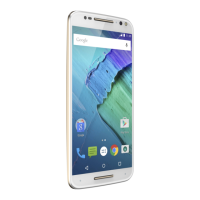
Home screen. At the top, tap the Google bar to type search options or tap the right hand microphone icon to speak a search. Icons at the top show notifications and phone status icons.
Swipe up from center bottom to get to your apps. App icons along the bottom are commonly used apps: phone, message, Google Chrome, Gallery, and camera.
Tips
» Open app list: Swipe up to see all your apps.
» Return home: To return to the home screen from any location, swipe
up from the navigation bar.
Swipe up to see
all your apps.
Search by typing or
tap the microphone
and say a command.
Swipe down for
notifications and
settings.



 To Next Page
 Loading...