3
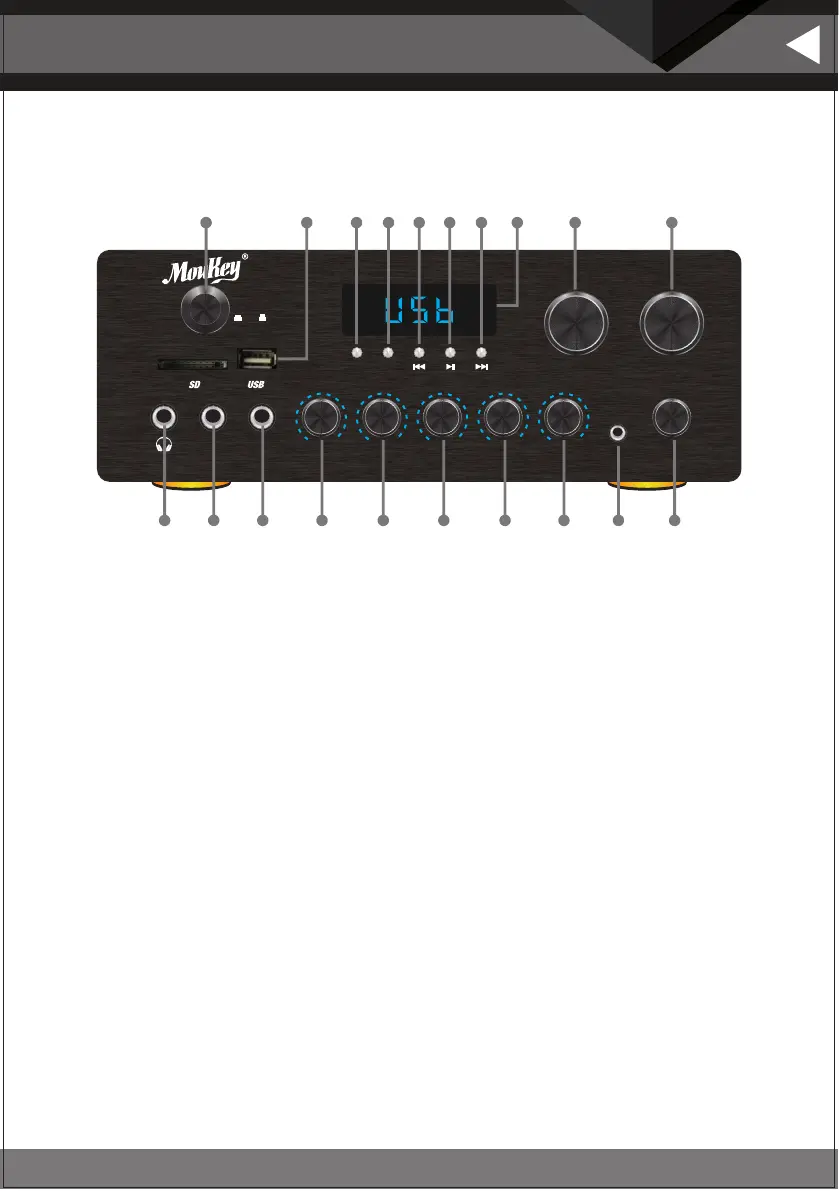
1. HEADPHONE JACK: Headphone connect to this jack.
2. MIC INPUT JACKS 1 KARAOKE MIC: Connect to these jacks.
3. MIC INPUT JACKS 2 KARAOKE MIC: Connect to these jacks.
4. MIC VOLUME: Adjusts the volume level. Turn the knob clockwise to increase the MIC volume .
5. ECHO CONTROL: Turn the knob to adjust the MIC echo level.
6. BASS:Turn BASS knob to adjust bass tone master channel.
7. TREBLE: Turn TREBLE knob to adjust treble tone master channel.
8. BALANCE: Master balance knob
9. AUDIO INPUT JACKS:Connect the audio output jacks of AUX to these jacks.
10. INPUT: This is used to select the input sources: DVD/CD/AUX/MP3/Wireless Connection/FM
11. POWER SWITCH: Press to switch the power unit ON or OFF.
12. USB/SD: Card input
13. MODE: This is used to select the input sources MP3/Wireless Connection/FM
14. W: This is used to select the input sources Wireless Connection
15. PREV:Used to select the Previous station which have been kept in system
16. PLAY/PAUSE: play/pause song button on USB/SD card
17. NEXT:Used to select the next station which have been kept in system
18. FUNCTION DISPLAYED LED WINDOW
19. FOLDER/TRACK: This is used to select the mp3 prev/next
20. MASTER VOLUME CONTROL: Adjusts the volume level. Turn the knob clockwise to increase the volume.
CONTROLS & FUNCTIONS
FRONT PANEL
English
BALANCE
AUX
MODE
DVD
CD
AUX
MP3/W
INPUT SELECTOR
W
CH- CH+
AUTO
MAMP1
POWER
ON OFF
MIN MAX
MASTER.VOL
FOLDER/TRACK
PUSH
-12 +12-12 +12 L R0 100 10
BASS
ECHOMIC VOL
TREBLE
MIC 1 MIC 2
DIGITAL KARAOKE AMPLIFIER
1 2 3 4 5 6 7 8 9 10
11 12 13 14 15 16 17 18 19 20


 To Next Page
 Loading...