09
Adjustments
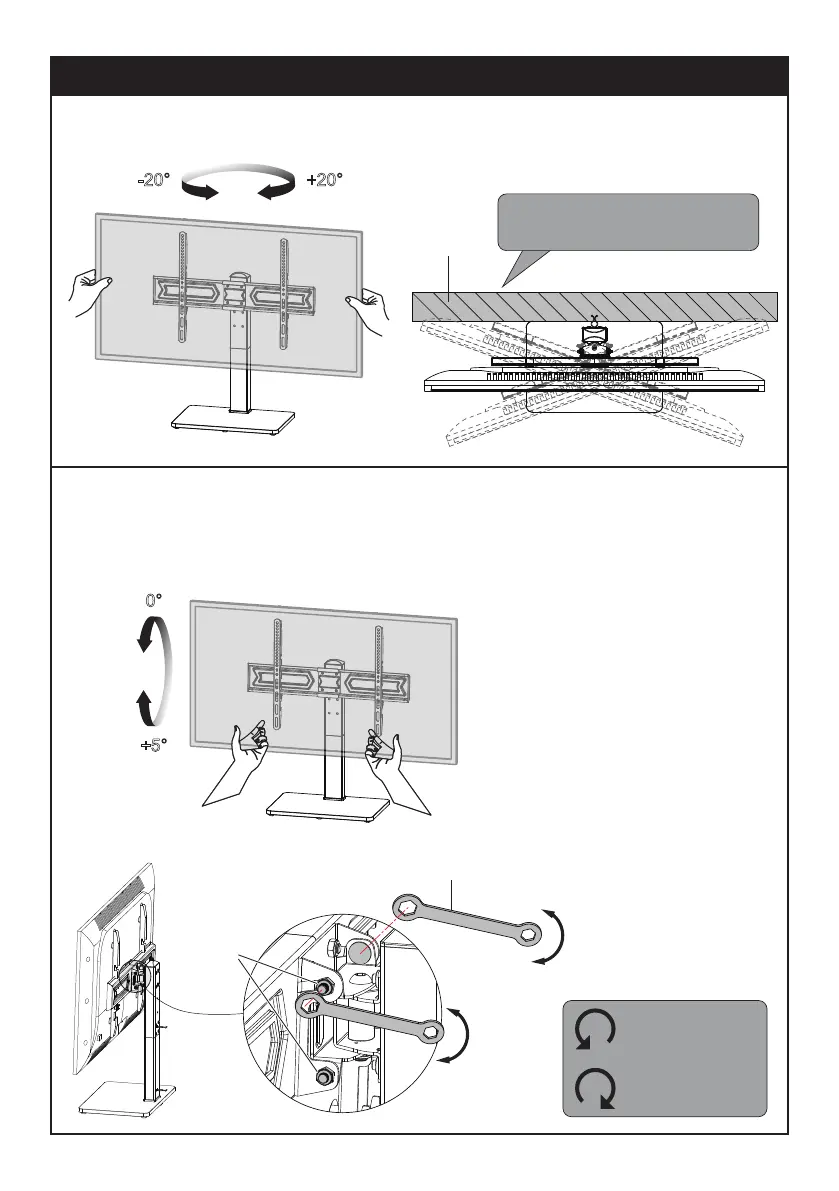
-20° +20°
Swivel Adjustment
Refer to below illustrations to adjust swivel angle.
Tilt Adjustment (If necessary)
1. Loosen 4 tilting bolts by MAXIMUM 1 turn with Wrench (J2).
2. Hold the TV with your hand, adjust TV to your desired angle.
3. Tighten 4 tilting bolts with Wrench (J2).
Wall
Note: When the TV Stand is placed
against the wall, the actual swivel
angle is determined by the screen size.
0°
+5°
J2
Tilting
Nuts
Clockwise,
Tighten
Counter-clockwise,
Loosen
Tighten
Loosen
Loosen
Tighten


 To Next Page