◆ Barcode setting
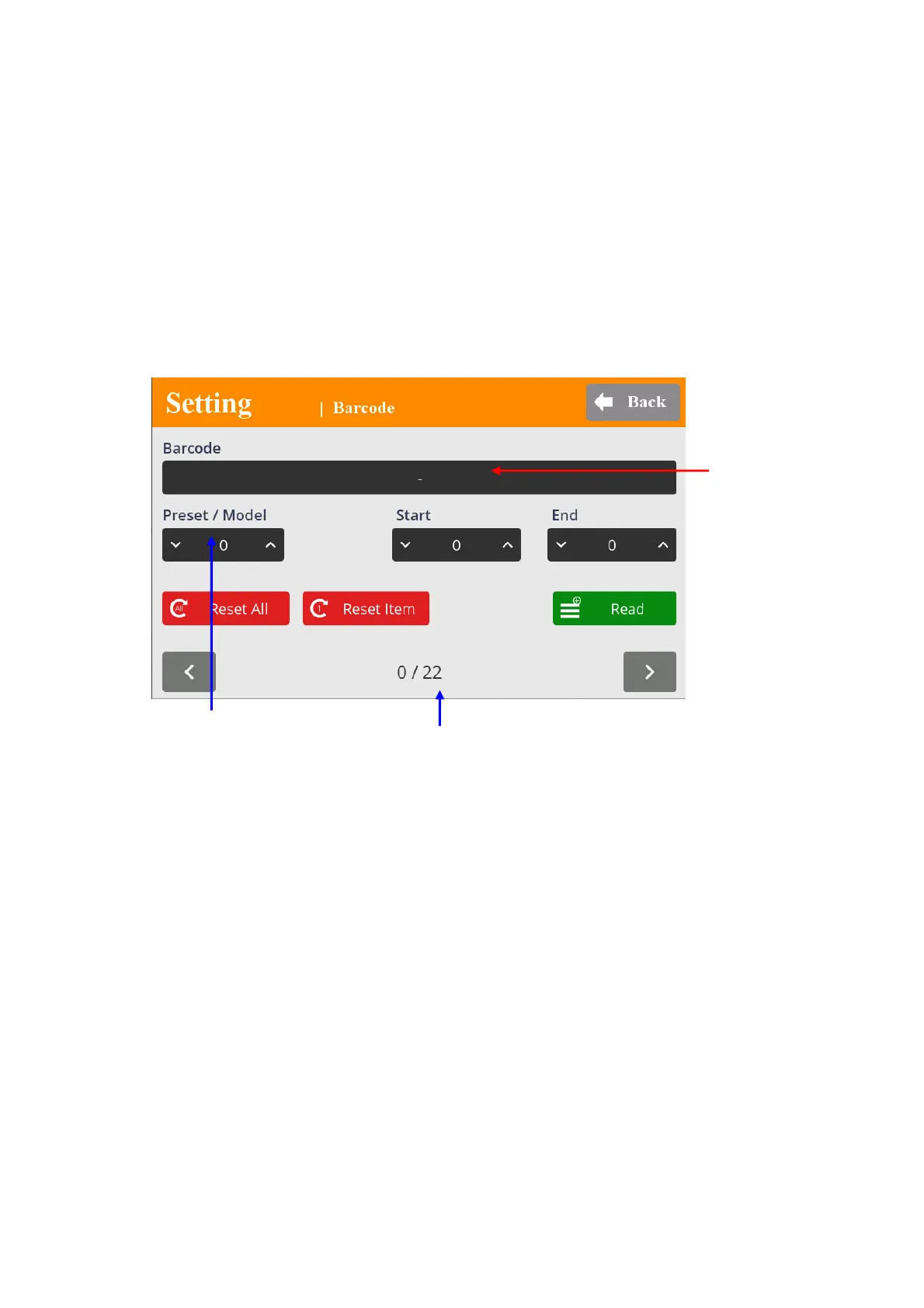
The barcode information can select the Preset or Model by the setting.
In order to use barcode scanner, there are some parameters to be selected prior to the
barcode setting.
[ Controller ] A306 R2232C : Modbus / Barcode (O)
A300 : RS232C baud rate : Select right one for the scanner
- Total number of barcode registration : up to 22
- Max number of barcode data length : 32 characters ( including CR data )
- Registering process
1) Click “READ” and scan the barcode
2) Select the first and ending digit number from the scan data for registration
3) Select Preset # to be linked with the registered scan data
4) Click UP button to move the next registration and repeat the same process.
** Preset #16 and 17 in P.M# window works for Multi
A a
nd B
When Muti A or B is used, the operation window display contains the followings according
to the sequence MA or MB > Step no. > Preset # (current preset #)
- “ R
eset all “ button is used to clear all registration
- “ Reset “ button is used to clear the current scan data.
Barcode data
Preset # Model #
Barcode registration # (total 22)
mountztorque.com - 1080 N 11th St, San Jose CA 95112 - 408.292.2214


 To Next Page
 Loading...