EasyManua.ls Logo

MOZOTER DBK02 - User Manual

MOZOTER DBK02
16 pages
Print Icon
To Next Page IconTo Next Page
Loading...
DBK02
User Manual
Button control
Warm notice
For any single earbud, when it is in standalone mode, you
can’t use it to play the previous song or decrease the volume.
Settings
Bluetooth
DBK02
Bluetooth
Now discoverable asQi iPhone.
MYDEVICES
To pair Apple Watch with your iPhone, go to the
Watch app.
First time using
Product overview
Choose the ear cap that suits you.
1x
1x
2x
2x
3x
Accept
Decline
Reject
Previous
track
Next track
Volume- Volume+
Play / Pause
Voice assistant
5.Turn on the Bluetooth function on your phone and search for
DBK02and connect it.
demonstration
Error
2
3
4
5
6
7
8
ON
OFF
Make sure that the ear
caps face down and put
the earbuds into the ear
in the angle shown as
the picture on the right.
After putting on the
earbuds, gently
rotating the earbuds
to a comfortable and
secure position shown
as picture 3 on the right.
Now the earbuds are
put on correctly!
Do not wear the earbuds
like the way shown as
the picture on the right
Warm notice
If indicators of both earbuds keep flashing red and blue, Click
either earbud's power
switch twice. Then the indicator of one earbud
will flash red and
blue alternately, another will go off. (in pairing mode
If you want to switch the Bluetooth connection to another device,
please disable the Bluetooth function in the previously connected
device OR delete the pairing name of "DBK02" from the original
device. Then the pairing name of "DBK02"can be searched in new
device and connected successfully.
1.Tear off the insulating film.
4.The indicator of one earbud will go off and another will flash
red and blue light
alternately
.(In pairing mode)
Red &Blue
Flash
Indicator off
Thanks for using our wireless electronic products. For a good user experience, please
read the manual carefully before using the products. Notice: To avoid unnecessary troubles,
please do not disassemble these products by yourself, and please use the standard charger
to charge.
Magnetic Contacts
Earbud Cap
Microphone
Charging Case Indicator Light
MFB Power Switch
2.Put the earbuds into the charging case and close
the lid to charge(the earbuds are in charging state).
3.Open the cover of the charging case and ,they will turn on and
pair automatically and will be prepared for pairing to the phone
(the indicator will turn to Red and Blue alternately).
●The earbuds will automatically turn on after opening the
top lid of the charging case.
OR
●Press and hold the power switch for 5s then leave hold,
the earbuds will turn on.(Not in the charging compartment
and is in the off state)
Put the earbuds into the charging case and
close the lid, they will
automatically
shut down.
OR
While in the non-working state, press and hold the
power
switch
for 5s, the two earbuds will be turned off at the same
time.
OR
Automatically shut down after not connected for more than
5 minutes
Warm noticeIf earbuds are not turned on or
there is no
sound come out, please put the earbud back into the charging
case and close the lid again,
make sure that earbuds are in
the charging state before opening the lid and taking out them
to use (red/blue light flash alternately)
Service@MOZOTER.com
SCAN ME
Question and Answer IconNeed help?

Do you have a question about the MOZOTER DBK02 and is the answer not in the manual?

Summary

Product Overview

Ear Cap Selection

Guides on selecting the correct ear cap size for a comfortable fit.

Earbud Wearing Guide

Correct Wearing Method

Demonstrates the correct method for wearing the earbuds for optimal fit and sound.

Incorrect Wearing Example

Illustrates incorrect ways to wear the earbuds to avoid issues.

First Time Using

Initial Preparation and Charging

Steps for preparing the earbuds for first use, including tearing off film and charging.

First Time Using - Pairing

Pairing and Indicator Lights

Details on opening the case, automatic power-on, and pairing indicators.

First Time Using - Connection

Connecting to Your Phone

Guide on enabling Bluetooth and connecting the earbuds to a phone.

Button Control

Power On;Off Functions

Explains automatic and manual methods for powering the earbuds on and off.

Button Control - Operations

Call and Media Management

How to manage calls, music playback, track skipping, and volume using earbud buttons.

Standalone Mode Features

Notes on functions not available when using a single earbud.

Voice Assistant

Activating Voice Assistants

Instructions on how to activate voice assistants like Siri or Google Assistant via button presses.

Restore Factory Setting

Factory Reset Procedure

Steps to perform a factory reset by button presses and clearing Bluetooth records.

Earbuds Indicator

Earbud LED Status Meanings

Explains the meaning of different LED light patterns for various states like charging, pairing, and low battery.

Charging Case Indicator

Charging Case LED Status Meanings

Details the meaning of LED lights on the charging case for earbud charging and case battery status.

Specifications

Technical Specifications

Lists key technical details such as Bluetooth version, transmission distance, battery capacity, and weight.

Charging Steps

Charging the Earbuds

Illustrates how to place earbuds in the case for charging and mentions automatic power-off.

Charging the Charging Case

Instructions on how to charge the charging case using a DC5V/1A charger or USB.

Important Attentions

Usage and Handling Precautions

Advises keeping the products dry and wiping them with a dry cloth to prevent damage.

Safety and Warnings

Product Care and Battery Safety

Lists important warnings regarding cleaning, temperature, fire hazards, physical damage, and battery safety.

Overview

This document serves as the user manual for the MOZOTER DBK02 wireless electronic products, providing instructions for use, technical specifications, and maintenance guidelines.

Function Description

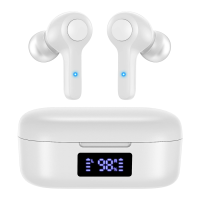
The DBK02 are wireless earbuds designed for audio playback and communication. They feature an MFB (Multi-Function Button) power switch, magnetic contacts for charging, earbud caps for a secure fit, and a built-in microphone for calls. The charging case includes an indicator light to show its status. The earbuds are designed for comfortable and secure placement in the ear, with instructions provided to ensure correct wear to avoid discomfort or poor sound quality.

Important Technical Specifications

  • Version: V5.2+EDR
  • Support: HFP, HSP, A2DP, AVRCP (These are Bluetooth profiles that define how Bluetooth devices communicate for specific functions like hands-free calling, stereo audio, and remote control.)
  • Transmission distance: 10m (This is the typical range for Bluetooth connectivity.)
  • Frequency range: 2.402GHz~2.480GHz (Standard Bluetooth operating frequency.)
  • Speaker: Φ 8.2mm*2 (Indicates two speakers, each with a diameter of 8.2mm.)
  • Impedance: 16 Ω (A measure of the electrical resistance, affecting sound output and power consumption.)
  • Standby time: 60 hours (How long the earbuds can remain powered on and connected without active use.)
  • Talk time: 4 hours (The duration of continuous call time on a single charge.)
  • Playing time: 4 hours (The duration of continuous music playback on a single charge.)
  • Earbud battery capacity: 40mAh (Milliampere-hours, indicating the battery size of each earbud.)
  • Fully charged time (earbuds): 1 hour
  • Charging case battery capacity: 500mAh (The battery size of the charging case, allowing for multiple earbud recharges.)
  • Charging time of charging case: About 1.5 hours
  • Weight (single earbud): 4.0 g

Usage Features

  • First-time Use: Before first use, users must tear off the insulating film from the earbuds. Then, place the earbuds into the charging case and close the lid to initiate charging.
  • Automatic Pairing: When the charging case lid is opened, the earbuds automatically turn on and pair with each other. They then enter pairing mode, indicated by alternating red and blue lights on one earbud while the other's indicator turns off.
  • Manual Pairing (Troubleshooting): If earbuds don't turn on or produce sound, place them back in the charging case, close the lid to ensure they are charging, then reopen and remove them.
  • Bluetooth Connection: Users need to turn on Bluetooth on their phone, search for "DBK02," and connect.
  • Switching Devices: To connect to a new device, disable Bluetooth on the previously connected device or delete "DBK02" from its pairing list.
  • Power On/Off:
    • On: Open the charging case lid, or press and hold the MFB power switch for 5 seconds (when not in the charging case and in the off state).
    • Off: Place earbuds in the charging case and close the lid (automatic shutdown), or press and hold the MFB power switch for 5 seconds (when not in use, both earbuds turn off simultaneously), or automatic shutdown after 5 minutes of no connection.
  • Call Control:
    • Accept: Single click L/R earbud.
    • Decline: Hold L/R earbud.
    • Reject: Hold L/R earbud.
  • Music Control:
    • Previous track: Double click L earbud.
    • Next track: Double click R earbud.
    • Play/Pause: Single click L/R earbud.
  • Volume Control:
    • Volume-: Hold L earbud.
    • Volume+: Hold R earbud.
  • Voice Assistant: Triple click the L or R power switch to activate Siri or other voice assistants (iOS and some Android users). The activation is OS-dependent.
  • Standalone Mode Limitation: In standalone mode (using a single earbud), users cannot play the previous song or decrease the volume.
  • Factory Reset: When earbuds are on but disconnected from a mobile phone, quickly click both the left and right power switches four times simultaneously. Red and blue lights will be on for 2 seconds, clearing memory, and the earbuds will shut down. After this, delete all paired records from the phone and search for "DBK02" again to reconnect.

Earbuds Indicator Status:

  • Turn on: Blue light flashes for 1 second, then red and blue light flash alternately.
  • Turn off: Red light goes out after flashing for one second.
  • Search earbuds: Red and blue light flash alternately.
  • Earbuds connect successfully: After successful pairing, the main ear's light flashes alternately in red and blue.
  • Connect with mobile phone successfully: Blue light of both earbuds flashes once circularly every 6 seconds.
  • Music play: No light.
  • Low battery: Red light of earbud flashes once every 6 seconds.
  • Charging: Red light on.
  • Full battery: Red light off.

Charging Case Indicator Status (White light):

  • Left earbud in charging state: "L" light on the charging case on.
  • Left earbud in full battery state: "L" light on the charging case off.
  • Right earbud in charging state: "R" light on the charging case on.
  • Right earbud in full battery state: "R" light on the charging case off.
  • Charging case in full battery state: Displays 100%.
  • Charging for earbuds: Displays the percentage of remaining power of the charging case.
  • Charging case in low battery state: Displays 5%.

Charging Instructions:

  • To charge earbuds, place them in the charging case and close the lid. They will automatically turn off and disconnect.
  • To charge the charging case, use a DC5V/1A charger (or a computer USB/other USB interface charger certified by a regular manufacturer).
  • Important Notice: If the charging case runs out of power, earbuds may fail to shut down and remain connected to the phone even when placed in the case. Always remember to charge the charging case promptly.

Maintenance Features

  • Cleaning: Do not use corrosive liquid. If contact with chemicals occurs, wipe with a damp cloth wet with clean water.
  • Environmental Conditions: Avoid extreme temperatures (below -10°C or above 60°C).
  • Physical Care:
    • Do not throw into fire to avoid explosion.
    • Avoid scratches; do not touch earbuds with sharp objects.
    • Do not insert objects into earbuds to prevent damage to internal components.
  • Battery Care:
    • Do not disassemble the earbud.
    • Maintain regular charging; do not let batteries become completely empty to preserve lifetime.
    • Do not charge with power adapters exceeding 2A current, as excessive current can damage the battery.
  • Moisture Protection: Ensure products are dry. If water droplets are on the surface, wipe with a dry cloth before returning them to the charging case to prevent damage.
  • Battery Warning: The product contains a built-in lithium battery. To avoid explosion, do NOT expose it to strong sunlight, fire, or throw it into fire.

MOZOTER DBK02 Specifications

General IconGeneral
BrandMOZOTER
ModelDBK02
CategoryWireless Headphones
LanguageEnglish