18
EN
NOTE
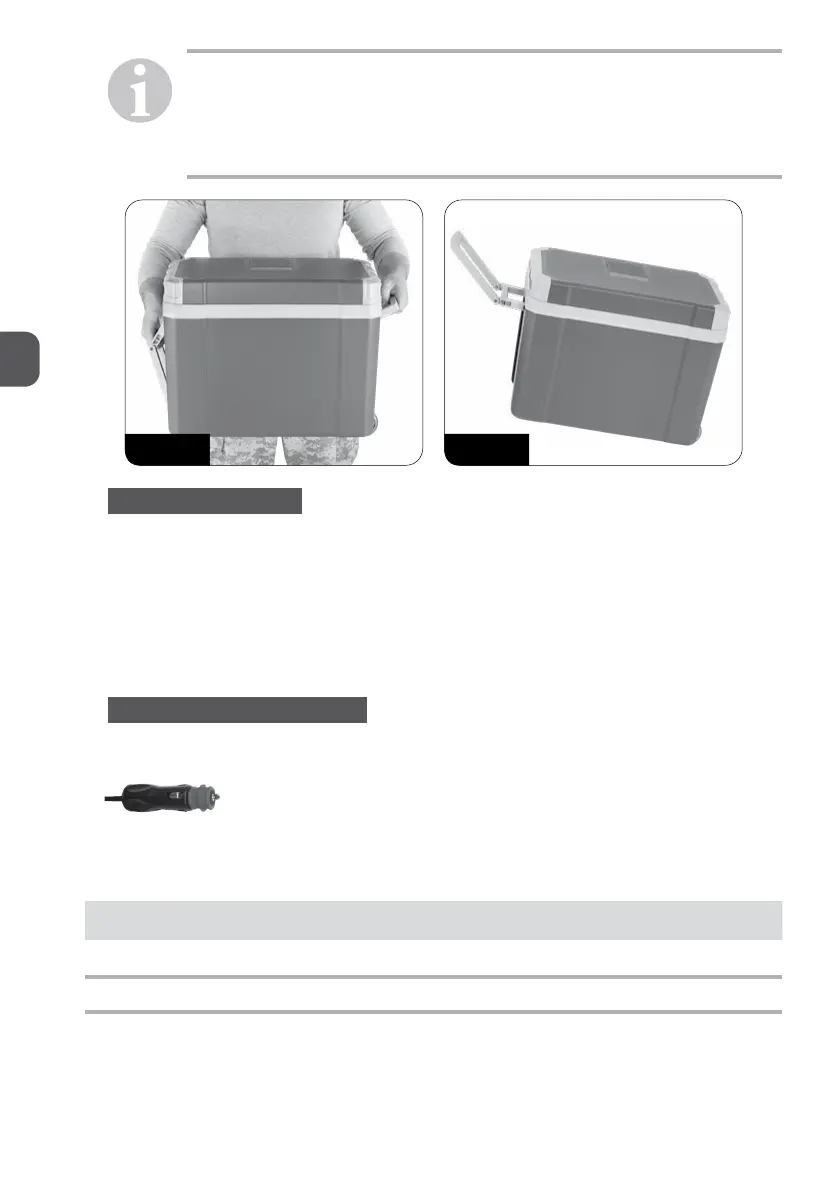
Use the handles to move the appliance - Photo 1
The longer handle can be unfolded and thanks to this you can conveniently
use the appliance’s wheels - Photo 2
When opening the cover (3), use the handles (14).
Photo 1 Photo 2
5.1. ENERGY SAVING TIPS
Choose a well ventilated installation location which is protected against direct sunlight.
If you want to set an increased energy efficiency and a limited cooling capacity for the cooler
unit, use the cooler’s ECO (for AC 230V supply) mode.
Allow warm food to cool down first before placing it in the device to keep cool.
Do not open the cooling device more often than necessary.
Do not leave the cooler unit open for longer than necessary.
Remove individual drinks bottles through the bottle hatch, if present.
5.2. USING THE COOLER IN DC MODE
h Place the cooler on a firm base.
h Connect the DC cable to the cigarette lighter or the DC socket in the vehicle.
h Push the switch on the control panel to HOT or COLD to switch the cooler on.
3 The indicators on the control panel show you the operating mode:
Operating display Operating mode
Red Heating
Green Cooling
3 The cooler starts cooling/heating the interior.
h To switch off the cooler,
− push the switch on the control panel from HOT or COLD to the OFF position,
− disconnect the plug.


 To Next Page