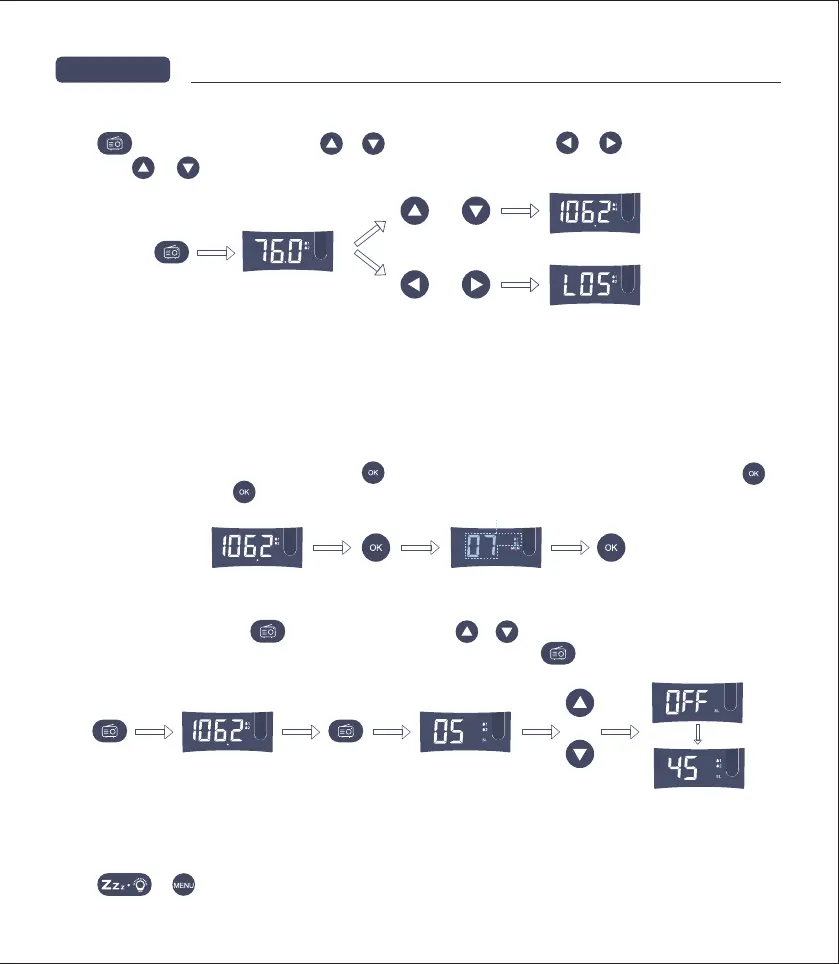
Press to listen to the radio, press or to change channels and or to change volume.
long press or to automatic search.
NOTE:
1. Enable the antenna when using the FM function for better signals.
2. The FM in the clock is different from traditional FM radio and the signals will be different.
3. The FM signal is not very strong. It is recommended to be used by the window, away from mobile phones,
computers, metal and other devices with radiation.
Choose the channel to be saved, long press . When the digits in the screen start to flicker, press
again to save. long press to recall the stored radio channel.
1. FM and volume setting
2. FM channel saving
NOTE: When the sleeping time is over, the FM Radio turns off automatically.
3. FM sleep function
Press or to turn off the FM Radio.
4. Turn off the FM
FM settingChapter4
or
or
Long press
Press again
Flash
or
When the FM is active, press to enter the sleep mode, or to choose the time of sleeping. Radio
sleep timer can be set to 5, 15, 30, 45, 60, 75, 90 minutes, double press to see the remaining sleeping
time.


 To Next Page