EN
Product:
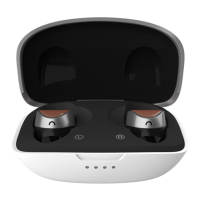
1. Music button and call sensors
2. Microphones
3. Charging indicator
4. Charging case
Before using the device:
Try all ear plugs to get the correct size for the best sound quality and power.
Put the earphones on properly, as shown in the picture. Move them around a little to find the most comfortable
position.
Start using the product.
1- To connect the earbuds to your device, remove them from the case. The headset will automatically turn on and
the green light will start flashing.
2- Switch on the Bluetooth of your device, search for 'EOS B710' in the menu and connect. You will hear a voice
saying 'connected'.
3- After the first use, the earphones will connect to your device automatically.
Music playback
You can control music playback using the earphones' touch buttons.
• To activate the voice assistant, triple-tap the right earphone.
• Touch once to pause, touch again to resume.
• Double-tap the left earphone to skip to the previous track.
• Double-tap the right earphone to skip to the next track.
• Press and hold the left earphone to lower the volume.
• Press and hold the right button to turn up the volume.
Calls
1- To answer a call, you can tap the earphone.
2- Tap once to answer an incoming call, hold for 3 seconds to reject it.
3- Tap once to end the call.
Recharging case
1- Connects case to PC, power bank or wall outlet (SV-1A to SV-1.SA) using included USB Type C cable.
2- Indicator flashes with a white light while charging.
3- Indicator stops blinking when the device is fully charged.
4- Disconnect the case when fully charged.
Charging the earphones
1-Put them in the case.
2-While charging, the earphone indicator lights up with a white light.
3-When fully charged, the indicator turns off.
4-When the battery level is only 2 minutes, you will hear "low battery" in the earbuds every 30 seconds.
Techincal specifications
Basic Specifications
Model: EOS B710
Size: 25.3X15.6X22.4mm Weight: 4.5g
Earphone charging current: 40mA Earphone charging time: 1 hour Voltage (voltage): 3.3V-4.2V Standby time: About
72 hours
Max. listening hours: 4
Max. talk time: 4 hours
Bluetooth: HS, HFO, A2DP, AVRCP Transmission range (Hz): 2.10GHz- 2.48GHz
Transmission distance: 10 meters
Audio Encoding Format: CVS, MSBC, SBC, AAC
SNR: >95dB
Temperature: 15'C-+60'C
Humidity: 10g6-85gS (in a non-frozen state)
Earphones speaker specifications:
Speaker Specifications
mode: @800
Impedance:16D/TYP
Frequency(Hz):20Hz-20KHz


 To Next Page
 Loading...