Installation and use steps (as the picture on the right side)
1 .Insert the USB interface of the keyboard into the USB interface of the notebook or PC.
2.The computer will automatically identify the keyboard device and install the driver.
3.Driver installation is complete, the keyboard can be used normally.
Specifications:
Gaming Mechanical Keyboard
Plug and Play, Auto driver setup
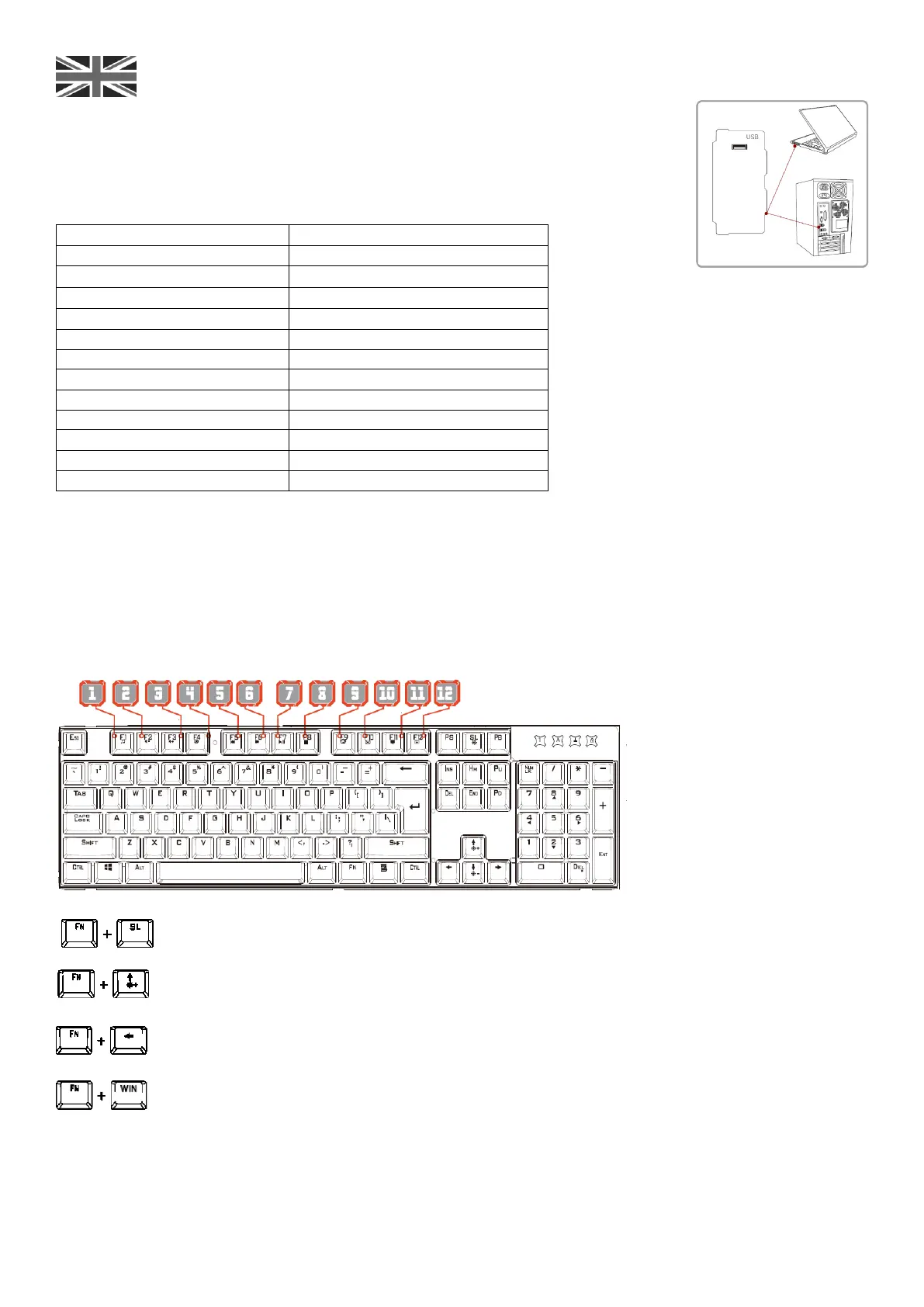
Multimedia Keys Function:
Multimedia Keys Function as following:
The mechanical keyboard has 10 kinds of backlighting modePress FN+SL key to change the backlighting mode.
There are there adjustable brightness are adjustable for backlighting. Press FN+↑ or FN+↓to adjust it.
The backlighting has 5 levels speed adjustable. Press FN+ ← or Fn+→ to adjust it.
Press FN+WIN Key= LOCK THE WIN KEY FUNCTION (when the WIN KEY is locked, the Win-Lock LED will be lighting).
Compatible OS:
-WIN10/WIN8/2IN7/VISTA/XP/2000
-OSX.10.2 or above



 To Next Page