The MSB Remote
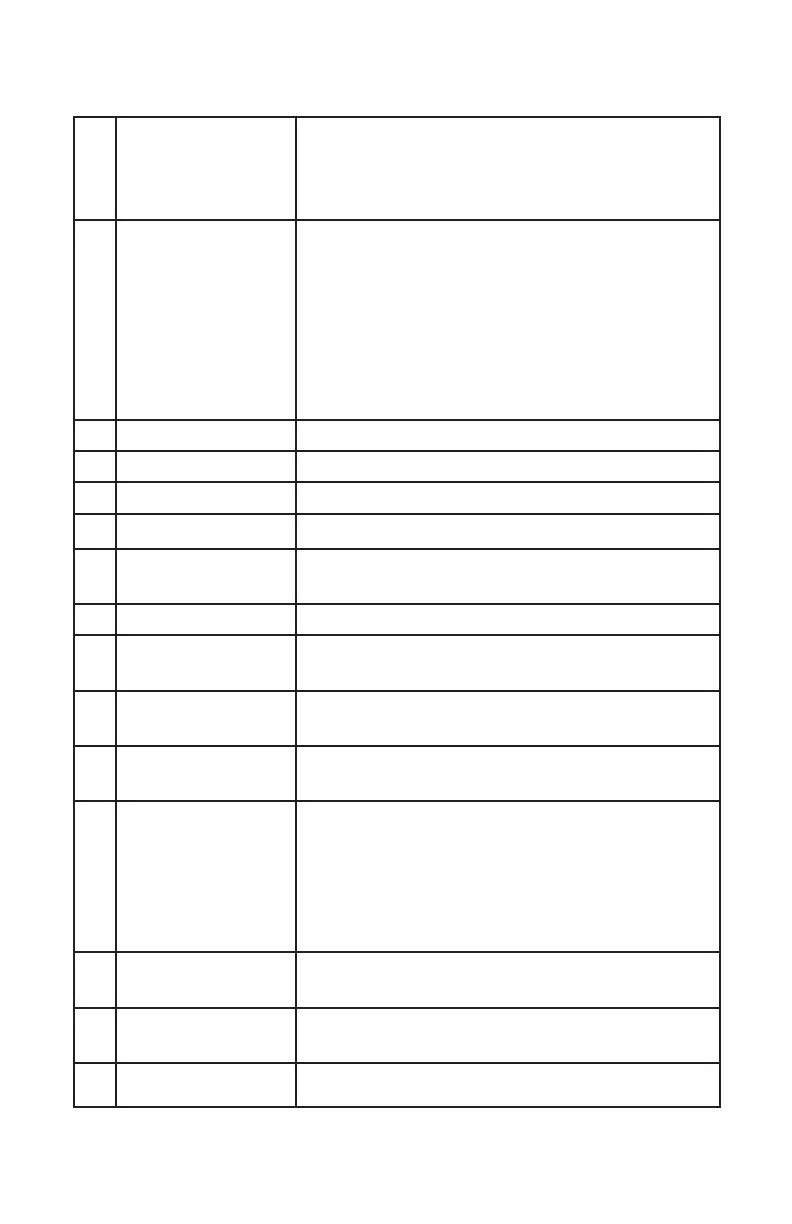
1 Power On/O Powerbase on and o. When the
powerbase is linked to an amplier or MSB
product, this button will turn o the entire
system
2 Indicator LED While in use:
White - Command Sent
Red and White - Command Sent
and Low Battery
Red Flashing - Needs Charging
While charging:
Red - Charging
White - Fully Charged
3 Input Toggles directly through DAC inputs
4 Phase Invert Toggles phase invert (I - on display)
5 Video Mode Toggles video mode (V - on display)
6 Display On/O Toggles Display On/O
7 Volume/Scroll The center scroll wheel controls DAC
volume and scrolls when in the menu.
8 Mute/Select DAC mute and select when in the menu.
9 Track Backward Skip backward
(Renderer only)
10 Play/Pause Play and pause
(Renderer only)
11 Track Forward Skip forward
(Renderer only)
12 DAC Menu Enter DAC menu
While in menu:
Up - Volume Up
Down - Volume Down
Enter - Mute
Return - DAC Menu
13 Stop Stop media
(Renderer only)
14 Track Repeat Track or playlist repeat
(Renderer only)
15 Charging Port Micro-USB to charge the remote battery



 To Next Page