Setup and Quick Start
The interface is simple with few user controls. Input source defaults
to auto switching. The display will let you know if you have an active
input. Make the necessary connections, power on your system and
turn the volume knob up until you hear music.
Step 1.
Unbox the units and place the units into their desired locations in
your audio system.
How to Disconnect Hybrid Power Cables
To disconnect a Hybrid Power cable, simply pinch the collar portion
of the cable where the arrow symbol is located and pull the collar of
the cable directly back from the jackpanel. No twisting or rotating is
required to disconnect the cable.
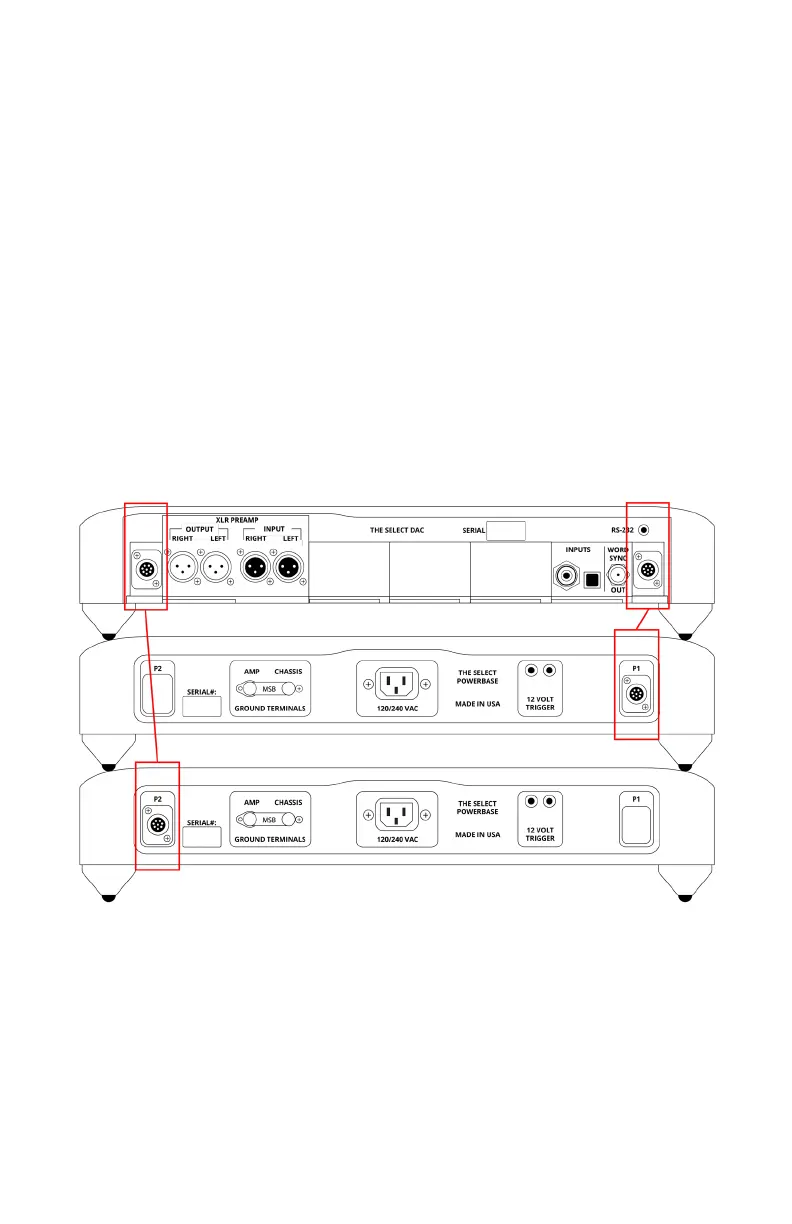
Step 2.
When connecting to the Select Powerbases, you’ll have two Hybrid
Power cables. Use both cables to connect the power connectors
located on each of the Select Powerbases to both of the power
connectors located on the back of the Select DAC.



 To Next Page