Need help?
Do you have a question about the MSI CLUTCH GM30 and is the answer not in the manual?
Lists the items included in the MSI CLUTCH GM30 gaming mouse package.
Specifies the PC and operating system prerequisites for using the gaming mouse.
Details the technical features and dimensions of the MSI CLUTCH GM30 gaming mouse.
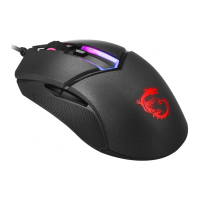
Identifies and labels the physical buttons and features of the gaming mouse.
Explains how to adjust LED lighting effects using button combinations.
The MSI CLUTCH GM30 is a gaming mouse designed to provide a delightful and professional experience for PC gamers. It serves as a companion for users seeking precision and responsiveness in their gaming sessions. The mouse is equipped with a variety of features aimed at enhancing usability, customization, and durability, making it a versatile tool for different gaming styles and preferences.
At its core, the CLUTCH GM30 functions as a standard computer mouse, but with advanced capabilities tailored for gaming. It allows users to navigate their operating system, interact with applications, and, most importantly, control in-game actions with high accuracy. The mouse features a total of six keys, providing ample options for assigning various commands and macros, which is crucial for competitive gaming. These keys include the fundamental Left and Right Buttons, a Scroll Wheel, a dedicated DPI Switch, and two Side Buttons (Side Button 1 and Side Button 2). Each of these buttons plays a specific role in the mouse's overall functionality and can be customized to suit individual user needs.
The Left Button is the primary click function, typically used for selecting items, firing weapons, or initiating actions in games. The Right Button often serves as a secondary action, such as opening context menus, aiming down sights, or performing alternative attacks. The Scroll Wheel is multi-functional, allowing for vertical scrolling through documents and web pages, as well as acting as a clickable button for additional commands. Its tactile feedback is designed to provide precise control, whether cycling through weapons or zooming in and out.
A key feature for gamers is the DPI Switch. This button allows users to quickly adjust the mouse's sensitivity on the fly. Changing the DPI (Dots Per Inch) directly impacts how far the cursor moves on the screen relative to the physical movement of the mouse. This is incredibly useful in gaming, where a lower DPI might be preferred for precise aiming in sniper scopes, while a higher DPI could be beneficial for quick turns and wide movements in fast-paced scenarios. The CLUTCH GM30 offers multiple DPI levels, enabling users to find their optimal sensitivity for different games or even different situations within the same game.
The two Side Buttons, Side Button 1 and Side Button 2, are strategically placed for easy thumb access. These buttons are highly customizable and are often assigned to in-game actions such as grenade throws, melee attacks, push-to-talk voice chat, or complex macro sequences. Their presence significantly enhances the mouse's utility by providing quick access to frequently used commands without needing to reach for the keyboard, thereby improving reaction times and overall gameplay fluidity.
Beyond its core button functionality, the CLUTCH GM30 incorporates several usage features that contribute to its ergonomic design and user experience. The mouse is designed with an anti-slip side grip, which is made from double-injection ultra-durable soft rubber. This material ensures a secure and comfortable grip, even during intense gaming sessions where hands might become sweaty. The anti-slip property prevents accidental slips, maintaining control and precision. The durable nature of the rubber also suggests longevity, resisting wear and tear from prolonged use.
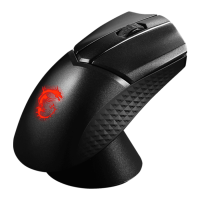
A prominent aesthetic and functional feature of the CLUTCH GM30 is its LED indicator system. The mouse includes an Edge LED and a Dragon LED, both of which are customizable. These LEDs not only add a stylish flair to the mouse but also serve as visual indicators for various settings and modes. The LED indicators can be adjusted to display different colors, brightness levels, and lighting effects, allowing users to personalize their gaming setup.
The LED Indicators Adjustment system is quite comprehensive, offering several combinations of button presses to modify the lighting effects:
These LED customization options are not just for aesthetics; they can also be used to visually distinguish between different DPI settings or profiles, providing a quick visual cue without needing to check software. For instance, a user might assign a specific color to a high DPI setting and another color to a low DPI setting, making it easy to confirm the current sensitivity at a glance.
In terms of maintenance, while the manual doesn't explicitly detail cleaning procedures, the durable materials used in the mouse's construction suggest a design that can withstand regular use and minor wear. The anti-slip side grip, made from ultra-durable soft rubber, is likely designed to be resistant to degradation from sweat and oils, which are common issues with gaming peripherals. Regular wiping with a soft, dry cloth would typically suffice to keep the mouse clean and maintain its aesthetic appeal. The gold-plated USB connector, mentioned in the specifications, is a subtle but important maintenance feature. Gold plating helps prevent corrosion and ensures a stable, reliable connection over time, reducing the likelihood of connectivity issues that could disrupt gameplay. This contributes to the overall longevity and consistent performance of the mouse.
The CLUTCH GM30 is designed to be user-friendly, with a plug-and-play approach for basic functionality. However, its full potential is unlocked through customization, particularly with its LED indicators and programmable buttons. The intuitive button combinations for LED adjustment mean that users can personalize their mouse's lighting without needing to install additional software, offering convenience and flexibility. This on-the-fly adjustment capability is a significant usage feature, allowing for quick changes during gaming sessions or when switching between different environments.
The overall design of the mouse, including its shape and button placement, is crafted to provide comfort during extended gaming periods. The ergonomic considerations aim to reduce strain on the hand and wrist, which is crucial for gamers who spend many hours at their computers. The balance between functionality, aesthetics, and comfort makes the MSI CLUTCH GM30 a well-rounded gaming mouse. Its robust feature set, from adjustable DPI to customizable RGB lighting and durable construction, positions it as a reliable and enjoyable peripheral for any PC gamer.
 General
| Sensor Type | Optical |
|---|---|
| Polling Rate | 1000 Hz |
| Buttons | 6 |
| Cable Length | 1.8 m |
| RGB Lighting | Yes |
| Weight | 85 g |
| Cable Type | Braided |
| Color | Black |

 To Next Page