Overview
1-5
h Rear View
5
6
32
1
4
4
1
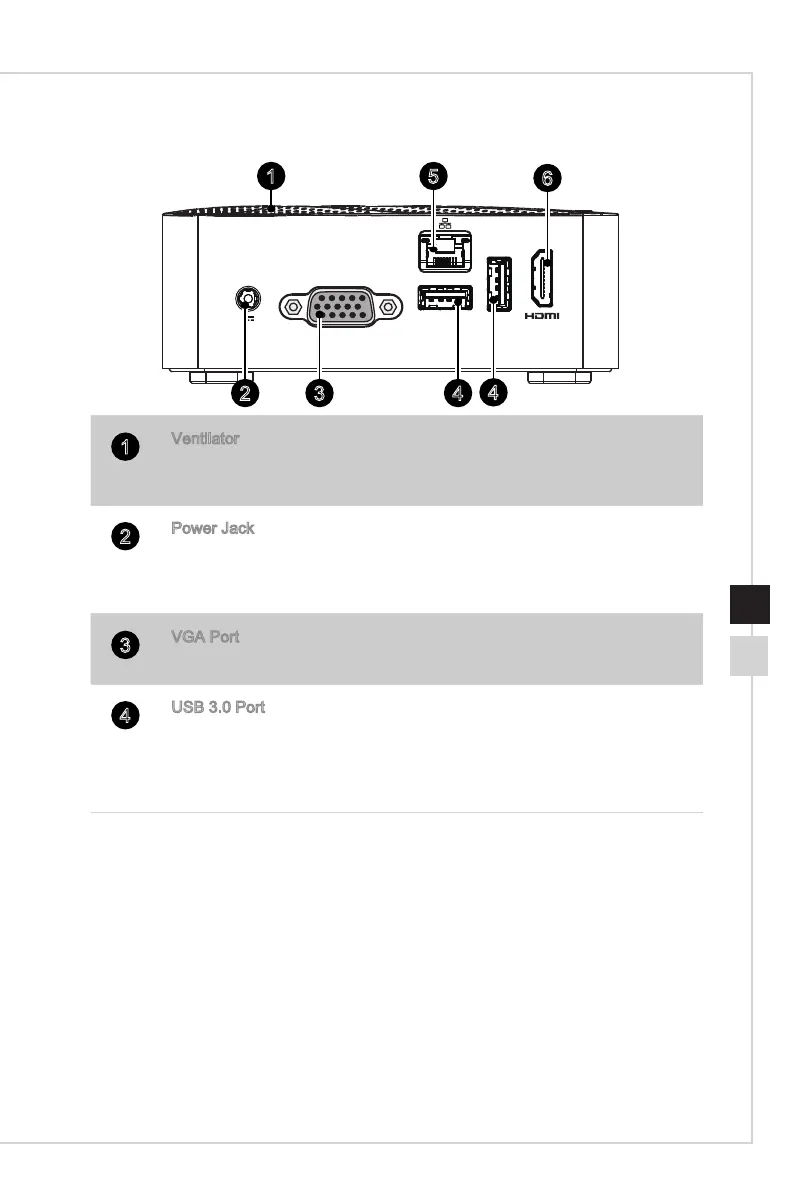
Ventilator
The ventilator on the enclosure is used for air convection and to prevent
the equipment from overheating� Do not cover the ventilator�
2
Power Jack
The AC/DC adapter converts AC power to DC power for this jack� Power
supplied through this jack supplies power to the PC� To prevent damage
to the PC, always use the supplied power adapter�
3
VGA Port
The DB15-pin female port is provided for monitor�
4
USB 3�0 Port
The USB (Universal Serial Bus) port is for attaching USB devices such
as keyboard, mouse, or other USB-compatible devices� It supports up to
5Gbit/s (SuperSpeed) data transfer rate� The USB 3�0 port is backward-
compatible with USB 2�0 devices�
Notice! Use a shielded USB 3.0 cable (at least 8” or 20cm long) when connecting
a USB 3.x device to the USB 3.0 port of this product so as to avoid wireless
interference.


 To Next Page