2
Installing Your MSI DS502 GAMING HEADSET Driver
Conguring Your DS502 GAMING HEADSET
Launch the Application
Plug the DS502 into the USB port of your computer.
Insert the DS502 disk that comes with the package into the CD-ROM and then
double-click the “Setup.exe” le with your mouse.
Follow the on-screen instructions to complete the installation.
Launch the application for DS502 GAMING HEADSET by double-clicking the
short-cut on the desktop.
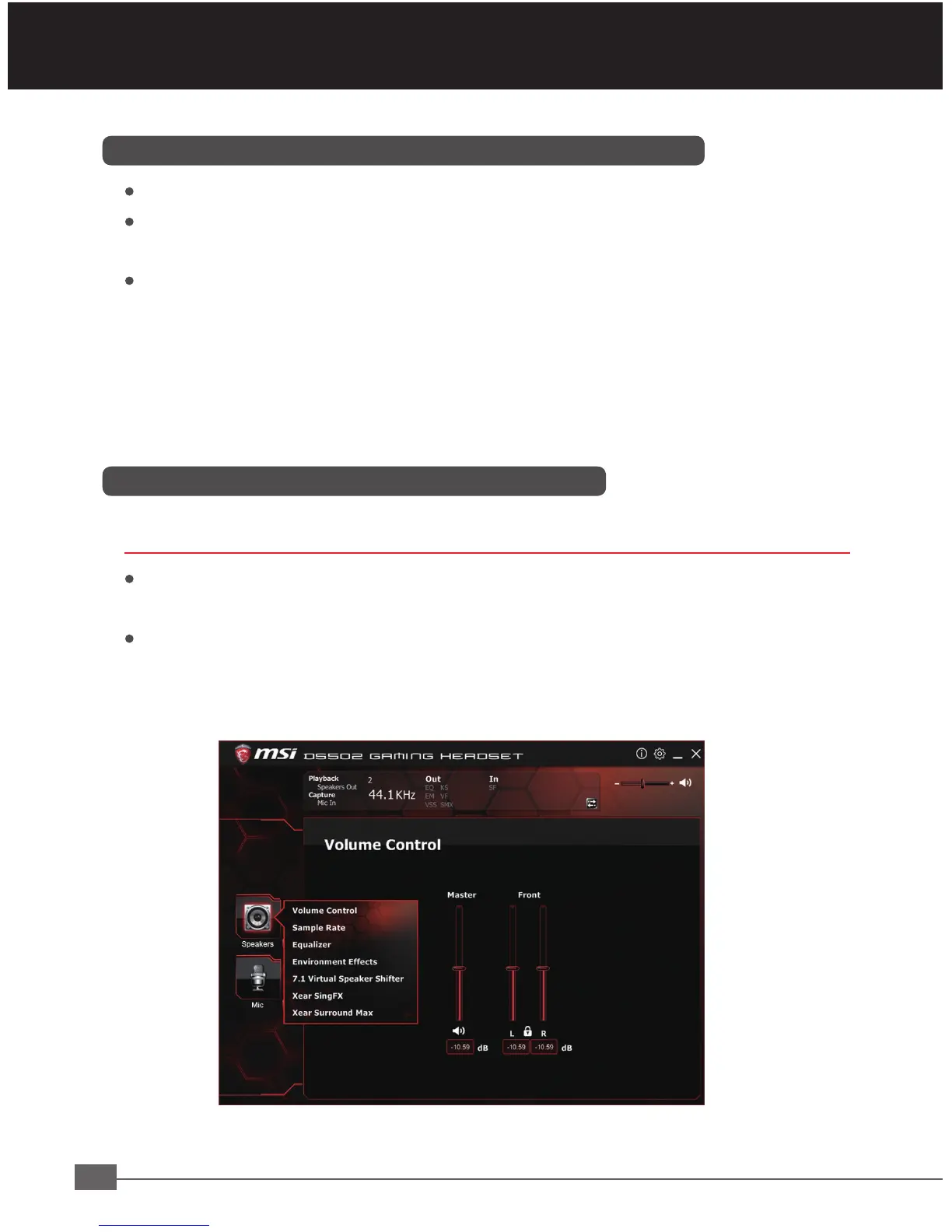
Move the mouse cursor to the “Speakers” and double-click on it to browse the
drop-down selection menu of “Speakers” or “Mic”.
Note: By default, the MSI DS502 GAMING HEADSET works out of the box as a
2.0 (stereo) headset. To achieve 7.1 surround sounds, please install the
necessary drivers to set up virtual 7.1 surround sound.


 To Next Page