11
G.I.
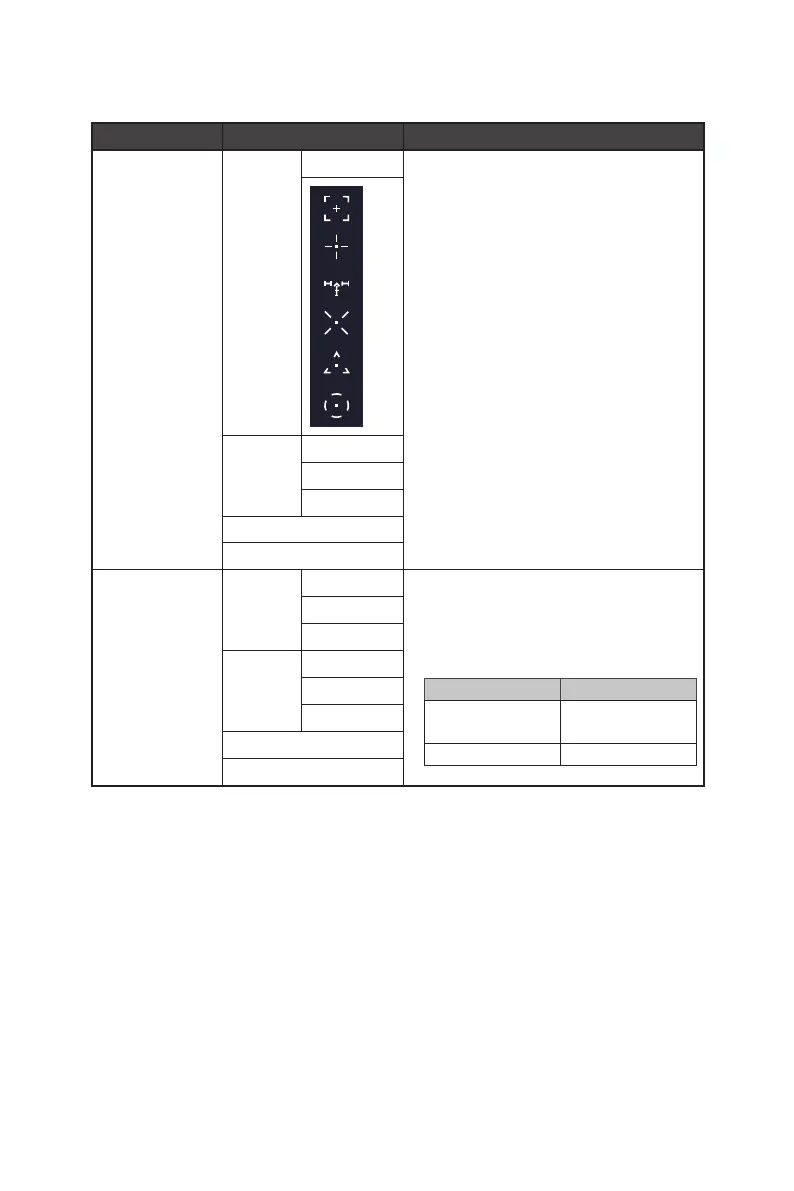
1st Level Menu 2nd/3rd Level Menu Description
Smart Crosshair Icon None ∙ Through AI algorithm, this function enhances
the visibility of in-game crosshair.
∙ Users can select the color and position of the
crosshair.
Color White
Red
Auto
Position
Reset
Optix Scope Scope Size Small ∙ The center point will zoom in when Optix Scope
is enabled.
∙ Smart Crosshair and Optix Scope can be
enabled at the same time.
∙ Activating Optix Scope will affect:
Affected Function Function Status
» Adaptive-Sync
» PIP/PBP
Set to OFF
» Screen Size 1:1 Set to Auto
Medium
Large
Scope
Ratio
x1.5
x2
x4
OFF
ON




 To Next Page