11
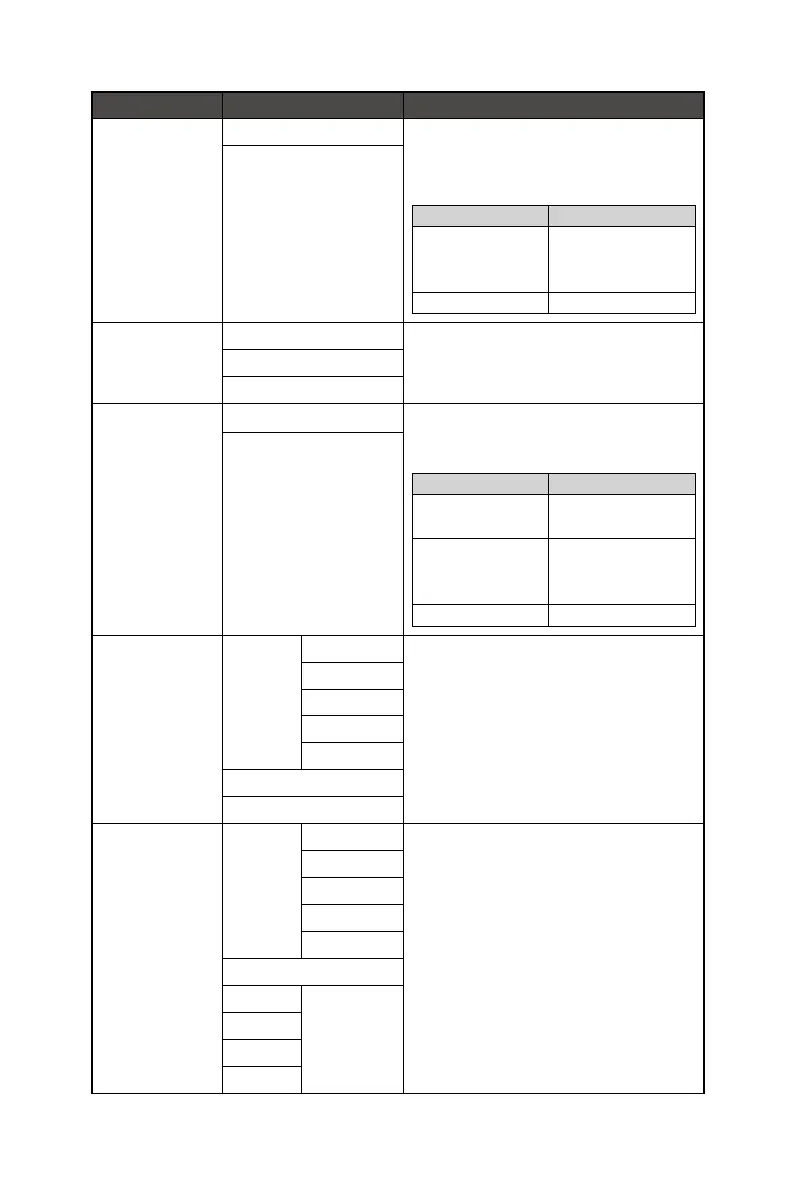
1st Level Menu 2nd/3rd Level Menu Description
AI Vision OFF ∙ AI Vision enhances image quality by optimizing
the contrast of images and background
brightness.
∙ Activating AI Vision will affect:
Affected Function Function Status
» Night Vision
» HDCR
» Brightness
Unable to select
» MPRT Set to OFF
ON
Response Time Normal ∙ Setting to Fastest will reach the shortest
response time and help improve blurred images
when playing very fast games.
Fast
Fastest
MPRT OFF ∙ MPRT is available when the refresh rate is over
85 Hz.
∙ Activating MPRT will affect:
Affected Function Function Status
» Brightness
» Response Time
Unable to select
» HDCR
» PIP/PBP
» Adaptive-Sync
Set to OFF
» Screen Size 1:1 Set to Auto
ON
Refresh Rate Location Left Top ∙ Location is adjustable in OSD Menu. Press the E
Button to confirm and apply your Refresh Rate
Location.
∙ This monitor follows and works at the Operating
System’s preset Screen Refresh Rate.
Right Top
Left Bottom
Right Bottom
Customize
OFF
ON
Alarm Clock Location Left Top ∙ After setting the time, press the E Button to
activate the timer.
∙ Users have to manually restore their preset
Alarm Clock after any AC power loss and
reconnection.
Right Top
Left Bottom
Right Bottom
Customize
OFF
15:00 00:01 ~ 99:59
30:00
45:00
60:00




 To Next Page