31
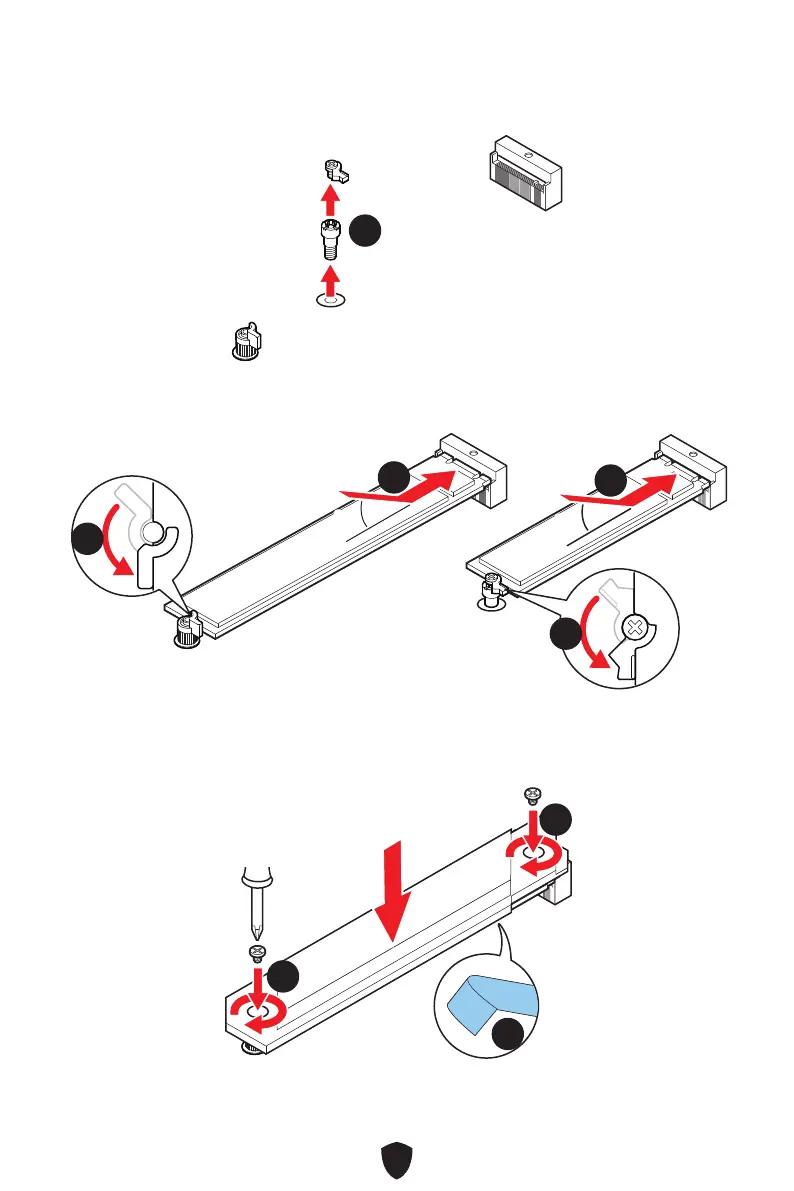
3. If you want to install 22110 M.2 SSD, please remove the EZ M.2 Clip kit in the 2280
screw hole. Skip this step, if you install 2280 SSD.
22110 SSD
33
4. Insert your M.2 SSD into the M.2 slot at a 30-degree angle.
5. Rotate the EZ M.2 Clip to fix the M.2 SSD.
30º30º
30º30º
55
55
44
44
22110 SSD
2280 SSD
6. Remove the protective film from the thermal pad under the M.2 Shield Frozr
heatsink.
7. Put the M.2 Shield Frozr heatsink back in place and secure it.
77
77
66


 To Next Page
 Loading...