26
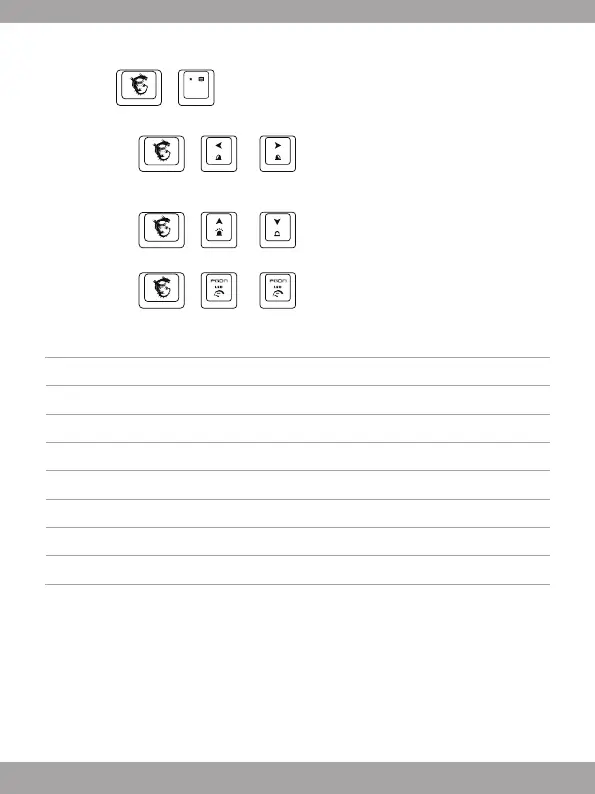
Comment personnaliser le Profile d’Eclairage
1. Pressez + to enter Customized Mode.
2. DansleModePersonnalisé:
• Pressez
+ ou pourchangeretsélectionnerlazone
duclavierquevoussouhaitezpersonnaliser,l’éclairagedelazonesélectionnée
clignotera deux fois.
• Pressez
+ ou pourajusterlabrillanced’éclairagedelazone
sélectionnéesurleclavier.
• Pressez
+ ou pour ajuster le ton de couleur.
Référence : Anti-ghosting
Tab+Caps+Shift+Ctrl+Q+W+E+R+T+A+S+D+F+G+Z+X+C+V+B+Space 20 touches
Q+W+E+R+T+Y+U+I+O+P+Space 11 touches
A+S+D+F+G+H+J+K+L+; +Space 11 touches
Z+X+C+V+B+N+M+,+.+/+Backspace 11 touches
TAB+CAPS+Shift+Ctrl+Alt+Q+W+E+A+S+D+Z+X+C 14 touches
TAB+CAPS+Shift+Ctrl+Space+Q+W+E+A+S+D+F+G+Z+X+C+↑+←+↓+→ 20 touches
Shift-L+Shift-R+Ctrl-L+Ctrl-R+Alt-L+Alt-R+Space+↑+←+↓+→ 11 touches
A+S+D+F+J+K+L+;+Backspace 9 touches



 To Next Page