5
How to Customize the Backlit Profile
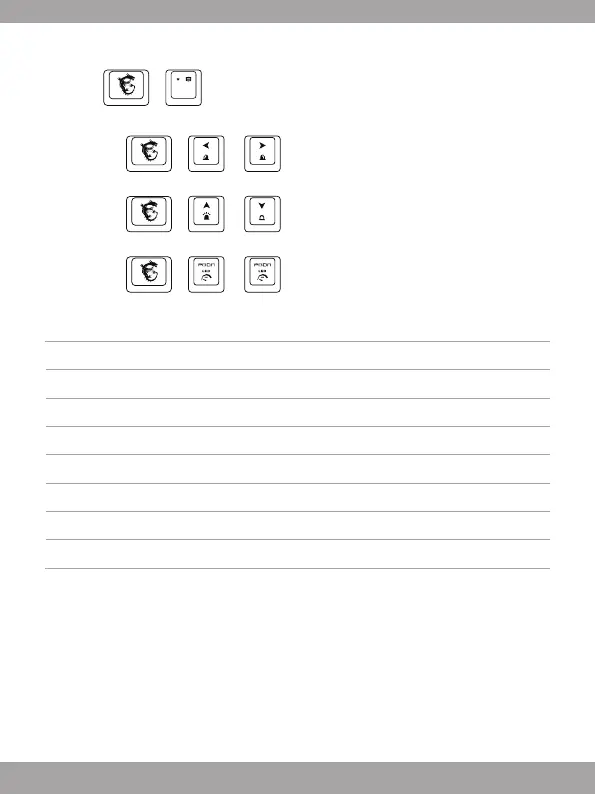
1. Press + to enter Customized Mode.
2. In Customized Mode:
• Press
+ or to switch and select the keyboard area you’d like
to customize, the keyboard backlit of the selected area will flash twice.
• Press
+ or to adjust the backlit brightness of the selected
keyboard area.
• Press
+ or to adjust the color tone.
Reference: Anti-ghosting
Tab+Caps+Shift+Ctrl+Q+W+E+R+T+A+S+D+F+G+Z+X+C+V+B+Space 20 keys
Q+W+E+R+T+Y+U+I+O+P+Space 11 keys
A+S+D+F+G+H+J+K+L+; +Space 11 keys
Z+X+C+V+B+N+M+,+.+/+Backspace 11 keys
TAB+CAPS+Shift+Ctrl+Alt+Q+W+E+A+S+D+Z+X+C 14 keys
TAB+CAPS+Shift+Ctrl+Space+Q+W+E+A+S+D+F+G+Z+X+C+↑+←+↓+→ 20 keys
Shift-L+Shift-R+Ctrl-L+Ctrl-R+Alt-L+Alt-R+Space+↑+←+↓+→ 11 keys
A+S+D+F+J+K+L+;+Backspace 9 keys



 To Next Page