65
Slik tilpassar du bakgrunnsprofil
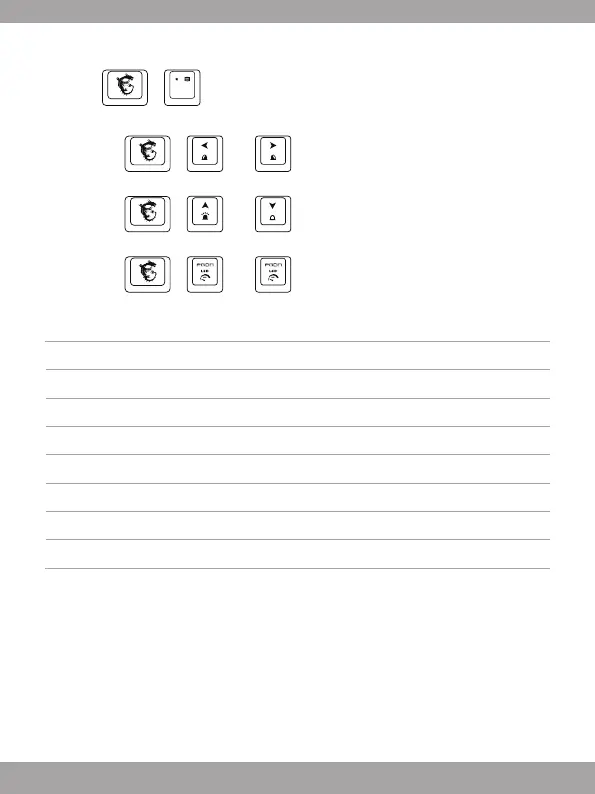
1. Trykk + for å gå inn i Tilpassa modus.
2. I Tilpassa modus:
• Trykk
+ eller om du vil bytte og velje tastaturområdet du vil
tilpassa, tastaturets bakgrunnslys blinkar to gonger.
• Trykk
+ eller for å justere bakgrunnslys lysstyrke på det
valgd tastaturområdet.
• Trykk
+ eller for å justere fargetonen.
Henvising: Anti-ghosting
Tab+Caps+Shift+Ctrl+Q+W+E+R+T+A+S+D+F+G+Z+X+C+V+B+Space 20 tastar
Q+W+E+R+T+Y+U+I+O+P+Space 11 tastar
A+S+D+F+G+H+J+K+L+; +Space 11 tastar
Z+X+C+V+B+N+M+,+.+/+Backspace 11 tastar
TAB+CAPS+Shift+Ctrl+Alt+Q+W+E+A+S+D+Z+X+C 14 tastar
TAB+CAPS+Shift+Ctrl+Space+Q+W+E+A+S+D+F+G+Z+X+C+↑+←+↓+→ 20 tastar
Shift-L+Shift-R+Ctrl-L+Ctrl-R+Alt-L+Alt-R+Space+↑+←+↓+→ 11 tastar
A+S+D+F+J+K+L+;+Backspace 9 tastar



 To Next Page