4
Introductions to Function Keys
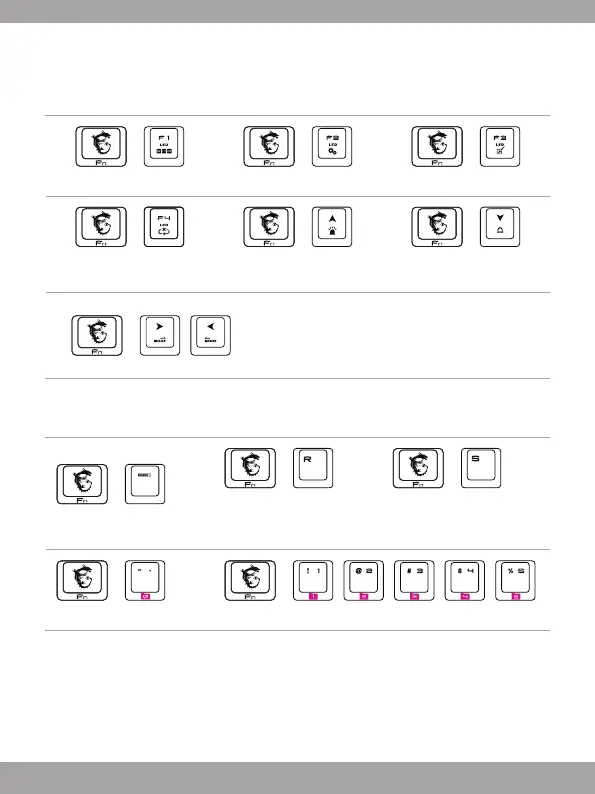
LED Indicators Adjustment
Use the keyboard hot keys listed below to customize the Backlit Profile and RGB Palette.
+
RGB Palette Setting Mode
+
Backlit Profile Setting Mode
+
Switching Backlit colors
+
Side Panel LED
turn on/off switch
+
Increase Brightness
(11 steps)
+
Decrease Brightness
(11 steps)
+
Switch Backlit Mode
Total 14 backlit modes available for selecting,
including 10 default backlit modes, 1 customized
Backlit Profile, and 3 special gaming backlit modes
for DOTA, FPS, and MMORPG.
Backlit Profile Setting
Use the keyboard hot keys listed below to customize the Backlit Profile and RGB Palette.
+
Exit programming mode
+
Long press 5 seconds to
reset the keyboard to default
settings
+
Save backlit settings to
profiles in Backlit Profile
Setting Mode
+
Unchangeable Default Profile
+
Profile 1/ Profile 2/ Profile 3/ Profile 4/ Profile 5


 To Next Page