2-8
Getting Started
▍
Connecting VGA & HDMI Devices (Optional)
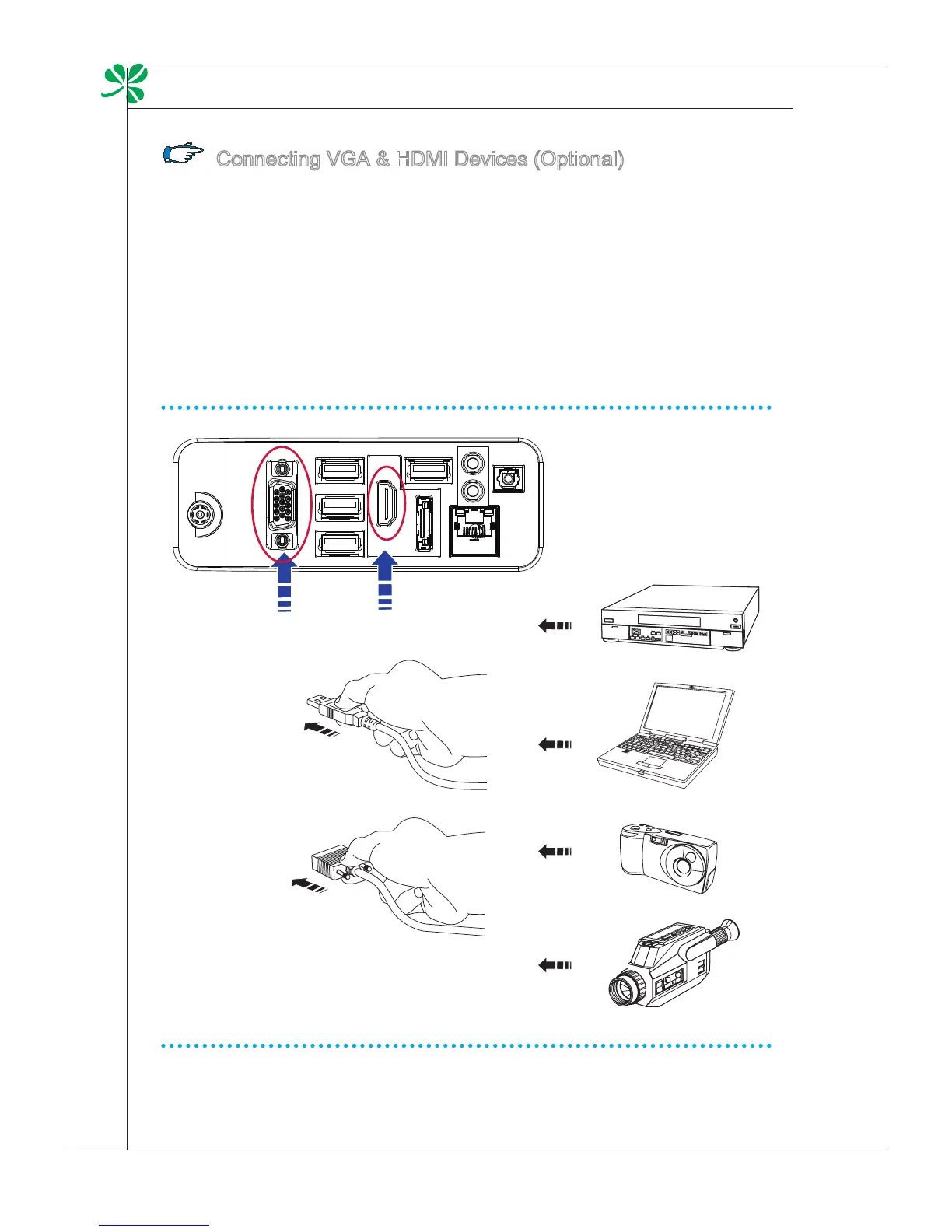
This AIO PC provides a VGA port and an HDMI port for connection to external moni-
tors, projectors, set-top boxes, DVD players, digital video cameras, mini notebooks,
digital cameras, etc.
VGA (Video Graphics Array) is a graphics display system for PCs. VGA connectors
and their associated cabling are always used solely to carry analog video signals
along with digital clock and data.
HDMI (High Denition Multimedia Interface) is a new interface standard for PCs,
displays and consumer electronics devices that supports standard, enhanced and
high-denition video, plus multi-channel digital audio on a single cable.
To connect the VGA/HDMI device, rst make sure the AIO PC and the targeted
device are both powered o, and then connect the cable of the device to the VGA/
HDMI port of your AIO PC.



 To Next Page