12
Charging the battery
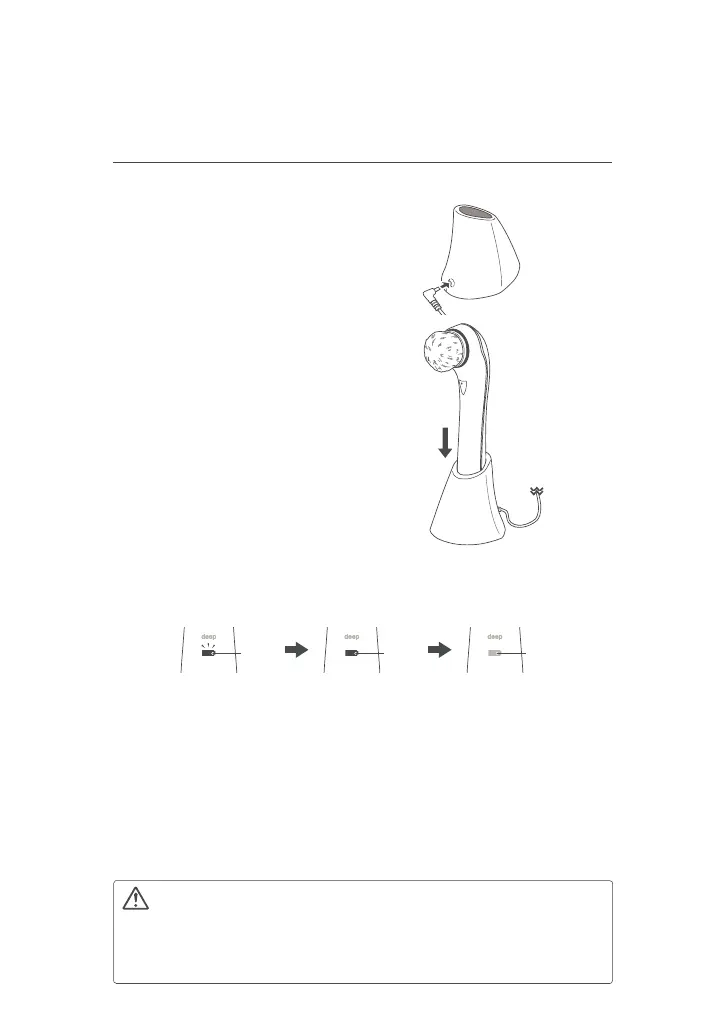
(1) Plug the plug of the charging
stand adapter into the charging
stand.
(2) Put the unit on the charging stand.
● Insert the main unit into the charging
stand with the brush facing away from
the adapter port on the stand.
● Wipe the main unit dry before placing
the main unit on the charging stand.
Plug the
power plug
into an outlet.
(2)
(3)
(3) Plug the power plug of the
charging stand adapter into an
outlet.
(4) Check the charging lamp to make sure that the main unit is being
charged.
Lit
Flashing
Charging
Charging complete
Low battery
Off
● After about 6 hours, charging is complete and the charging lamp turns off.
● The charging time varies with the amount of power remaining in the battery.
● The charging lamp does not light up if the unit is not placed on the charging
stand properly.
If the charging lamp fails to light up, check and make sure the unit is
positioned properly. Also check whether dust or debris has accumulated in
the jack of the charging stand.
(5) When charging is complete, unplug the charging stand adapter
from the outlet and remove the main unit from the charging stand.
● Do not put anything other than this product on the charging stand. Doing so
may generate heat.
● Always use the special charging stand and its adapter (SELV).



 To Next Page