8
EN: ROBOT VACUUM CLEANER |
Instruction Manual
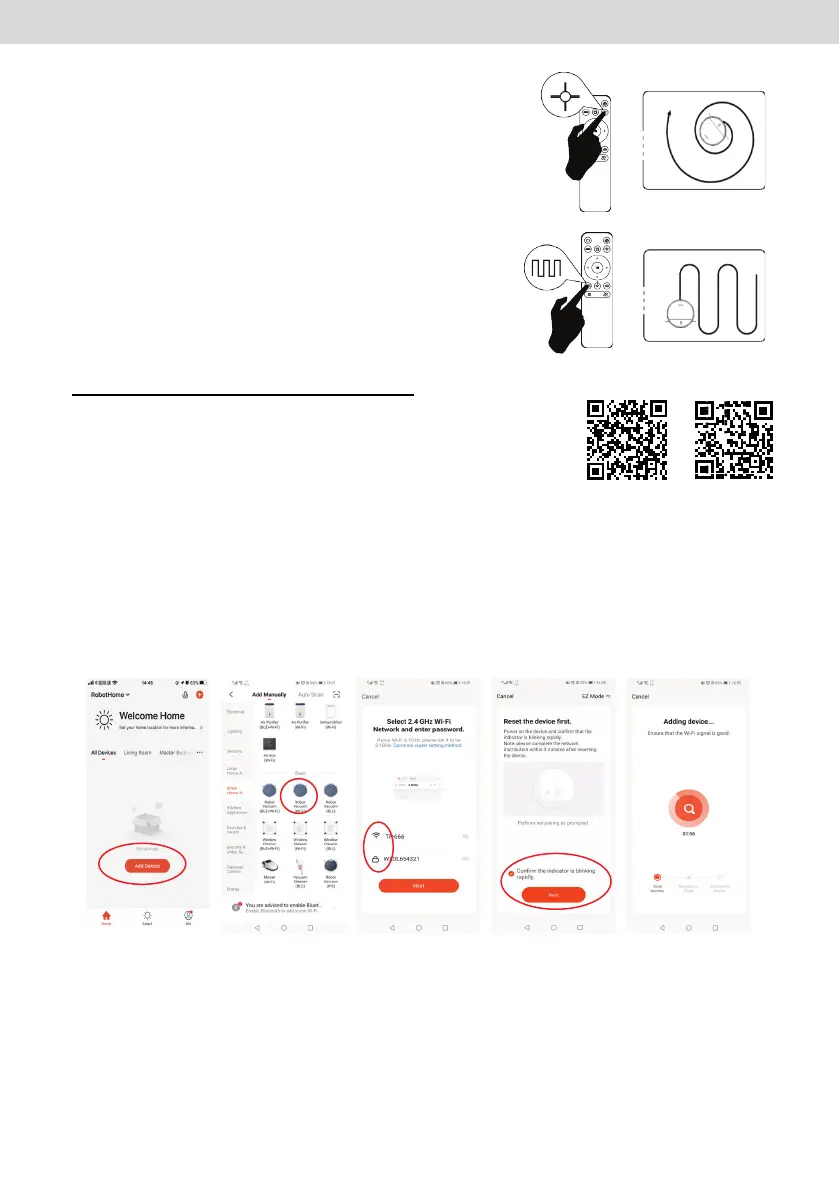
3. Spot Cleaning
The robot runs clockwise in a spiral. After reaching a
radius of 0.6 meters it returns to the starting position.
4. Zigzag Cleaning
Under zigzag cleaning mode. The longest cleaning
distance in straight line is 5 meters.
PRODUCT USAGE/WI-FI CONNECTION
1. Download APP/Register
Scan this QR code or search “Tuya Smart” in your APP-
store and download it. Register it according to the instructions.
2. Wi-Fi Connection
There are two Wi-Fi connection modes: EZ mode and AP mode.
(1)EZ mode:
(2)AP mode:
1. Power on the robot, press and hold the recharge button for 6 seconds to enter AP
mode, you will hear a beep twice. The power light turns yellow and blinks.
2. Log in your Tuya
Smart
APP and
” Add Device”
4.Select 2.4 Ghz Wi-
Fi network and enter
WI
-FI name and
password, then click
“Next”
1. Power on the robot, press and hold the recharge button for 3 seconds to enter EZ
mode, you will hear a beep
. The power light turns yellow and blinks.
3.Select “Small
Home Appliance
”,
“WI-FI
5.Select EZ mode, click “confirm the
indicator is blinking rapidly”
and “Next”
GOOGLE PLAY STORE APPLE STORE


 To Next Page