122
www.multilaser.com.br
- IP Address – This is the WAN IP address as seen by external users on the Internet (including your ISP).
Enter the IP address into the field.
- Subnet Mask – A Máscara de Sub-rede é utilizada para o endereço IP da WAN, e geralmente é
255.255.255.0.
- Default Gateway – Enter the gateway IP address into the box if required.
- Primary DNS – Enter the DNS Server IP address into the box if required.
- Secundary DNS – If your ISP provides another DNS server, enter it into this field.
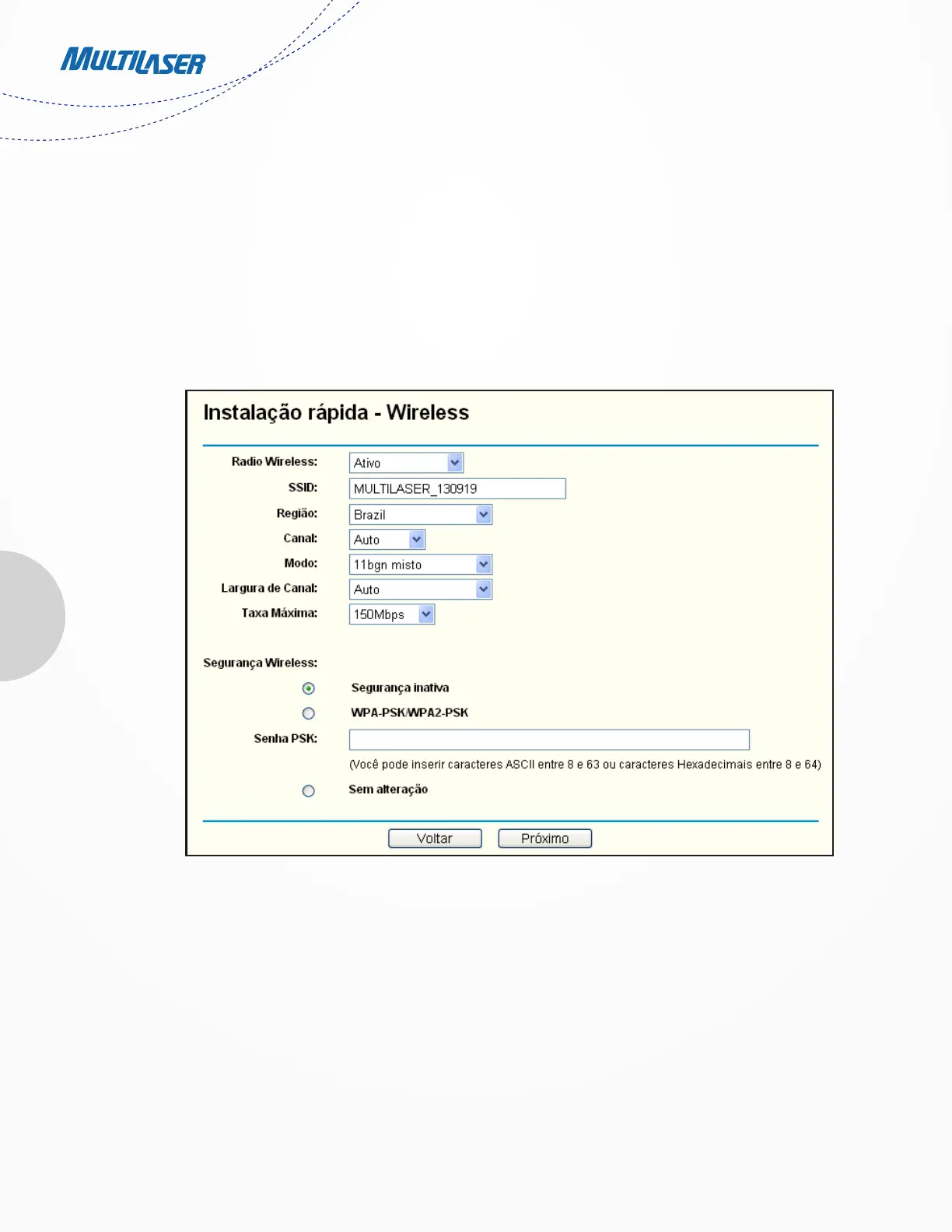
5. Click Next to continue, the Wireless settings page will appear as shown in Figure 3 9.
- Wireless Radio – Enable or disable the wireless radio choosing from the pull-down list.
- SSID – Enter a value of up to 32 characters. The same name of SSID (Service Set Identification) must be
assigned to all wireless devices in your network. Considering your wireless network security, the default
SSID is set to be MULTILASER_XXXXXX (XXXXXX indicates the last unique six numbers of each Router’s MAC
address). This value is case-sensitive. For example, TEST is NOT the same as test.
Figure 3-9 Quick Setup – Wireless


 To Next Page
 Loading...