147
www.multilaser.com.br
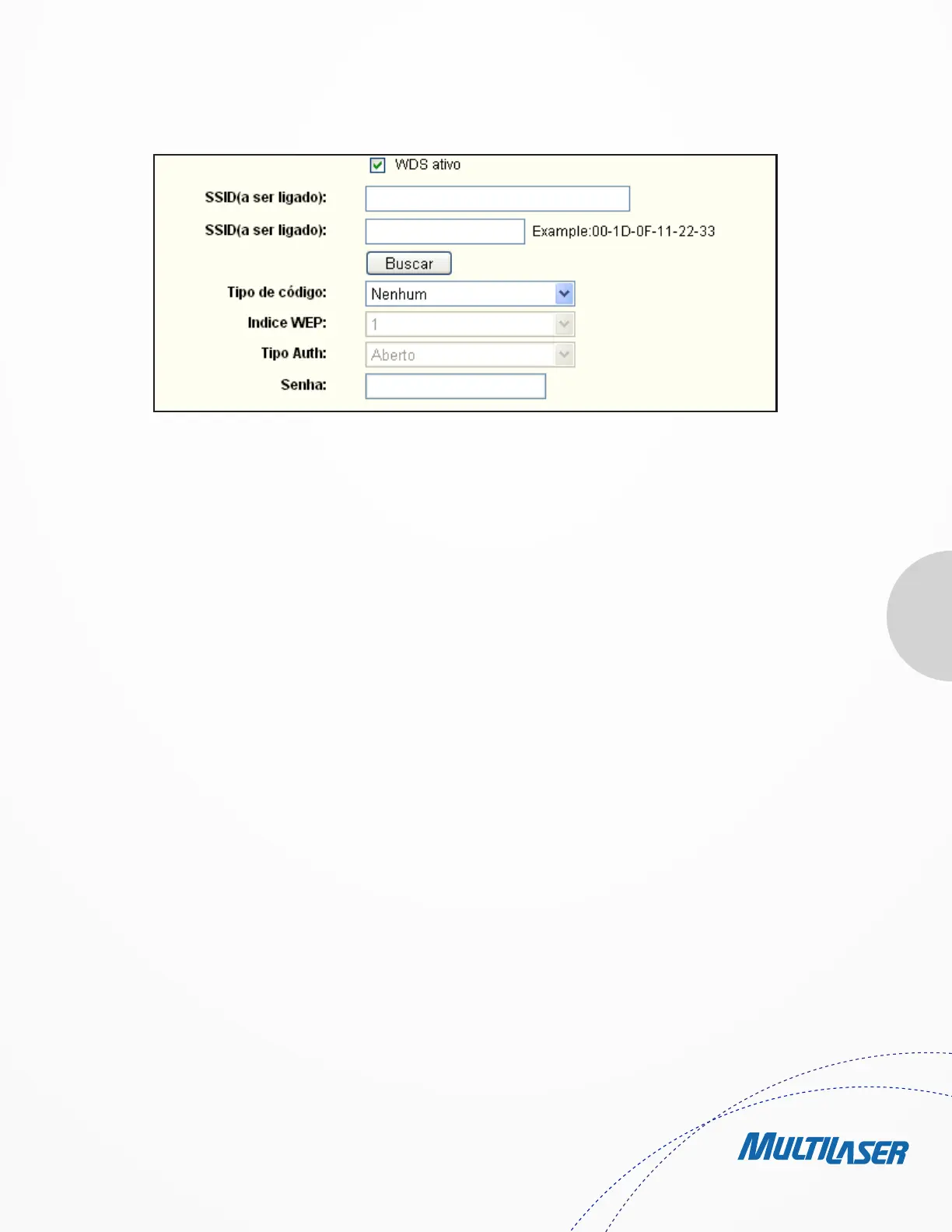
Figure 4-17
function to select the SSID to join.
• BSSID(to be bridged) - The BSSID of the AP your Router is going to connect to as a client. You can also use the search
function to select the BSSID to join.
• Search - Click this button, you can search the AP which runs in the current channel.
• Key type - This option should be chosen according to the AP’s security configuration.It is recommended that the security
type is the same as your AP’s security type
• WEP Index - This option should be chosen if the key type is WEP(ASCII) or WEP(HEX).It indicates the index of the WEP key.
• Auth Type - This option should be chosen if the key type is WEP(ASCII) or WEP(HEX).It indicates the authorization type of
the Root AP.
• Password - If the AP your Router is going to connect needs password, you need to fill the password in this blank.
4.6.2. Wireless Security
Choose menu “Wireless > Wireless Security”, you can configure the security settings of your wireless network.
There are five wireless security modes supported by the Router: WEP (Wired Equivalent Privacy), WPA (Wi-Fi Protected Access), WPA2
(Wi-Fi Protected Access 2), WPA-PSK (Pre-Shared Key), WPA2-PSK (Pre-Shared Key).
• Disable Security - If you do not want to use wireless security, check this radio button. But it’s strongly recommended to


 To Next Page
 Loading...