155
www.multilaser.com.br
4.7. DHCP
There are three submenus under the DHCP menu (shown in Figure 4 26), DHCP Settings, DHCP Clients List and Address Reservation.
Click any of them, and you will be able to configure the corresponding function.
4.7. DHCP Settings
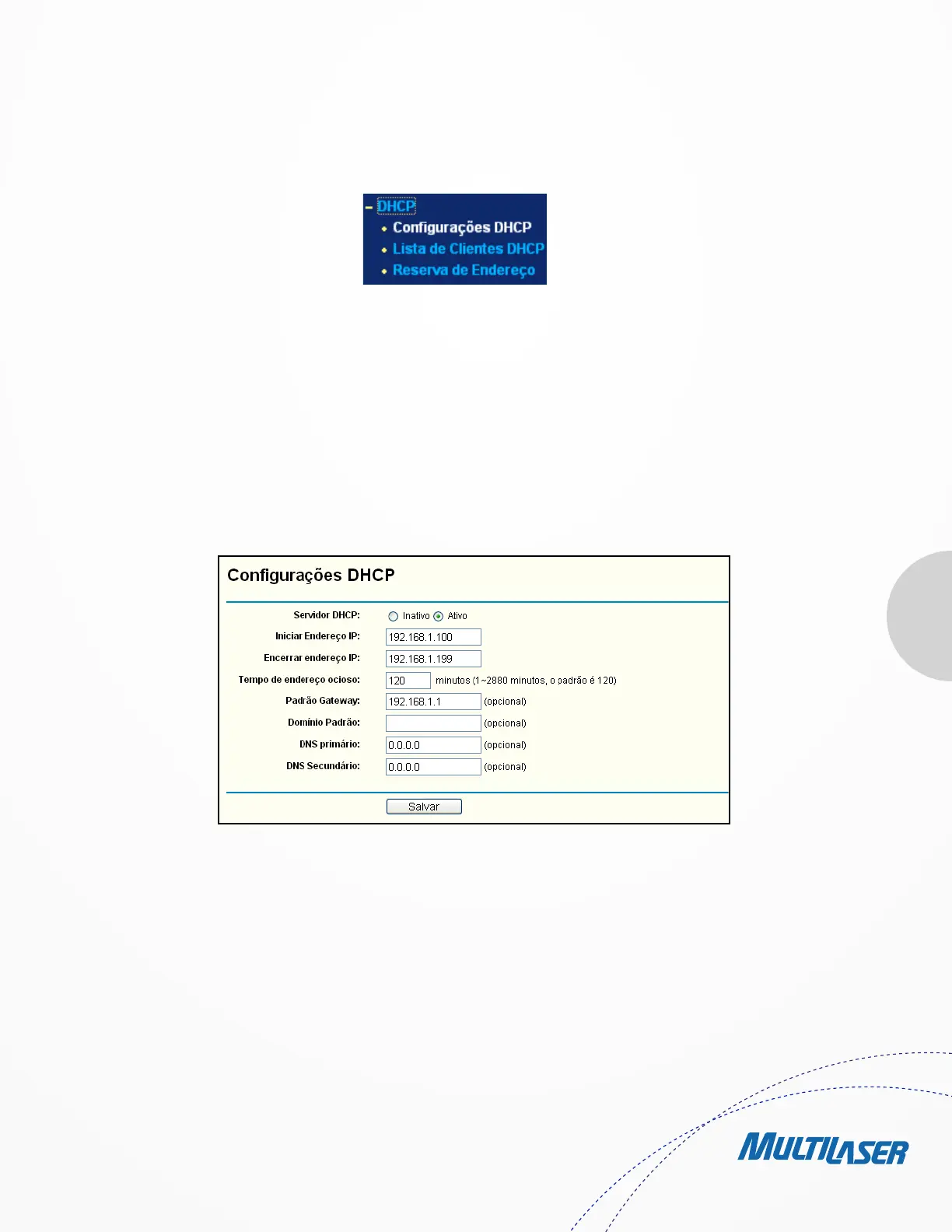
Choose menu “DHCP > DHCP Settings”, you can configure the DHCP Server on the page as shown in Figure 4-27. The Router is set
up by default as a DHCP (Dynamic Host Configuration Protocol) server, which provides the TCP/IP configuration for all the PC(s) that are
connected to the Router on the LAN.
• DHCP Server - Enable or Disable the DHCP server. If you disable the Server, you must have another DHCP server within
your network or else you must configure the computer manually.
• Start IP Address - Specify an IP address for the DHCP Server to start with when assigning IP addresses. 192.168.1.100
is the default start address.
• End IP Address - Specify an IP address for the DHCP Server to end with when assigning IP addresses. 192.168.1.199 is
the default end address.
Figura 4-26 O menu DHCP
Figure 4-27 DHCP Settings


 To Next Page
 Loading...