182
www.multilaser.com.br
Selecione o menu
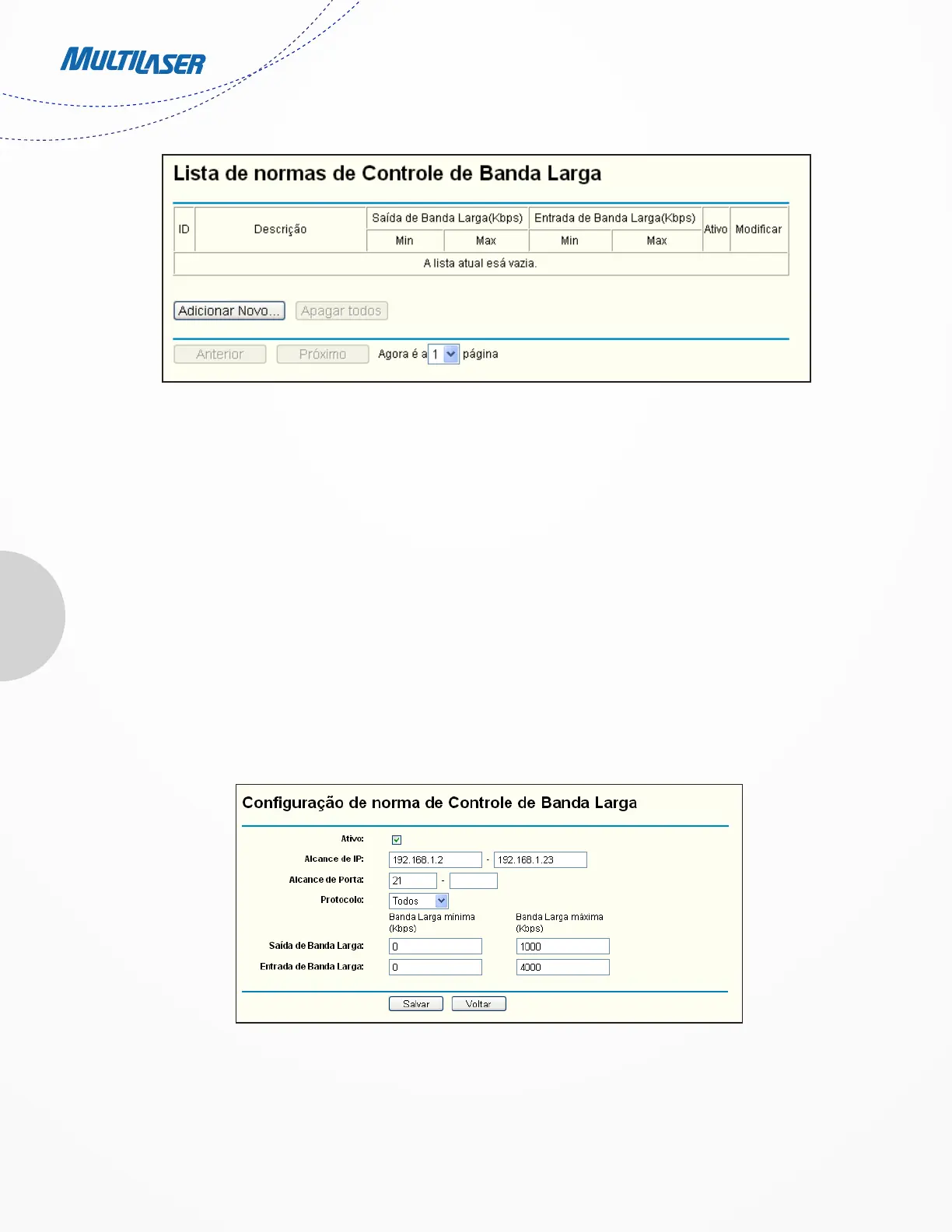
“Controle de Banda Larga > Lista de normas” para visualizar e configurar as normas de Controle de Largura de Banda na próxima tela.
• Description - This is the information about the rules such as address range.
• Egress bandwidth - This field displays the max and mix upload bandwidth through the WAN port, the default is 0.
• Ingress bandwidth - This field displays the max and mix download bandwidth through the WAN port, the default is 0.
• Enable - This displays the status of the rule.
• Modify - Click Modify to edit the rule. Click Delete to delete the rule.
To add/modify a Bandwidth Control rule, follow the steps below.
Step 1: Click Add New… shown in Figure 4-61, you will see a new screen shown in Figure 4-62.
Step 2: Enter the information like the screen shown below.
Step 3: Click the Save button.
4.14 IP& MAC Binding
Figure 4-61 Bandwidth Control Rules List
Figura 4-62 Configuração de norma de Controle de Banda Larga


 To Next Page
 Loading...