PROGRAMMING THE SYSTEM FOR THE LEFT HAND KEYBOARD
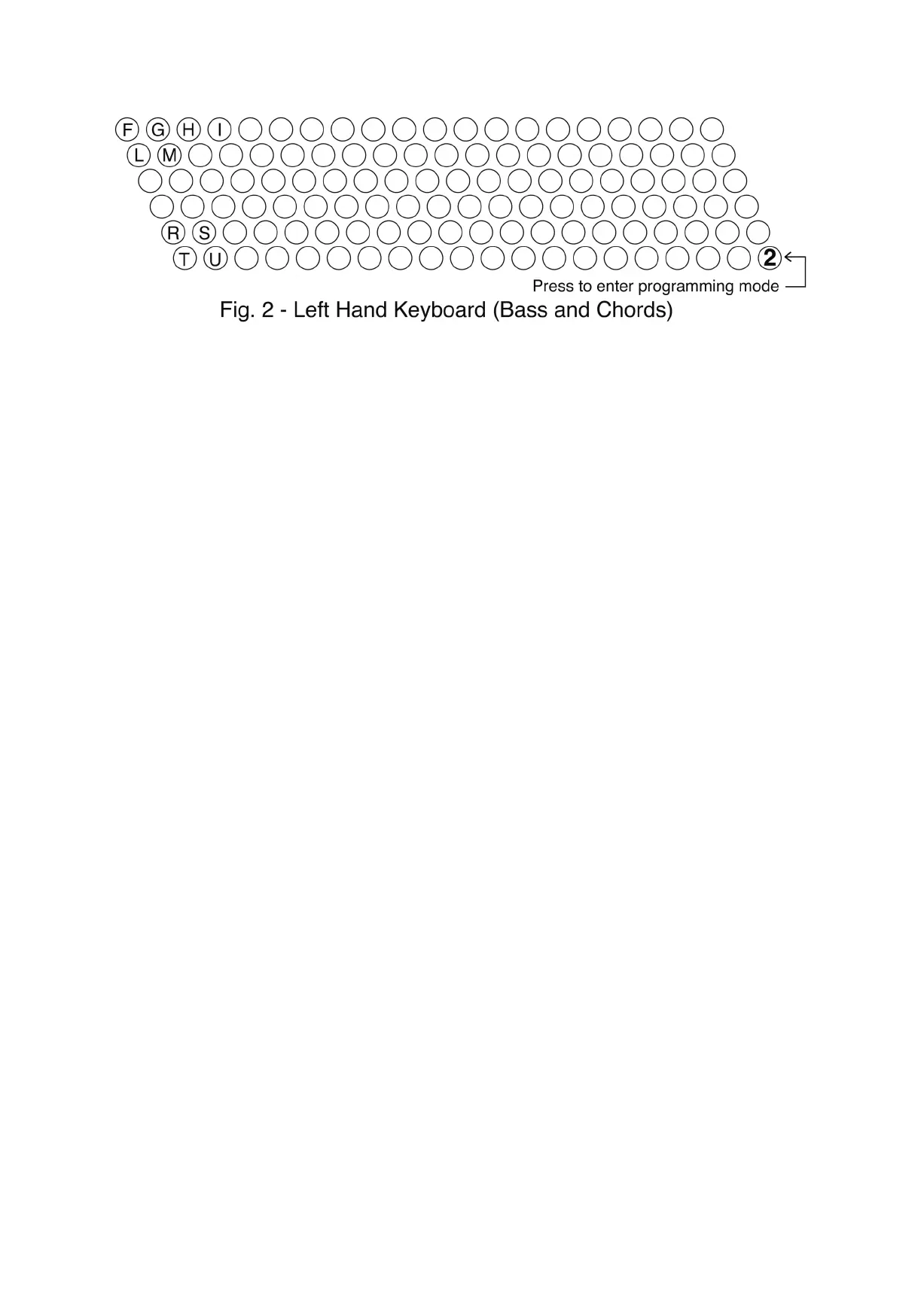
The method used for the selection of the Left Hand keyboard system is similar to that of the Right Hand.
After the primary switching “On” stages described on the previous page and following any other
programming if this was necessary, select the system required on the Left Hand keyboard by referring
to Fig. 2 and following the instructions below.
Remember that all settings, in any of the sections below, must be made within 3 secs of the previous
one, therefore it may be necessary to restart the instrument, repeating the primary switching “On”
stages, if this time is exceeded.
TO SELECT:
International System (2 rows of Bass and 4 rows of Chords): Press button F on Left Hand keyboard.
Belgian System: Press button G on Left Hand keyboard.
Dutch System: - button H on Left Hand keyboard.
French System: - button I on Left Hand keyboard.
The Left Hand keyboard will now have been programmed for the system selected.
LEFT HAND DYNAMICS - The button dynamics on the Left Hand keyboard can be selected in “On”
or “Off” as follows:
Left Hand Dynamics active - press button L (Left Hand keyboard - Bass and Chords).
Left Hand Dynamics not active - press button M (Left Hand keyboard - Bass and Chords).
HOW TO SELECT THE OCTAVE OF THE CHORDS ON THE LEFT HAND (FOR ALL SYSTEMS)
The octave for the chords of the Left Hand keyboard can be set to a maximum of +/- 2 octaves by
pressing specific buttons listed below:
For Midi Channel 2:
Press button R on the keyboard (see Fig. 2 above) to lower the notes by 1 octave at a time.
Press button S on the keyboard to raise the notes by 1 octave at a time.
For Midi Channel 1:
Press button T on the keyboard (see Fig. 2 above) to lower the notes by 1 octave at a time.
Press button U on the keyboard to raise the notes by 1 octave at a time.
ON/OFF FOR ADDITIONAL CHORDS TRANSMISSION ON MIDI CHANNEL 1
The chords transmit on Midi channel 2 by default but the instrument provides for the addition of
Midi transmission on channel 1 also. This function allows a second sound to be controlled from the
chords section (a string backing for example).
To activate/deactivate Midi channel 1, do as follows:
1. Press the first button F (see Fig. 1 above) in the first row on the Left Hand Keyboard;
2. Press the second button G in the same row, while keeping the first button pressed;
3. Press the third button H in the same row, while keeping the first and second buttons pressed;
4. A Led will indicate that Midi Channel 1 activated (LED ON) or deactivated (LED OFF).


 To Previous Page
 Loading...