XY
Unicorn Information System
Chapter 2: Introduction
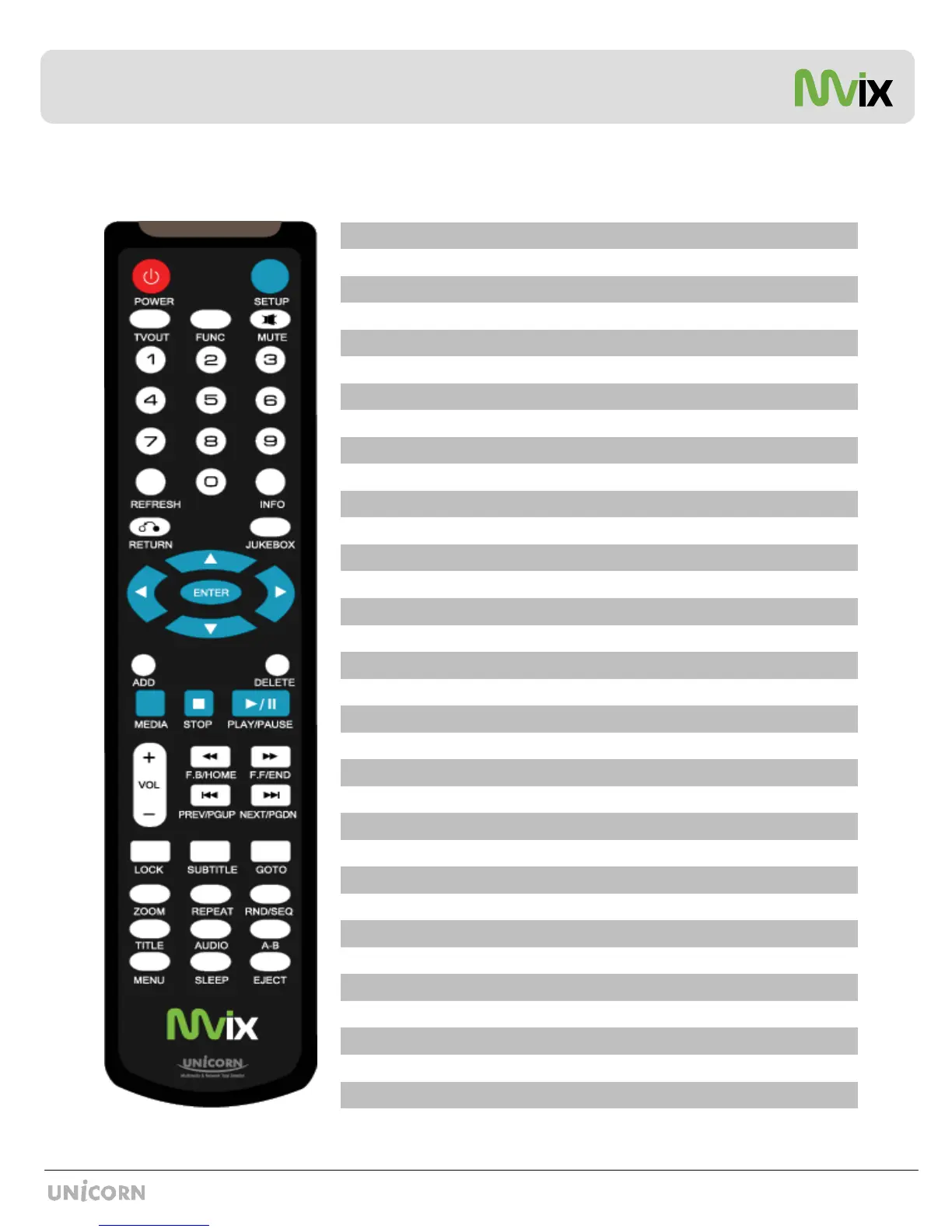
Mvix Remote Control
Eject CD or DVD ROM drive (USB host)EJECT
Set Sleep TimerSLEEP
DVD / VCD Menu Screen (Chapters, Extras etc.)MENU
Repeat one Small Segment of a Media FileA-B
Display a list of AUDIO files & start JUKEBOXAUDIO
Display DVD / VCD Title Screen on Main Menu ScreenTITLE
Switch between Random – Sequential Playback.RND/SEQ
Repeat Media file(s) PlaybackREPEAT
Zoom Video PlaybackZOOM
Time-Stamp based Search and FF/FR.GOTO
Subtitle ON / OFF, Change SettingsSUBTITLE
Set Folder Password (Folder access Control)LOCK
Next Chapter / File / Page Down on ListNEXT / PGDN
Previous Chapter / File / Page Up on ListPREV / PGUP
Fast Backwards / Rewind Playback. Scroll to beginning of File List.FB / Home
Fast Forward Playback. Scroll to end of File List.FF / End
Volume (Increase / Decrease)VOL + / -
Play (Continuous-Sequential Play) / Pause PlaybackPLAY / PAUSE
Stop PlaybackSTOP
Toggle Media List (Video / Audio / Photo / Mixed)MEDIA
Delete file from MY LISTDELETE
Add the file to MY LISTADD
Enter / Play (Individual file) / Select the Highlighted SelectionENTER
Toggle Jukebox Display Options (Audio Only)JUKEBOX
Return to Previous Screen / FolderRETURN
Display Media File InformationINFO
Refresh Shared-Folder / Directory Contents REFRESH
Cursor Navigation Arrow Buttons(ARROW)
Stop Audio Output from the PlayerMUTE
Display Control Options (Vol, Contrast, Subtitle etc..)FUNC
Toggle Video Output ModesTVOUT
Enter Setup Menu, Apply/Confirm Setup SettingsSETUP
Toggle Unit Power (ON / OFF)POWER


 To Next Page