EasyManua.ls Logo

MVMT EB5587 - User Manual

MVMT EB5587
10 pages
Print Icon
To Next Page IconTo Next Page
Loading...
This equipment has been tested and found to comply with the
limits for a Class B digital device, pursuant to Part 15 of the FCC
Rules. These limits are designed to provide reasonable protection
against harmful interference in a residential installation. This
equipment generates, uses, and can radiate radio frequency
energy and, if not installed and used in accordance with the
instructions, may cause harmful interference to radio
communications. However, there is no guarantee that
interference will not occur in a particular installation. If this
equipment does cause harmful interference to radio or television
reception, which can be determined by turning the equipment off
FCC Disclaimer:
This device Complies with Part 15 of the FCC Rules. Operation is
subject to the following two conditions:
1 This device may not cause harmful interference, and
2 This device must accept any interference received,
including Interference that may cause undesired
operation. The manufacturer is not responsible for any
radio or TV interference caused by unauthorized
modifications to this equipment. Such modifications could
void the user authority to operate the equipment.
1 This device may not cause harmful interference, and
2 This device must accept any interference received, including
interference that may cause undesired operation. The
manufacturer is not responsible for any radio or TV
interference caused by unauthorized modifications to this
equipment. Such modifications could void the user's
authority to operate the equipment. Under Industry Canada
regulations, this radio transmitter may only operate using an
antenna of a type and maximum (or lesser) gain approved for
This device complies with Part 15 of the FCC Rules and Industry
Canada license-exempt RS5 standard(s). Operation is subject to the
following two conditions;
- Reorient or relocate the receiving antenna.
- Increase the separation between the equipment and
receiver.
- Connect the equipment into an outlet on a circuit different
from that to which the receiver is connected.
- Consult the dealer or on experienced radio/TV technician
for help or assistance.
and on, the user is encouraged to try to correct the interference by
one or more of the following measures:
the transmitter by Industry Canada. To reduce potential radio
interference to other users, the antenna type and its gain
should be so chosen that the equivalent isotropically radiated
power (e.i.r.p.) is not more than that necessary for
successful communication.
Electronic and electrical devices disposal
This symbol indicates that electrical and electronic device is to be
collected separately.
This product is designated for separate collection at an
appropriate collection point. Do not dispose of as
household waste.
If the device use batteries, they must be removed from the
device and disposed in a appropriate collection center.
If the batteries cannot be removed, do not attempt to do it
yourself since it must be done by a qualified professional.
Separate collection and recycling helps conserve natural
resources and prevent negative consequence for human health
and the environment that might result from incorrect disposal.
Warning: To prevent possible hearing damage, do not listen at high volume levels for long periods.
PARAMETERS
Bluetooth version: v5.1
Bluetooth range: Up to 30 ft (10 m)
Frequency range: 24 02 2480 GHz
Battery capacity: 30 mAh each
Speaker driver: 10 mm 32 Ω
Speaker sensitivity: 105 dB ± 3 dB
Total playtime*: 2-3 hours (12 hours with case)
Total standby time: 80 hours
Waterproof rating: IPX4
CHARGING CASE
Battery capacity: 200mAh
Charging time: 2 hours
USB Type-C charging
*Depends on individual use
INSTRUCTION MANUAL: EB5587
TWS Earbuds
The device has been evaluated to meet general RF exposure requirement. The device can be used in portable exposure condition without restriction.
Question and Answer IconNeed help?

Do you have a question about the MVMT EB5587 and is the answer not in the manual?

Summary

Basic Operation

Turn On Earbuds

Earbuds automatically power on when removed from the charging case and connect to each other.

Turn Off Earbuds

Long press the control button until the LED turns red. Earbuds also auto-power off after 5 minutes if not in the case.

Bluetooth Connectivity

Pairing Process

Power on earbuds; they pair automatically. Enable Bluetooth on device and select 'MV-EB5587'. A tone confirms connection.

Charging Instructions

Charging Earbuds and Case

Place earbuds in the charging case to charge. Connect the charging case to a power supply using the provided cable.

Earbud Functions

Control Button Functions

Manage music playback, calls, and redialing by pressing the earbud's control button.

Technical Specifications

Device Parameters

Details on Bluetooth version, range, frequency, battery, speaker, playtime, standby time, and waterproof rating.

Charging Case Specifications

Information on charging case battery capacity, charging time, and charging method (USB Type-C).

Overview

This document is an instruction manual for MVMT TWS Earbuds, model EB5587.

Function Description

The MVMT TWS Earbuds are true wireless stereo earbuds designed for audio playback and call management. They automatically turn on and connect to each other when removed from the charging case. They can be paired with a Bluetooth-enabled device for wireless audio streaming and hands-free calling. The earbuds feature control buttons for various functions such as playing/stopping music, answering/declining calls, and redialing. The accompanying charging case provides portable charging for the earbuds.

Important Technical Specifications

  • Model: EB5587
  • Bluetooth Version: v5.1
  • Bluetooth Range: Up to 30 ft (10 m)
  • Frequency Range: 2402-2480 GHz
  • Earbud Battery Capacity: 30 mAh each
  • Speaker Driver: 10 mm, 32 Ω
  • Speaker Sensitivity: 105 dB ± 3 dB
  • Total Playtime: 2-3 hours (12 hours with charging case)
  • Total Standby Time: 80 hours
  • Waterproof Rating: IPX4
  • Charging Case Battery Capacity: 200 mAh
  • Charging Case Charging Time: 2 hours
  • Charging Case Charging Type: USB Type-C
  • FCC ID: 2A3ZO-EB5587

Usage Features

Turning On: Take both earbuds out of the charging case. They will automatically turn on and connect to each other, indicated by a sound.

Turning Off: To manually turn off the earbuds, long press the control button until the LED turns red, indicating they are not in use. The earbuds will also automatically turn off if they are away from the case for more than 5 minutes.

Bluetooth Connection:

  1. Ensure the earbuds are powered on and have automatically paired with each other.
  2. Turn on Bluetooth on your device (e.g., mobile phone).
  3. From the Bluetooth menu, select "MV-EB5587".
  4. A tone will confirm successful pairing. The earbuds will automatically reconnect to previously paired devices. However, depending on the device type and configuration, manual reconnection may be required.

Music Control:

  • Play/Stop Music: Quickly press either earbud's control button.
  • Volume Control: Adjust the volume via your connected device (e.g., mobile phone).

Call Management:

  • Answering Call: Briefly press either earbud's control button when a call is received.
  • Hanging Up Call: Briefly press either earbud's control button once again to end a call.
  • Declining Call: When playing music, press and hold the control button for 2 seconds.
  • Redial: Double press the earbud's control button to dial the last number on your list.

Power Down Note: Holding the control button for 3 seconds will power down the earbuds.

Maintenance Features

Charging Earbuds: Place the earbuds into the charging case. They will automatically enter charging mode if the case is charged or connected to a power supply. A red LED light will display on the earbuds while charging and turn off when fully charged.

Charging Case: Use the provided USB Type-C cable to connect the charging case to a power supply. The charging time for the case is approximately 2 hours.

Disposal Information:

  • The product is designated for separate collection at an appropriate collection point and should not be disposed of as household waste.
  • If the device uses batteries, they must be removed and disposed of in an appropriate collection center.
  • If batteries cannot be removed by the user, a qualified professional should handle their removal.
  • Separate collection and recycling help conserve natural resources and prevent negative environmental and health consequences from incorrect disposal.

Warning: To prevent possible hearing damage, avoid listening at high volume levels for prolonged periods.
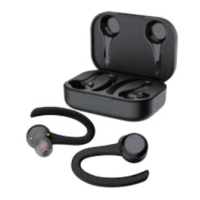
MVMT EB5587 Specifications

General IconGeneral
BrandMVMT
ModelEB5587
CategoryHeadphone
LanguageEnglish

Related product manuals