NOTES
Remarques | Notas | ノート | 참고 및 주의 사항
EN 1. The camera will shut down automatically in 1 minute when left idle.
2. During charging, the light indicator should show red. When the battery is fully charged,
the light indicator will turn off.
3. Do not disassemble the device.
4. Avoid liquid contact on the device.
FR 1. L'appareil s'éteindra automatiquement au bout d'une minute s'il n'est pas utilisé.
2. Pendant la charge, le voyant lumineux doit être rouge. Lorsque la pile est complète-
ment chargée, le voyant s’éteint.
3. Ne pas désassembler l'appareil.
4. Éviter tout contact de l'appareil avec des liquides.
ES 1. La cámara se apagará automáticamente en 1 minuto cuando se deja inactiva.
2. Durante la carga, el indicador luminoso debería mostrar rojo. Cuando la batería esté
completamente cargada, el indicador luminoso se apagará.
3. No desmonte el dispositivo.
4. Evite el contacto con líquidos en el dispositivo.
JP 1. カメラはアイドル状態のまま1分で自動的にシャットダウンします。
2. 充電中は、ランプが赤色に点灯しているはずです。バッテリーが完全に充電されると、ラン
プが消灯します。
3. 装置を分解しないでください。
4. デバイスに液体が接触しないようにしてください。
KR 1. 유휴 상태로 두면 1분 후에 카메라가 자동으로 꺼집니다.
2. 충전 중에는 표시등이 빨간색으로 표시됩니다. 배터리가 완전히 충전되면 표시등이
꺼집니다.
3. 기기를 분해하지 마십시오. 기기를 분해하면 A/S가 불가능합니다.
4. 장치에 액체가 닿지 않도록 하십시오. 방수 사용시 반드시 방수케이스를 착용 후
사용하십시오.
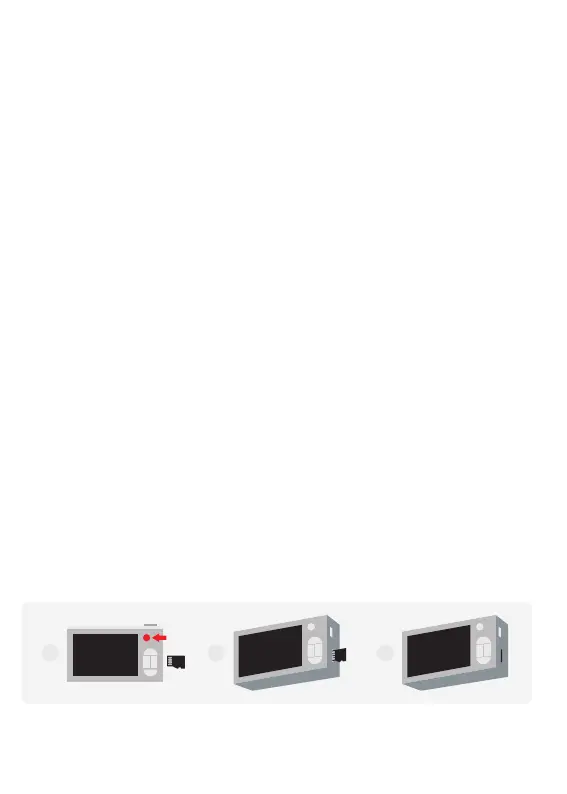
HOW TO INSTALL THE MEMORY CARD
Comment installer la carte mémoire | Cómo instalar la tarjeta de memoria | メモリカードのインス
トール方法| 메모리카드 카드 설치
EN 1. Insert the memory card as illustrated.
2. Gently push the card into the slot with a pointed object. The card should clip into place.
3. When properly installed, the memory card should be fully flushed with the camera body.
1 2 3


 To Next Page
 Loading...