SETTINGS
Paramètres | Ajustes | 設定 | 설정
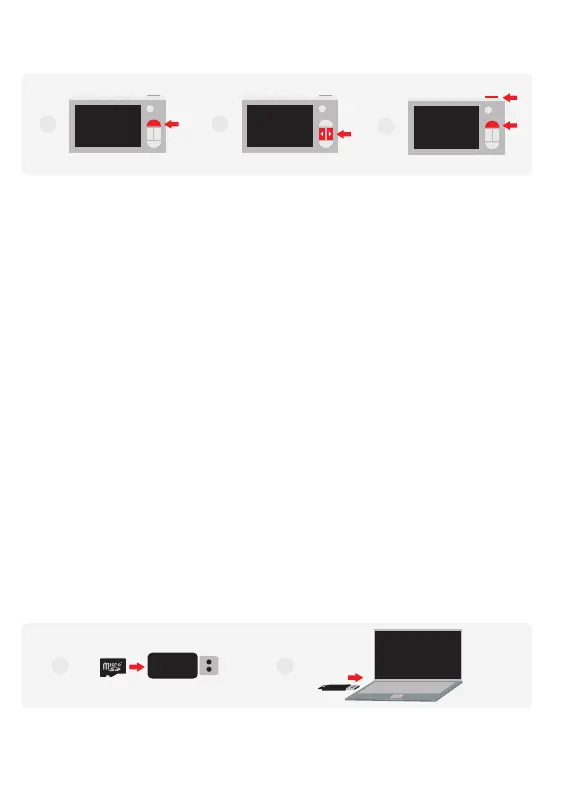
EN 1. When camera is turned on, press the ‘Settings’ button to enter the settings menu
2. Navigate using the ‘Left’ and ‘Right’ buttons.
3. To select, press the ‘Shutter’ button. To cancel, ‘press the ‘Settings’ button.
FR 1. Lorsque l’appareil photo est en marche, appuyer sur le bouton « Paramètres » pour
accéder au menu des paramètres.
2. Parcourir le menu à l’aide des boutons « Gauche » et « Droite ».
3. Pour faire une sélection, appuyer sur le bouton « Obturateur ». Pour
l'annuler, appuyer sur le bouton « Paramètres ».
ES 1. Cuando la cámara está encendida, presione el botón ‘Configuración’ para ingresar al
menú de configuración
2. Navegue con los botones "Izquierda" y "Derecha".
3. Para seleccionar, presione el botón ‘Obturador’. Para cancelar, ‘presione el botón‘
Configuración ’.
JP 1. カメラの電源を入れたら、「設定」ボタンを押して設定メニューに入ります
2. '左'と'右'ボタンを使用してナビゲートします。
3. 選択するには、「シャッター」ボタンを押します。キャンセルするには、'設定'ボタンを押して
ください。
KR 1. 카메라가 켜지면 '설정' 버튼을 눌러 설정 메뉴로 들어갑니다.
2. '왼쪽' 또는 '오른쪽' 버튼을 사용하여 탐색하십시오.
3. 선택하려면 '셔터' 버튼, 취소하려면 '설정' 버튼을 누르십시오.
EXPORTING FILES
Exporter des fichiers | Exportando archivos | ファイルの エクスポ ート | 파일 내보내기
EN 1. Insert the microSD card into the provided card reader
2. Insert the card reader into a USB slot of a computer
2
3
1
21


 To Next Page
 Loading...