EasyManua.ls Logo

My Smart Object IOT-220 - User Manual

My Smart Object IOT-220
10 pages
Print Icon
To Next Page IconTo Next Page
Loading...
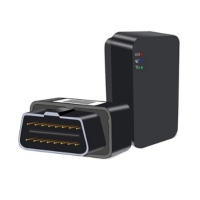
OBD GPS tracker
IOT-220
Please read carefully before use.
5. Mobile app
The MySmartObject app is available :
6. Caution & Notice
d) Low battery alert
If the device uses backup battery to work, the device
will send low battery alert to platform when battery is
low.
e) Geo-fence alert
Alter setting the lance area on the platform and
selecting the trigger conditions of the alarm, the device
will send corresponding in and out alert to the platform
according to the trigger conditions when the device
enters and exits the geo-fence.
f) Overspeed alert
The car speed threshold can be set by platform or
SMS. When vehicle speed over the setting threshold,
the overspeed alert will be triggered.
Download the app
on the App Store or
Google Play Store,
depending on your
smartphone type.
Use this QR code to
download the app
user guide :
To add a new device to your mobile
app account, click the [+] button and
scan the device bar code or enter
manually the IMEI number indicated
on the packaging.
Use your credentials to login and
then complete your personal
information.
To create geofence, select a zone
manually and then choose if you
want to receive an alert when
entering ou leaving this zone.
You can choose if you want to
receive an alert via email or a Push
notification.
You will be able to
access the real time
location of your
vehicle, object or
person, its latest
positions and trips.
You can find some more information in our
installation guide or look for the information
in the manufacture manual of your vehicle.
In some cases the usage of OBD M/F
elongation cable is mandatory. It might be
due to the position of the OBD-II port or the
space under the cover on top of the port.
If it is the case, you need to purchase this
cable separately.
6. Installation options
Please note that the location of the OBD-II ports
may vary depending on the make and model of
your vehicle.
Most vehicle OBD interface ports are under the
steering wheel, especially in A area and B area.
Just plugs in the port and it works, no need wire
installation.
Question and Answer IconNeed help?

Do you have a question about the My Smart Object IOT-220 and is the answer not in the manual?

Overview

The IOT-220 is an OBD GPS tracker designed for real-time vehicle tracking and monitoring. It features a compact design and includes a SIM card for immediate use.

Technical Specifications

  • GSM Frequency: 900/1800MHz
  • Positioning Way: GPS
  • Positioning Accuracy: <10m
  • Working Voltage/Current: 12V / 50mA
  • Dimensions: 47mm x 24mm x 30.7mm
  • Working Temperature: -20°C to 70°C

Usage Features

The IOT-220 offers several features for tracking and alerts:

  • Real-time GPS Tracking: Provides continuous location updates of the vehicle.
  • Plug Out Alarm: Triggers an alert if the device is unplugged from the car. This alert can be sent to the platform or designated SOS numbers.
  • Power Cut-off Alert: Activates an alarm if the device's power supply is interrupted. An alert message is sent to the platform or SOS numbers.
  • Low Battery Alert: If the device uses a backup battery, it will send a low battery alert to the platform when the battery level is low.
  • Geo-fence Alert: Allows users to define a specific geographical area. The device will send "in" and "out" alerts to the platform when it enters or exits this geo-fenced zone, based on user-defined trigger conditions.
  • Overspeed Alert: Users can set a car speed threshold via the platform or SMS. If the vehicle's speed exceeds this threshold, an overspeed alert will be triggered.
  • SOS Numbers: Up to three SOS numbers can be set to receive alerts.
    • Adding SOS Numbers: This can be done via SMS command: SOS, A,number1,number2,number3#. The device will reply "ok" upon successful setup.
    • Deleting SOS Numbers: Numbers can be deleted using the SMS command: SOS, D, 1,2,3# (to delete by sequence number) or SOS, D,number# (to delete by the number itself).
    • Adding SOS Numbers via Platform: SOS numbers can also be configured through the platform after activating the terminal.

LED Indications

The device uses LED indicators to show its status:

Power Indicator (Red):

  • Slow flashing: GSM initialization
  • Solid red: Network is OK/Online
  • No light: Power off / low battery / internal fault / sleep mode

GSM Indicator (Green):

  • Quick flashing: GSM initialization
  • Slow flashing: Receiving GSM signal normally
  • Solid green: In communication with phones link up
  • No light: No GSM signal

GPS Indicator (Blue):

  • Quick flashing: Searching GPS signal
  • Solid blue: Positioned
  • No light: Not working / sleep mode

Installation

The IOT-220 is designed for easy installation into a vehicle's OBD-II port.

  • The location of OBD-II ports can vary by vehicle make and model.
  • Most OBD interface ports are typically found under the steering wheel, often in areas designated as A or B.
  • The device simply plugs into the port, requiring no additional wiring.
  • In some cases, if the OBD-II port is in an inconvenient position or hidden, an OBD M/F (male/female) elongation cable may be necessary. This cable would need to be purchased separately.

Mobile Application

The MySmartObject app is available for both iOS (App Store) and Android (Google Play).

  • Users can download the app and use their credentials to log in and complete their personal information.
  • To add a new device, users click the [+] button within the app and can either scan the device's barcode or manually enter the IMEI number found on the packaging.
  • The app allows users to access the real-time location of their vehicle, view its latest positions, and track trips.
  • Users can also create geofences within the app, selecting a zone manually and choosing to receive alerts via email or push notification when the device enters or leaves the defined area.

Maintenance Features

While the manual does not explicitly detail maintenance features, the device's design and alert system inherently contribute to its upkeep and operational efficiency:

  • Self-diagnosis through LED indicators: The LED lights provide immediate visual feedback on the device's operational status (power, GSM, GPS), allowing users to quickly identify if there are any issues such as no signal, low battery, or internal faults.
  • Low battery alert: This feature helps prevent unexpected power loss by notifying the user when the backup battery needs attention, ensuring continuous operation even if the main power supply is interrupted.
  • Plug out alarm: This acts as a security and integrity check, alerting the user if the device has been tampered with or accidentally disconnected, which helps maintain the tracking functionality.
  • Power cut-off alert: Similar to the plug-out alarm, this feature ensures that users are informed if the device loses its primary power source, which could indicate a vehicle issue or tampering.

The IOT-220 is a user-friendly and robust GPS tracking solution, offering essential features for vehicle monitoring and security through its compact design, comprehensive alert system, and intuitive mobile application.

My Smart Object IOT-220 Specifications

General IconGeneral
BrandMy Smart Object
ModelIOT-220
CategoryGPS
LanguageEnglish