The MYCOND YUGO 12 is an air dehumidifier designed to remove excess moisture from the air, creating a comfortable environment for homes and offices. Its compact design and castor wheels allow for easy movement between rooms.
Function Description
The dehumidifier operates in various modes to suit different needs:
- Dehumidification: The primary function is to reduce ambient humidity. The default humidity setting is 60% when the device is turned on.
- Air Purification: The device includes an ionization and purification function, which can be turned on or off.
- Timer Function: A 0-24 hour timer can be set in 1-hour intervals. Setting the timer to "00" cancels the function. The timer LED indicator lights up when active and turns off automatically when the time expires. In operating mode, the timer can be set to turn off the dehumidifier, and in standby mode, it can be set to turn on the device.
- Sleep Mode: Activating sleep mode gradually dims all indicators and automatically switches the fan speed from high to low. Touching any button will turn the indicators back on.
- Operating Modes:
- Sunny Day Mode: The default target humidity is 60%, which can be adjusted while the machine is running.
- Rainy Day Mode: The default target humidity is 40%, which can be adjusted while the machine is running.
- Dry Clothes Function: In this mode, the machine operates continuously, and the target humidity cannot be adjusted.
Usage Features
- Power On/Off: In standby, press the power button to turn on the dehumidifier. The operation indicator and PURIFY indicator light up, and the fan starts at high speed. Pressing the power button again turns the device off, stopping the compressor immediately and the fan after 10 seconds.
- Humidity Setting: Touch the humidity button to check the current ambient humidity. Touch it again to set the target humidity within a range of 20% to 95% (in 5% increments). The system confirms the input value after 3 seconds, then displays the current humidity. In Dry Clothes Function mode, the target humidity cannot be changed.
- Temperature Display: Press and hold the humidity button for 5 seconds to display the current ambient temperature.
- Speed/Child Lock: This button switches between high and low wind speed modes. The corresponding indicator lights up. In Dry Clothes Function, sleep mode, and defrosting mode, the air speed cannot be changed. Press and hold the wind speed button for 3 seconds to activate/deactivate the child lock function.
- Indicator Lights:
- The "88" display shows the current humidity.
- Ambient humidity <60%: blue indicator.
- Ambient humidity ≥ 60% and <80%: green indicator.
- Ambient humidity ≥ 80%: red indicator.
- When the water tank is full, the indicator turns red, the compressor and fan stop, and three beeps sound (except in sleep mode) to remind the user to empty and reposition the tank.
Important Technical Specifications
- Model: YUGO 12
- Power Supply: AC220V-240V/50Hz
- Power Consumption: 156W (at 27°C, 60% humidity); 190W (at 30°C, 80% humidity)
- Rated Current: 0.75A (at 27°C, 60% humidity); 0.9A (at 30°C, 80% humidity)
- Dehumidify Capacity: 6.8kg/24h (at 27°C, 60% humidity); 12kg/24h (at 30°C, 80% humidity)
- Noise: ≤36dB(A)
- Air Circulation: 120m³/hr
- Total Water Volume: 2L
- Refrigerant/Charge: R134a/105g
- Working Temperature: 5°C-35°C
- Recommend Room Size: 15-25m² (height=2.6m)
- Body Size: 280x200x500mm
- Net Weight: 12kg
Maintenance Features
- Water Tank:
- Do not remove the float from the tank, as this will prevent the machine from starting.
- Clean the water tank with cool or warm water. Avoid using harsh cleaning agents, steel wool, chemical rags, gas oil, benzene, thinner, or other solvents, as they can damage the tank and cause leakage.
- When installing the water tank, use both hands to push it into the correct position. Improper positioning will prevent the device from turning on.
- Continuous Drainage: If using a water tube for continuous drainage, ensure the outlet is not submerged in water to prevent clogging. Remove the water tank, connect the hose, and reposition the tank, ensuring the drain pipe is tilted sufficiently for free condensate flow.
- Filter Cleaning:
- Lift the handle and remove the filter frame.
- Remove the filter.
- Wash the filter with water.
- Dry the filter and reinsert it.
- Storage: For long-term storage, follow these steps:
- Empty the water tank and wipe any water droplets from the inside bottom of the machine.
- Collect the power cord and store it in a dry water tank.
- Clean the filter.
- Place the machine in a cool, dry environment.
- Free Space: Ensure a minimum of 20 cm free space behind the dehumidifier when it is running to ensure proper operation.
Troubleshooting
- Unit doesn't operate: Check power supply, ensure the water tank is not full (indicator flashing), and verify room temperature is within the 5°C-38°C operating range (CL/CH errors indicate out-of-range temperatures).
- Dehumidifying function doesn't work well/No air intake: Check if the air filter is clogged or if the intake/discharge ducts are obstructed. Clean the air filter as instructed.
- Loud noise when running: Ensure the machine is on a flat, hard surface and that the air filter is not clogged.
- LO (Ambient humidity below 35%): Humidity is too low for optimal operation.
- H1 (Ambient humidity above 95%): Humidity is too high for optimal operation.
- CL (Low temperature protection activated, <5°C): Increase the ambient temperature.
- CH (High temperature protection activated, >38°C): Decrease the ambient temperature.
Precautions:
Always operate the unit upright on a flat floor. Turn on the device 1 hour after delivery or if it has been tilted. Keep children and animals away during operation. Turn off and unplug the device before cleaning or storing. Do not immerse the device in water or place it near a water source. The unit is for indoor use only. Do not place it near heating equipment or flammable materials. Keep fingers and other objects away from air inlets and outlets. Do not sit or stand on the unit. Never insert objects into the unit body. Empty the water tank before moving. If the power cable is damaged, contact a licensed servicer for replacement. Do not leave a working unit unattended. Unplug the unit when not in use for extended periods. For maintenance, consult a licensed electrician; self-maintenance is not permitted.

 Need help?
 General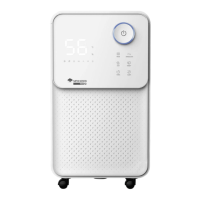

 To Next Page