Auto Power O
The earbuds will automatically power o in the following
situations:
• If they are in pairing mode and no device is connected
after 5 minutes.
• If the earbuds and connected device are too far apart and
no connection is made after 5 minutes in the connection
and pairing mode.
• If the earbuds' battery voltage falls below 3.2V.
Connect
To connect the earbuds to your device, follow these steps:
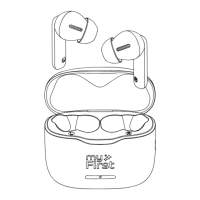
1. Open the charging case and remove the earbuds. They
will automatically turn on and pair with each other.
2. When the blue and red lights on the earbuds flash
alternately, they are ready to be paired with your device.
3. Select "myFirst CareBuds" from the list of available
connections to connect the earbuds to your device.
*Note: During the pairing process, you may hear voice
prompts indicating the status of the connection.
Eartip sizes (Diameter)
Fit
To ensure a proper fit and comfortable use of your earbuds,
follow these steps:
1. Make sure the eartip is securely attached to the earbud
and does not easily come o.
2. Gently insert the earbud into your ear, tucking it in and
slightly rotating it until it fits comfortably without any
pressure.
*Note: The earbuds come with small eartips already
attached, but you can try using one of the 5 additional sizes
of eartips included if needed. Keep in mind that your left and
right ears may have dierent sizes and shapes, so it may be
necessary to use dierent eartip sizes for each ear.
Controls
myFirst CareBuds allow you to control your media, and
manage your calls while on the go with just a few simple
gestures.
1xTap
1xTap
2xTap
Press & Hold
(Transparency mode)
3xTap
Transparency Mode
To ensure children's safety, the transparency mode on myFirst
CareBuds is automatically activated when a child is walking.
The earbuds detect the child's walking status and turn on the
feature when the child is walking within 10 meters.
You can also manually turn the transparency mode on or o
by taping and holding one of earbuds for 2 seconds.
*Note:
• The distance at which the function is triggered may vary
based on each person's stride.
• The transparency mode may also be activated by larger
movements of the body.
• The transparency mode can only be enabled while the
myFirst CareBuds are turned on.
5


 To Next Page
 Loading...