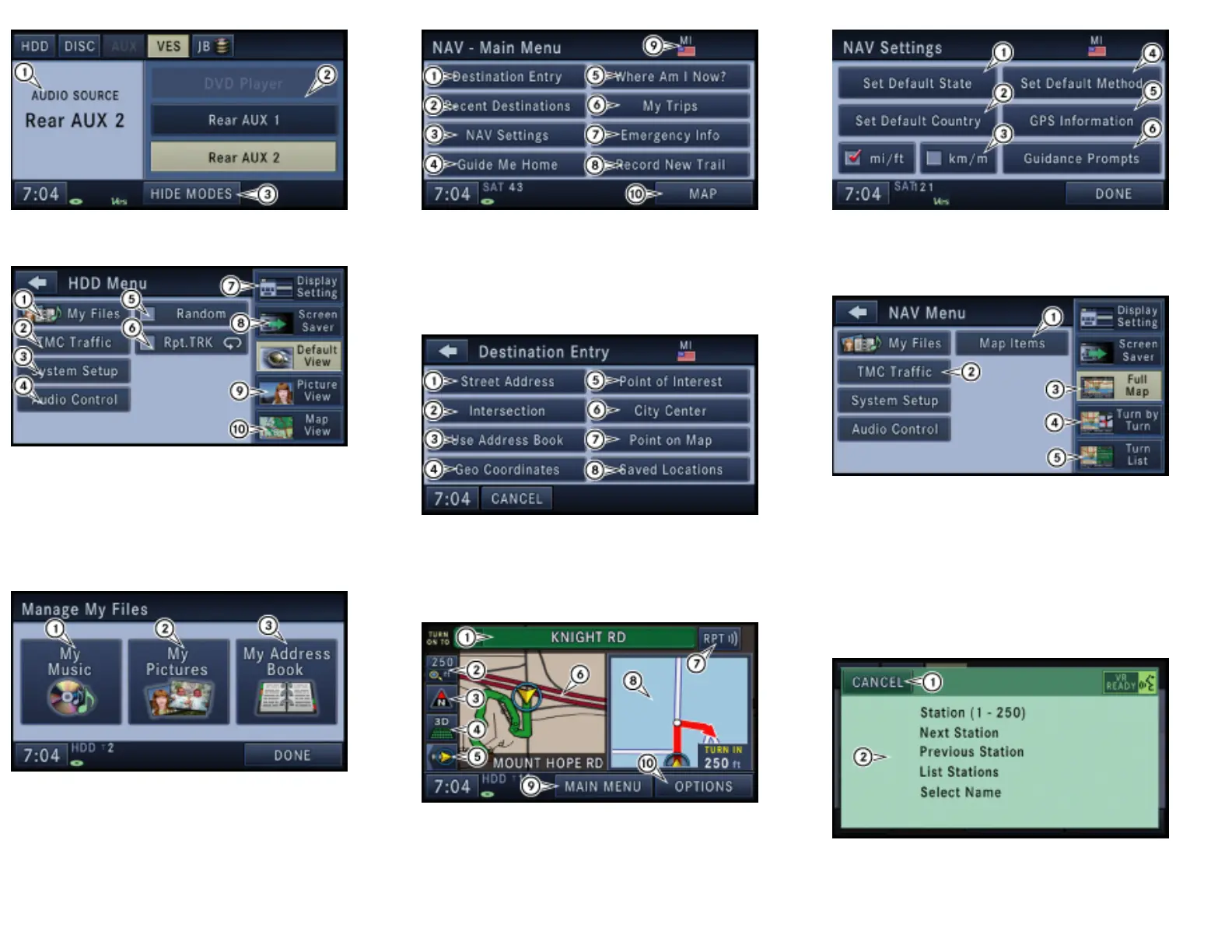
VEHICLE ENTERTAINMENT SYSTEM (VES)
1. Current audio source info
2. VES available mode soft-keys
3. Hide VES mode soft-keys
HDD - MENU
1. Access files on HDD
2. View and configure Traffic Message Channel
3. Access system setup menu
4. Change audio settings
5. Play tracks in random order
6. Repeat tracks
7. Change display settings to automatic, day, or night mode
8. Activate screen saver
9. Display personal pictures in radio/media screens
10. Display Map in radio/media screens
MANAGING FILES
Manage My Files allows you to add and edit music, picture and address book files.
1. Access music files
2. Access custom picture files
3. Access address book database
NAVIGATION (NAV) - MAIN MENU
1. Enter destination screen
2. Access recently used destinations
3. Navigation settings
4. Guide to home address
5. Locate vehicle position
6. Trip planner
7. Emergency Points of Interest (POI’s)
8. Record trail when in non mapped areas.
9. Shows flag of State for current destination.
10. Map viewer
NAV - DESTINATION ENTRY
1. Enter destination by street
2. Enter destination by intersection
3. Enter destination from address book
4. Enter destination by geo coordinates
5. Enter destination from POI database
6. Enter destination by city center
7. Enter destination by point on map
8. Enter destination from saved destination memory
NAV- MAP VIEWER
1. Next turn on to displayed road
2. Set map zoom
3. Set map heading
4. 3D/2D view
5. Toggle current road name display on and off
6. Map viewer displays current position and route
7. Intersection zoom during maneuver
8. Repeat navigation announcement
9. Switch to navigation main menu
10. Change and display routing options
NAV - SYSTEM SETTINGS
1. Change default state
2. Set default country
3. Change metrics
4. Change default routing options
5. Current GPS information
6. Guidance prompt volume settings
NAV - MENU
1. Display map items, buttons, icons etc.
2. View and configure Traffic Message Channel
3. Full map view
4. Turn by turn route guidance view
5. Turn list route guidance view
UConnect™
UConnect™ is a voice-activated, hands-free, in vehicle communications system. UConnect™
allows you to dial a phone number with your cellular bluetooth phone using simple voice
commands (e.g., “Call” … “Jim” …Work” or “Dial” … “248-555-1212”). Your cellular phone’s
audio is transmitted through your vehicle’s audio system; the system will automatically mute
your radio when using the UConnect™ system.
When you press the UConnect™ hard-key you will hear the word UConnect™ followed by a
BEEP. The beep is your signal to give a command.
If nothing is said within a few seconds, the system will present a list of menu options.
Listen to the choices and give your command after the beep.
SDS - DIALOG SCREEN
This Voice Recognition System allows you to control your AM and FM radio, satellite radio,
disc player, navigation system, hard disk drive storage, and a memo recorder.
When you press the VR hard-key, you will hear a beep. The beep is your signal to give a
command. If nothing is said within a few seconds, the system will present a list of menu
options. Listen to the choices and give your command after the beep.


 To Previous Page
 Loading...