Mylight MC3D01RM User Manual V2
Mylight Systems
0 800 710 226
|
https://www.mylight-systems.com
|
Specifications are subject to change without notice
Se
t-up Mode
To get into Set-up Mode, the user need press the “Enter” button for 3 seconds.
Page Display Descriptions
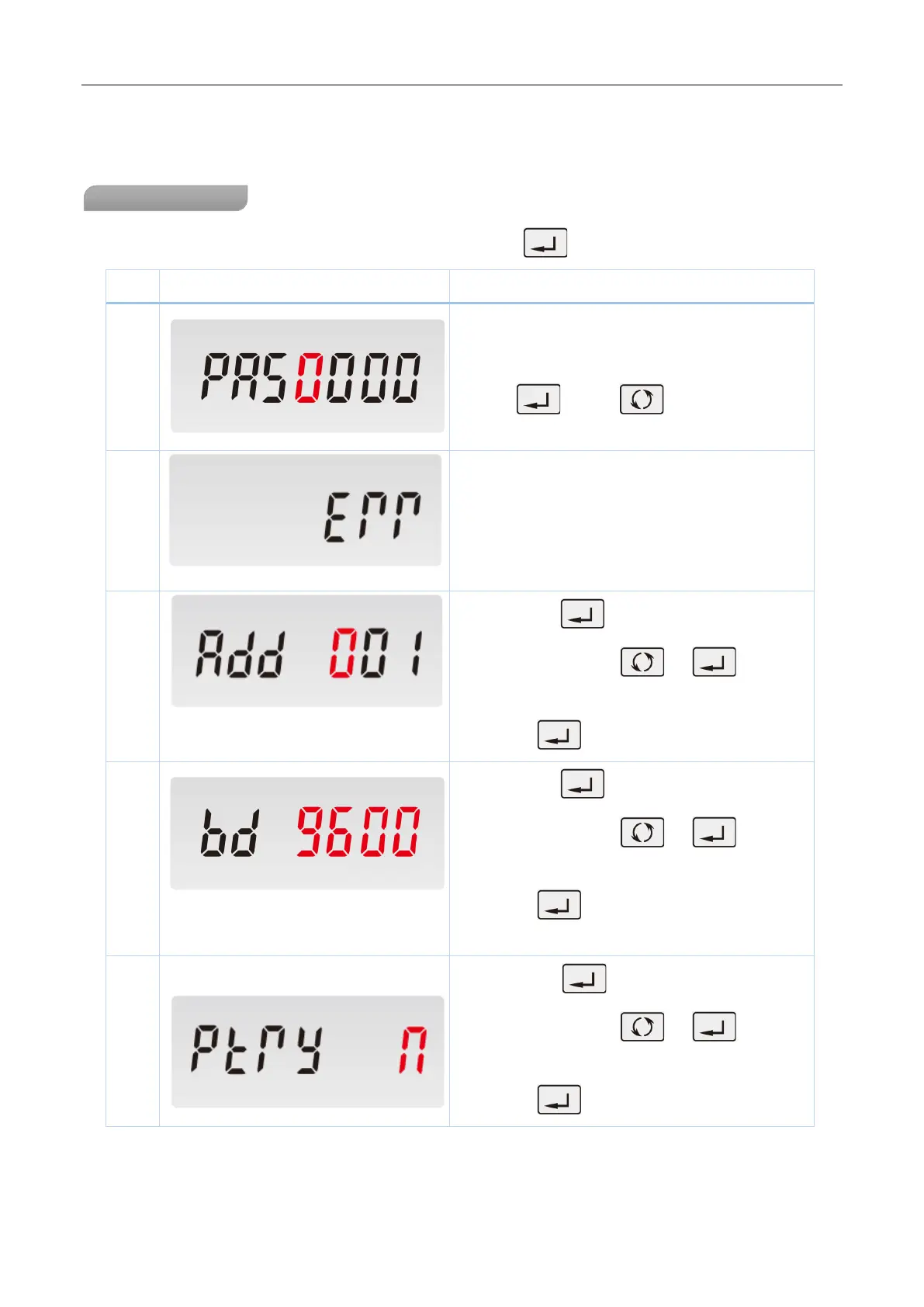
To get into Set-
up mode, it asks a password
confirmation. Default password: 1000
Use and
password.
The entering information is wrong. The operation
fails.
Keep pressing
for 3 seconds, the current
selection will flash, use and to change
the Modbus address. Options: 1~247
Keep press for 3s to confirm the selection.
3
Keep pressing
for 3 seconds, the current
selection will flash, use and to change
the Baud rate. Options: 1.2k, 2.4k,4.8k,9.6k ( default )
Keep press for 3s to confirm the selection.
4
Keep pressing
for 3 second, the current
selection will flash, use and to change
the Parity. Options: EVEN,ODD,NONE ( default )
Keep press for 3s to confirm the selection.


 To Next Page
 Loading...