81-SS30048a
- 11 -
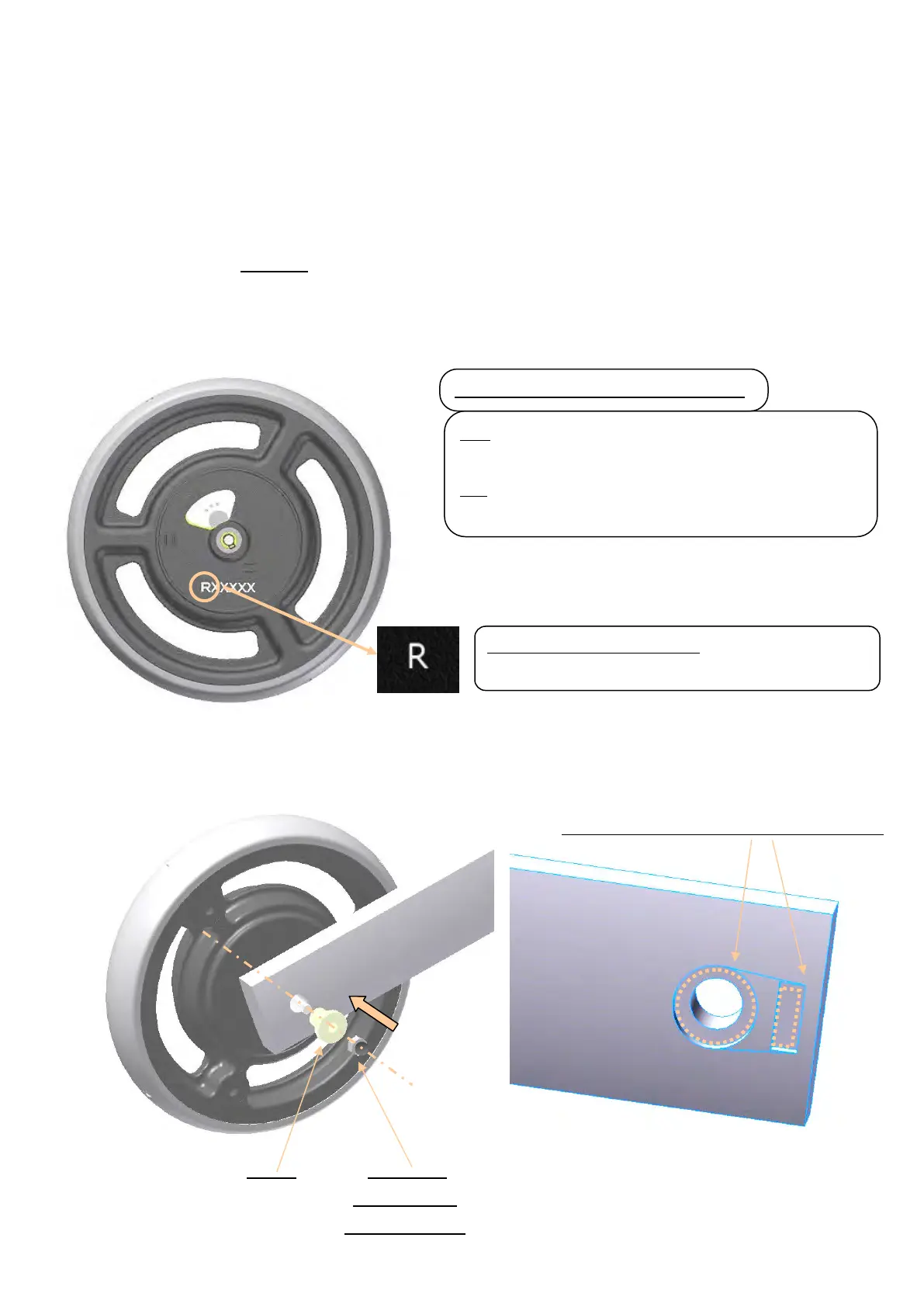
Open the center cap, and verify the CONPAL left-right installation direction. (Figure 3)
(1) Insert the sleeve from the Rollator inside. (Figure 4)
(2) Insert the CONPAL wheel from the Rollator outside into the installed sleeve, in alignment with the left-right
installation direction, and securely insert the adapter, aligning it to the indented sections of the main body.
(Figure 5)
(3) Install the main body installation nut to the axis that protrudes from the Rollator inside, and tighten the nut at
the specified torque (5.2 Nm) by using a torque wrench. Tightening the nut too strong may result in the
malfunction of the brake system.
Figure 4
Figure 5
Figure 3
If R:
Install on the “right” as viewed from the Rollator rear.
If L:
Install on the “left” as viewed from the Rollator rear.
Character code and installation direction
Installation example: Figure 3
Install on the “right” as viewed from the Rollator rear.
Insert the adapter into the indented sections.
Sleeve Main body
installation nut
(torque:
::
:5.2Nm)
))
)


 To Next Page
 Loading...