EN /
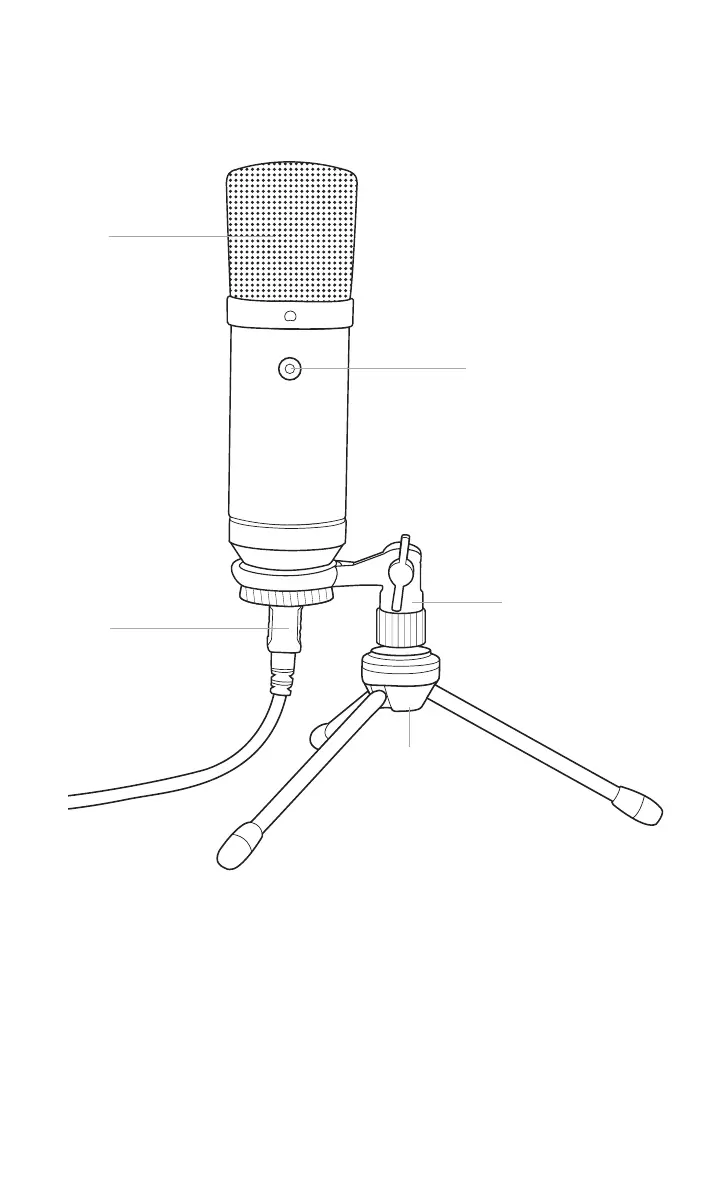
I Control elements
1/ Audio recording direction
2/ USB connector
3/ Tripod stand
4/ Microphone holder
5/ Mute function
1
2
4
5
3
I First-time connection with PlayStation®4
This microphone is a Plug’n’Play device. Simply connect it to one
of the free USB ports in your PlayStation®4 system. It should be
recognised by the system after a period of time (approx. 5 seconds).
If this is not the case, then please unplug the microphone and use a
different USB port. You can check the microphone’s status and adjust
the volume level by checking the following, from the PlayStation®4
system’s menu: “Settings” > “Devices” > “Audi Devices” > “Adjust
Microphone Level”.


 To Next Page