HDX Hard Disk Player Quick Start Guide
1 Installing, Connecting and Switching On
• Install your HDX on an equipment stand or rack intended for the purpose. Ensure that the
fan aperture is not obstructed.
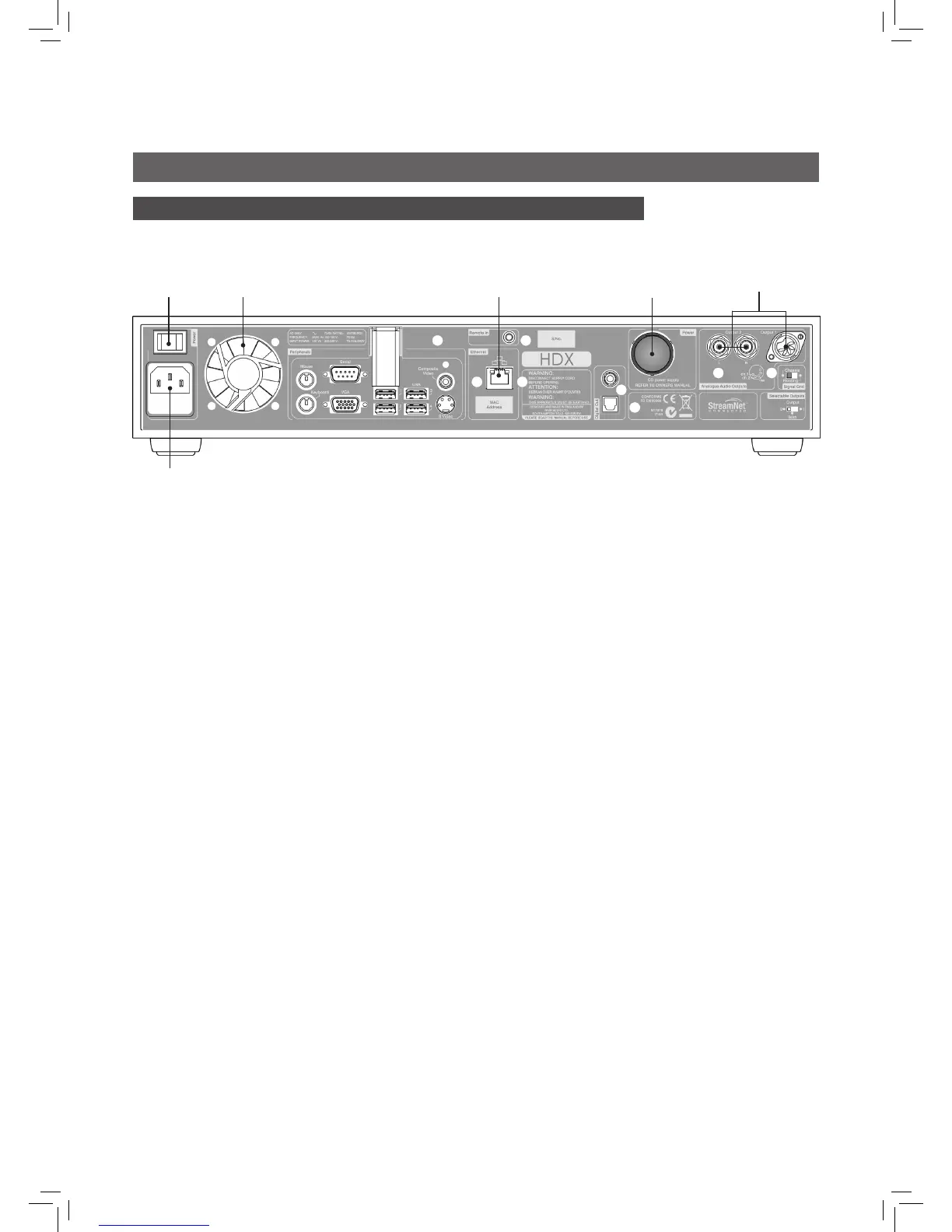
• Identify the Audio Output, Network, Power Supply Link Plug and Mains Input sockets.
• Connect one or both of the Audio Output sockets - DIN (output 1) or Phono (output 2) -
to an audio system. Set the rear panel Select Outputs switch to reflect the choice of DIN
or Phono sockets. Unless connecting to a system that includes another earthed source
component (a Naim CD player, DVD player or AV processor for example), switch the rear
panel Signal Ground to Chassis. The Signal Ground switch should be set to Floating if mains
“hum” is heard through the speakers or if the audio system includes another earthed source
item.
• If the HDX is to be connected to a network, use a standard RJ45 ethernet cable to connect
the Network socket to a network router with a known working internet connection.
• Wired network connection is strongly recommended for the most consistent and secure
HDX operation. Ethernet-over-mains hardware may be used and provides a simple and
convenient method of home network connection. However, the presence of network data
on the mains supply may compromise overall system sound quality.
• If the HDX is to be used with an XPS or CD555PS power supply remove the rear panel link
plug and connect the power supply using the appropriate Burndy cable. Switch on the
XPS or CD555PS before switching on the HDX. The link plug must be fitted if the HDX internal
power supply only is used. THE SXPS BURNDY CABLE ONLY MUST BE USED TO CONNECT THE
XPS OR 555PS POWER SUPPLIES.
• Connect the HDX Mains Input using the supplied mains cable.
• Ensure that the network (if present), and peripheral audio equipment is connected,
switched on and working. Switch on the HDX using the rear panel Power Switch.
• After a delay of approximately one minute the user interface Home menu will appear on
the front panel display.
• The HDX is configured when originally shipped not to require any network setup but to
connect to a network automatically. However, if your HDX has been previously used, its
network configuration may have been altered, leaving it unable to connect automatically.
Refer to the HDX Reference Manual or contact your retailer or installer if this appears to be
the case.
Full installation and operational information can be found in the HDX Reference Manual
included on the CD packed with the product, or at www.naimaudio.com
mains input
power
switch
DIN and phono
audio outputs
network
socket
power supply
upgrade socket
(link plug tted)
fan
aperture


 To Next Page