Need help?
Do you have a question about the NAIM NaimUniti and is the answer not in the manual?
Describes the amplifier's inputs, outputs, controls, and speaker outputs.
Details the NaimUniti's built-in CD player functionality.
Explains the FM, DAB, and internet radio tuner features.
Covers connecting to network audio files via UPnP.
Describes how to connect and use an iPod with the NaimUniti.
Explains playing audio files from USB memory sticks.
Illustrates and labels the rear panel connection sockets.
How to connect the unit to mains power.
Instructions for connecting the radio aerial.
Details on connecting audio sources and outputs.
Describes the various analogue and digital audio inputs.
Describes the unit's audio outputs.
Details speaker connection.
Describes the front panel headphone socket.
Explains the purpose and setting of the signal ground switch.
Details connecting an iPod.
Covers wired and wireless network setup.
Specifics on wired network setup.
Details wireless network setup.
Discusses network configuration.
Mentions RS232 and Remote in sockets.
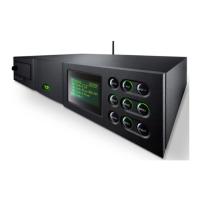
Identifies and describes front panel components.
Explains buttons in normal playback.
Explains buttons in list/setup modes.
Detailed button functions in normal play.
Detailed button functions in list/setup modes.
Shows display info during normal playback.
Shows display info in list mode.
Shows display info in setup mode.
Describes the remote control handset.
Lists handset key functions for different modes.
Details keys used in normal play mode.
Explains how to enter text using the handset.
Overview of the eight setup menus.
How to change the user interface language.
Configuring input parameters.
Specific settings for the CD input.
Settings for the FM tuner input.
Settings for the DAB tuner input.
Settings for the iRadio input.
Settings for network audio input.
Settings for iPod connection.
Settings for USB input.
Settings for the front panel input.
Settings for remaining inputs.
Configuring speaker settings.
Settings for headphone output.
Customizing network parameters.
Steps for setting up wireless connection.
Setting up a static network connection.
Modifying front panel display behavior.
Configuring handset input and navigation keys.
Details on navigation key settings.
Assigning inputs to handset keys.
Location of navigation keys.
Details on input selection keys.
Accessing system status and reset options.
How to choose audio inputs.
Adjusting listening volume and mute function.
Information shown on the front panel display.
Details on line, subwoofer, preamplifier, and headphone outputs.
What to do if the amplifier encounters issues.
Instructions for loading CDs.
Operating CD playback functions.
Viewing CD info and selecting tracks.
Creating custom track playlists.
How to clean and maintain the CD player.
Details on tuning FM stations.
Details on tuning DAB stations.
Details on tuning internet radio stations.
How to save favorite radio stations.
How to select saved radio presets.
Information on UPnP servers.
Supported audio file types.
How to browse and play network files.
Details on compatible iPod models.
Steps for connecting an iPod.
How to navigate and control the iPod.
Settings for iPod battery charging.
Compatibility of USB media and files.
How to browse and play files from USB.
 General
| RMS rated power | 250 W |
|---|---|
| Built-in speaker(s) | No |
| Digital tuner | Yes |
| FM band range | 87.5 - 108 MHz |
| Supported radio bands | FM |
| CD changer | - |
| Device type | HiFi CD player |
| Product color | Black |
| USB 2.0 ports quantity | 1 |
| Power consumption (typical) | 35 W |
 Weight and Dimensions
| Depth | 314 mm |
|---|---|
| Width | 432 mm |
| Height | 87 mm |
| Weight | 11300 g |

 To Next Page