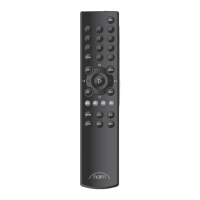
NARCOM 5 Remote Handset – English
1. Using NARCOM 5
NARCOM 5 can be congured to operate preampliers,
tuners or CD players by pressing the appropriate System
Component Key.
Note: The “rec” system component key enables record
side input, mute and mono selection on appropriately
equipped preampliers.
NARCOM 5 keys behave as described below:
disp: Selects illumination options.
numeric: Selects preamplier inputs, CD tracks or tuner
presets or frequencies.
: Repeats a CD or CD playlist.
prog: Press and hold to select preamplier program
mode. Enables CD playlist programming and
tuner preset management.
vol (+ / –): Adjusts volume and volume control position.
mute: Mutes and restores volume.
bal (+ / –): Adjusts channel balance. On preampliers
without a manual balance control, balance will
automatically centre. This is indicated by a
ashing volume indicator.
mon : Enables a record device output to be heard
while recording. Alternatively, selects mono
mode on some products.
: CD play, pause, previous, next and stop.
: CD fast forward and reverse. The keys can
also select preamplier inputs and FM radio
frequencies.
mode: Selects FM frequency, scan and preset modes.
scan: Selects tuner scan mode. When a station is
found the scan will pause. A second press will
resume the scan.
2. NARCOM 5 keys
The NARCOM 5 is a multifunctional remote handset designed specically for Naim CD players, analogue tuners and
preampliers (including integrated ampliers). To t batteries, remove the battery cover and insert the batteries into the
body taking care with their orientation. Replace the battery cover.
prog
mute
mon
vol +
vol -
disp
pre
rec
cd
tun
bal +scan
mode
bal -
0
1
2
3
4
5
6
7
8
9
disp
repeat
prog
mode
scan
system
component
keys
fast forward and
reverse
balance
numeric
volume, mute,
and mon and CD
transport


 To Next Page
 Loading...