
 Need help?
Do you have a question about the Nanoleaf Wood Look Hexagons and is the answer not in the manual?
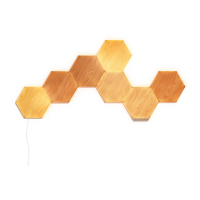
The core hexagonal lighting elements for the Nanoleaf Elements system.
Includes mounting plates and adhesive tape for surface attachment.
Components for linking panels and providing power, including the controller.
Links to download the Nanoleaf App for setup and control.
Provides a link to access the full user manual and register the product warranty.
Ensures sufficient PSUs are used; each PSU supports up to 42W.
Clean surfaces thoroughly to be free of dust, moisture, and oil.
Apply strong, circular pressure to the center of the panel for 30 seconds.
Tape is not suitable for textured, porous, or ceiling surfaces.
Utilize the Nanoleaf App's Layout Assistant to plan panel placement.
Connect linkers and the power supply unit to the panels.
Secure the mounting plates to the back of the panels.
Apply pressure to panels for secure adhesion to the wall.
Connect the hexagonal panels together in the desired configuration.
Details on attaching mounting plates to the wall using screws.
 General
| Product Name | Nanoleaf Wood Look Hexagons |
|---|---|
| Category | Home Lighting |
| Shape | Hexagon |
| Color Range | 16 million colors |
| Control Method | App, Voice, Touch |
| Color Channel Configuration | RGB |
| Dimmable | Yes |
| Lifespan | 25, 000 hours |
| Mounting | Wall-mounted |
| Modular Design | Yes |
| Connectivity | Wi-Fi |
| Compatibility | Apple HomeKit, Amazon Alexa, Google Assistant |
| Color Temperature | 6500K |
| Communication Protocol | Wi-Fi |
| Power Supply Voltage | 100VAC - 240VAC |

 To Next Page