The NAVAC NRS2i01 is a wireless smart e-Scale designed for HVAC system installation and maintenance. Its primary function is to accurately measure refrigerant weights during charging and recovery processes, providing warning alerts upon completion. The device is FCC, IC, and RED certified, ensuring compliance with relevant standards.
Function Description
The NRS2i01 operates as a wireless refrigerant scale, allowing technicians to precisely control the amount of refrigerant added to or recovered from HVAC systems. It features a hand-held keypad that communicates wirelessly with the scale platform, offering flexibility and ease of use. The scale is designed to display weight in both kilograms (kg) and grams (g), or pounds (lb) and ounces (oz), providing versatility for different measurement preferences.
The device includes several operational modes:
- Standard Weighing Mode: Upon startup and successful synchronization between the keypad and scale, the device enters standard weighing mode, displaying the current weight on the scale platform.
- Clear Setting: In standard weighing mode, users can zero out the weight displayed on the scale. This is particularly useful when placing a container on the scale and wanting to measure only the net weight of the refrigerant. The scale automatically zeros if the weight change is within a certain range.
- Charge Mode: This mode is designed for rapidly and safely adding refrigerant to a system. Users can input a target charge value using the keypad. The scale then monitors the refrigerant weight as it is added, providing an alarm and visual indication when the target amount is approached and when charging is complete. The minimum charge amount is specified to ensure accurate measurement.
- Recover Mode: Similar to charge mode, the recover mode allows users to safely remove refrigerant from a system. Technicians can input a target recovery value, and the scale will track the amount of refrigerant recovered. An alarm and visual indicator will signal when the recovery process is nearing completion and when the target amount has been reached. The minimum recovery volume is also specified.
The keypad features a range of buttons for various functions:
- Numeric Buttons (0-9): Used for entering charge or recovery values.
- Charge Button: Initiates the charge mode.
- Unit Button: Switches between measurement units (kg+g and lb+oz).
- Light Button: Toggles the backlight on and off. The backlight automatically turns off after a period of inactivity.
- Clear Button: Zeros the weight displayed on the scale in standard weighing mode.
- Recover Button: Initiates the recover mode.
- Shift Button: Used to move the flashing cursor during input to correct errors.
- Enter/Exit Button: Confirms input or exits a mode.
- Power Button: Turns the hand-held device on/off. When successfully paired, pressing and holding this button on the hand-held device will switch off both the keypad and the scale platform.
- SYNC Button: Used for wireless synchronization between the keypad and the scale.
The LCD display screen provides crucial information, including:
- Controller Power Level: Indicates the battery level of the hand-held device.
- Scale Power Level: Indicates the battery level of the scale platform.
- Numeral Display Area: Shows the measured weight or input values.
- Wireless Signal Display: Indicates the strength of the wireless connection.
- Recover Symbol: Appears when in recover mode.
- Charge/Recover Completion Symbol: Flashes to indicate that charging or recovery is nearing completion.
- Charge Symbol: Appears when in charge mode.
- Measurement Unit Area: Displays the current unit of measurement (Kg, g, Lb, oz).
Usage Features
The NRS2i01 is designed with the service technician in mind, emphasizing portability, durability, and ease of operation.
- Magnesium Alloy Cast Scale Plate: The scale platform is constructed from a magnesium alloy, contributing to its light weight and durability, making it easy to transport.
- Storage Bag: A dedicated storage bag is provided to further enhance portability and protect the device during transit.
- Integrated Keypad Storage: The hand-held keypad can be stored within a compartment inside the scale platform. This design not only makes it convenient for users to retrieve and store the keypad but also provides better protection for the device, potentially extending its lifespan.
- Wireless Communication: The wireless connection between the keypad and the scale platform allows for flexible positioning and operation, reducing clutter from cables. The device has a specified wireless broadcast distance, with recommendations for optimal weighing and function operation distances.
- Automatic Shut-off: To conserve battery life, the hand-held keypad automatically shuts down if it fails to connect to the scale within a certain time. If a connection is established, the scale itself will turn off automatically if the weight on the platform does not change for a specified duration.
- Overweight Alarm: The device includes an overweight alarm feature. If the weight on the scale exceeds its maximum capacity, the LCD screen will display "OL," and a buzzer will sound, alerting the user to remove the excess weight to prevent damage to the electronic scale.
- Synchronization: The keypad and scale are pre-synced at the factory. However, if a replacement keypad or scale is needed, a Bluetooth synchronization setup process is available. This involves specific button presses on both units to establish a new wireless connection. The device provides feedback through LCD display changes and buzzer sounds during the synchronization process.
- Error Correction: During charge or recovery input, users can correct errors by using the shift button to move the flashing figure and re-enter the correct value.
- Charge/Recovery Default Settings: After startup, the charge default is 0. Pressing the charge button again will display the measurement of the last charge, which can then be reset.
Maintenance Features
Proper maintenance ensures the longevity and accuracy of the NRS2i01.
- Cleaning: The surface of the scale should be cleaned with a moist cloth and a small amount of cleaning fluid. Users are advised to avoid using chemical solvents, which could damage the product.
- Repair and Warranty: If the device requires repair, users should contact a NAVAC dealer company. Opening the device by an unauthorized individual or company will void the warranty.
- Battery Management: After use, the scale should be promptly turned off. For long periods of inactivity, it is recommended to remove the batteries to prevent leakage and damage.
- Storage: The scale should not be stored in moist, high-temperature, or magnetized locations, as these conditions can negatively impact its performance and lifespan.
- Calibration: If the scale experiences inaccuracy due to severe impact, it should be returned to NAVAC or an authorized distributor for calibration and repair.

 Need help?
 General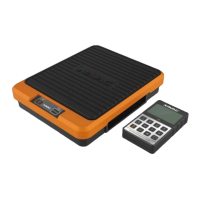

 To Next Page