NAVIN Corporation www.navin.com.tw
works best when the miniHomer is held horizontally.
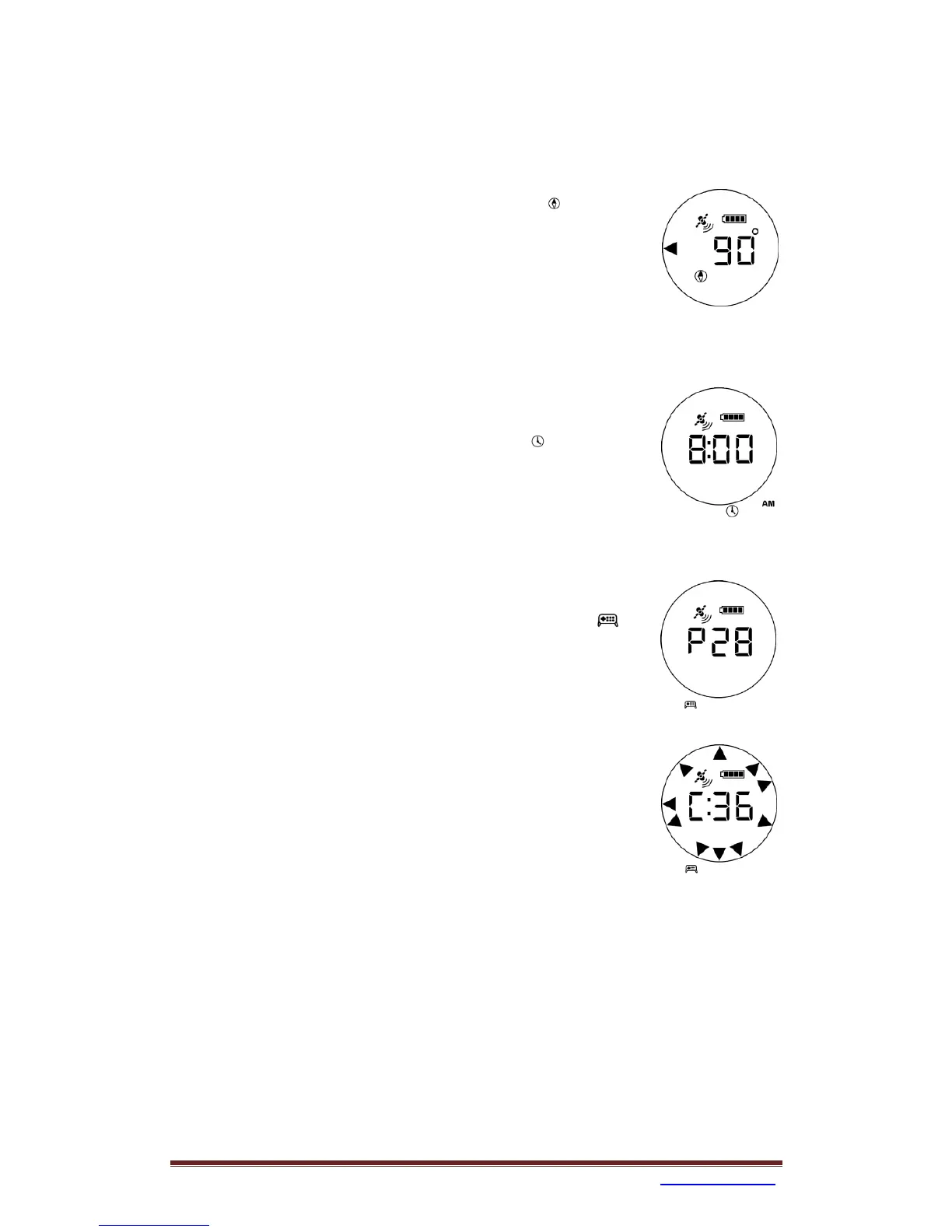
Using as a Compass
1. Click Power/Mode key to select compass icon .
2. An arrow will point to the direction of the magnetic north.
3. The displayed number indicates the clockwise angle from
the magnetic north to the forward direction of the
miniHomer.
Note that you can calibrate the compass in this mode.
Using as a Clock
1. Click Power/Mode key to select clock icon .
2. The current time will be displayed.
Note that you can set the local time in this mode.
Checking Satellites (for the technically curious users)
1. Click Power/Mode key to select satellite mode icon .
2. Satellite number (such as P28) and the satellite signal
strength (such as C36) of each tracked satellite will be
displayed.
3. After your current position is determined, direction
triangles will be shown. Each triangle represents a used
satellite and its quadrant orientation. When the triangles
are spread across the circle, GPS positioning result will
be more accurate.
For those satellites used in determining your location, their
number and signal strength will be shown with a colon, e.g.
P:28 and C:36.


 To Next Page