The Naxa NT-110A is a portable 10.1" TV and digital multimedia player, designed for versatile entertainment on the go. This device combines the functionality of a television with the ability to play various digital media files, making it a comprehensive entertainment solution. Its compact size and portability allow users to enjoy TV programs, movies, music, and photos in different environments, from home to outdoor settings.
Function Description
The NT-110A serves as a multi-functional entertainment hub. As a portable TV, it can receive both over-the-air (ATSC) and cable signals, offering access to a wide range of television channels. Users can switch between "Air" for antenna reception and "Cable" for cable signals, ensuring compatibility with different broadcast infrastructures. The device features an auto-scan function to automatically find and save available channels, simplifying the setup process. For optimal reception, users are advised to position the antenna strategically, ideally by a window with a clear view of the sky, as high as possible, and aimed towards broadcast towers. The included antennas have a range of up to 15 miles, and for greater distances, an amplified antenna may be required. The TV also provides a DTV Signal strength indicator to assist with antenna positioning.
Beyond its TV capabilities, the NT-110A functions as a digital multimedia player. It supports playback of various media formats, including MP3 for audio, JPEG for photos, and MPEG, XVID, AVC, MP4, H.264, HEVC(H.265), FLV, MKV, and TXT for video and text files. Media files can be played from USB memory sticks or SD cards inserted into the dedicated slots. The device automatically categorizes files into "Music," "Photos," "Videos," and "Text" for easy navigation.
The device also includes an FM radio receiver, allowing users to tune into their favorite radio stations. It features an auto-scan function for FM channels and allows users to manually select stations by frequency or channel number.
Input and output options enhance its versatility. It has an AV input for connecting external video sources like DVD players or security cameras, and an AV output to mirror the screen onto an external display. A 3.5mm headphone jack is available for private listening.
Usage Features
The NT-110A is designed for user-friendly operation, primarily through its remote control and on-device buttons.
- Power Management: The device can be toggled between standby and on mode using the power button on the unit or the remote. A master power switch also controls the overall power. A power indicator light changes color to show charging status: red when connected to power, green when charging, and darkens when fully charged.
- Channel Navigation: Channels can be changed using the number keypad on the remote or the CH+/CH- buttons on the device. Users can mark favorite channels for quick access and hide unwanted channels to skip them during navigation. The "Return" key allows users to go back to the last viewed channel.
- Picture Settings: The "Picture Mode Standard" menu offers various preset image settings like Standard, Soft, and Gorgeous, or allows for user-defined adjustments to brightness, color, and contrast. "Color Temperature" provides options for adjusting the color balance, while "Aspect Ratio" allows users to choose screen display width ratios such as 4:3, 16:9, Zoom1, or Zoom 2. "Noise Reduction" settings can be adjusted to improve video quality, though it's recommended to keep it off for OTA digital TV.
- Sound Settings: "Sound Mode" offers preset audio settings like standard, music, movie, and sports. "Balance" adjusts the speaker output between left and right channels. "Auto Volume" helps maintain consistent volume levels across different channels, reducing variations. "Surround Sound" can be toggled on or off for an immersive audio experience. The "Audio Only" mode allows users to turn off the display while continuing to play audio, saving battery life.
- Time and Sleep Functions: The "TIME" menu allows users to set the current date and time. "Off Time" and "On Time" functions enable scheduled power-off and power-on times, respectively, with options to specify days and even tune into a specific channel and volume level upon power-on. A "Sleep Timer" can be set for durations ranging from 10 to 240 minutes, automatically turning off the device after the specified time. "Auto Sync" manages automatic time synchronization, and "Time Zone" allows for selecting the correct time zone.
- Language and Accessibility: "OSD Language" allows users to select the desired on-screen display language. "Closed Caption" provides options for displaying captions, including open caption or mute audio when captions are open. "TTS (Text To Speech)" is an accessibility feature that can be toggled on or off, with configurable voice speed and effect.
- Setup and Reset: The "Setup Wizard" guides users through initial setup, including time zone, date, time, and channel auto-scan. The "Restore Factory Default" option allows users to reset the device to its original settings, which can be useful for troubleshooting or preparing the device for a new user.
- Security Features: The "LOCK" menu includes a "Lock System" feature, allowing users to set a password (default "0000") to prevent unauthorized use of the television. "Set Password" enables changing the default password. "Input Block" allows specific inputs to be blocked without a password. "US (Use Rights)" provides parental control by blocking programs based on their ratings category, automatically blocking content exceeding a permissible level.
- Multimedia Playback: For photo playback, users can initiate a slideshow or select individual images to add to a queue. During a slideshow, users can navigate to the next or previous image. For music playback, users can browse tracks, play all music, or create custom playlists. During playback, users can skip to the next or previous track. Video playback allows users to play selected videos, skip to the next or previous chapter. Text file playback enables viewing selected text files, with options to go to the next or previous page.
- FM Radio Operation: After selecting "FM Radio" mode, users can press the RED key on the remote to auto-scan and save FM channels. The GREEN key can be used to close or open the display screen without affecting radio reception. Users can switch between FM channels using the up/down arrow keys. The OK button on the remote allows for selecting a specific station, and the arrow keys can be used for auto-frequency tuning or navigating between stations.
Maintenance Features
Proper care and maintenance are crucial for the longevity and optimal performance of the NT-110A.
- Storage Conditions: The device should be stored away from extreme temperatures, specifically between 60°F and 115°F. It should not be exposed to water or used in damp environments like bathrooms or near swimming pools. High humidity, dust, or oil smoke should also be avoided.
- Physical Handling: The product should not be thrown or dropped. When storing, heavy objects should not be placed on the screen, and the screen should always be protected with a plastic film. Users should avoid pushing or scrubbing the product with sharp objects.
- Cleaning: For cleaning, glass cleaner and ammonia-containing products should be avoided. The device should be cleaned with a damp microfiber cloth as needed.
- Electrical Safety: To reduce the risk of electric shock, the product casing should not be opened, as there are no user-serviceable parts inside. Servicing should be referred to a qualified professional. The product should not be exposed to rain or moisture, and no liquid-filled objects should be placed on or near it. The AC plug's wider blade must match the wall socket slot for proper grounding.
- Battery Care: Batteries and the battery compartment should not be exposed to excessive heat, such as direct sunshine or fire. If batteries are incorrectly placed, there is a danger of explosion; only the same or equivalent type should be used for replacement.
- Electrostatic Phenomenon: In the event of electrostatic phenomena, the product may malfunction and cause the power to reset.
- Screen Anomalies: Bright or dark spots may appear on the screen, which is a normal phenomenon for active matrix display technology and not a sign of malfunction.
- Disassembly Warning: Users should not attempt to disassemble or repair the product, as this can lead to damage or personal injury. If the television malfunctions, operation should cease immediately, and the dealer should be contacted for assistance.
- USB/SD Card Usage: When naming MP3 files, only English characters and numerals should be used, as underscores and spaces may cause readability issues. While compatible with USB 1. and 2.0 standards, a small percentage of USB Flash devices may not be readable due to non-compliance with official standards. Crucially, USB devices or SD cards should NEVER be removed during playback. The STOP button must always be pressed before removing the card/device to prevent corruption of audio files or the Flash device. The USB port does not support MP3 players due to software incompatibility; only USB "Flash" devices can be used for audio playback.
- Power Cord Protection: Power supply cords should be routed to prevent them from being walked on, tripped over, or pinched. Special attention should be given to where the cord meets the wall plug and where it exits the product.
- Overload Protection: The product is equipped with overload protection. If the plug needs replacement, a service technician should use a plug specified by the manufacturer with the same overload protection.
- Lightning Storm Protection: For added protection during lightning storms or when the product is left unused and unattended, it should be unplugged from the wall outlet.
- Product Service: Users should not attempt to service the product themselves, as opening covers may expose them to dangerous voltage or other hazards. All service should be referred to a qualified technician.

 Need help?
 General
 Weight and Dimensions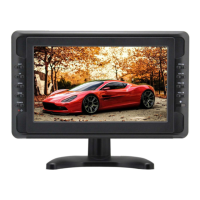

 To Next Page