
 Need help?
Do you have a question about the Nayatel WeChip W1 and is the answer not in the manual?
Instructions to increase mouse cursor speed by holding OK and volume + for 3 seconds.
Instructions to decrease mouse cursor speed by holding OK and volume - for 3 seconds.
How to turn on/off the air mouse function and confirm selections using the OK button.
The remote enters sleep mode after 15 seconds of inactivity and wakes up with any button press.
Press the designated button to perform a right-click action.
Procedure to learn IR signals from other remotes using the OK and Power buttons.
Details on typing alphabets and using the numeric keypad via the Fn button.
Indicates low battery when the red LED is blinking; recommends using a fully charged remote.
Notes on smart TV compatibility, battery care, voltage, and USB dongle specificity.
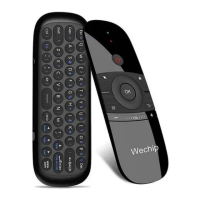
The WeChip W1 is a 2.4GHz wireless air mouse designed to function as both a remote control and a mini-keyboard, offering versatile input for various devices, including smart TVs. Its primary function is to provide intuitive navigation and text input through a combination of an air mouse, a traditional remote interface, and a QWERTY keyboard.
The device integrates three main functionalities:

 To Next Page
 General