EasyManua.ls Logo

NB Trainer Stopwatch - User Manual

NB Trainer Stopwatch
4 pages
Print Icon
To Next Page IconTo Next Page
Loading...
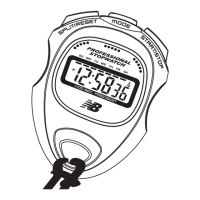
Trainer Stopwatch
Instruction Manual
SPLIT/RESET
- Enter settings
- Split
- Clear elapsed
and split times
in chronograph
TIME
Displays Hour / Minutes / Seconds
(in 12-Hour or 24-Hour format), plus
Month / Date / Day of Week.
CHRONOGRAPH
Equipped with a 1/100 second
resolution Chronograph. Measures
elapsed and/or split times.
ALARM/CHIME
Features Daily Alarm and Hourly
Chime
FEATURES
Question and Answer IconNeed help?

Do you have a question about the NB Trainer Stopwatch and is the answer not in the manual?

Summary

Keys and Functions

SPLIT;RESET Function

Enter settings, split times, and clear elapsed/split times in chronograph.

MODE Function

Scroll through modes and confirm selections.

START;STOP Function

Start/stop chronograph/alarm and increase digits.

Time Setting

Setting Time and Date

Procedure to set Hour, Minutes, Seconds, Date, Month, and Day of the Week.

Viewing Date Information

How to view the current Month, Date, and Day of the Week.

Chronograph Operation

Measuring Times

Instructions on starting, stopping, pausing, and resetting the chronograph.

Capturing Split Timing

How to record split times during a chronograph session.

Alarm and Chime Functions

Setting the Alarm

Procedure to set the alarm hour and minutes.

Viewing and Activating Alarm

How to view, activate, or deactivate the alarm function.

Setting Hourly Chime

How to enable or disable the hourly chime feature.

Battery Replacement

NB Trainer Stopwatch Specifications

General IconGeneral
TypeDigital Stopwatch
DisplayLCD
FunctionsAlarm
Battery LifeApproximately 2 years
Case MaterialPlastic

Related product manuals