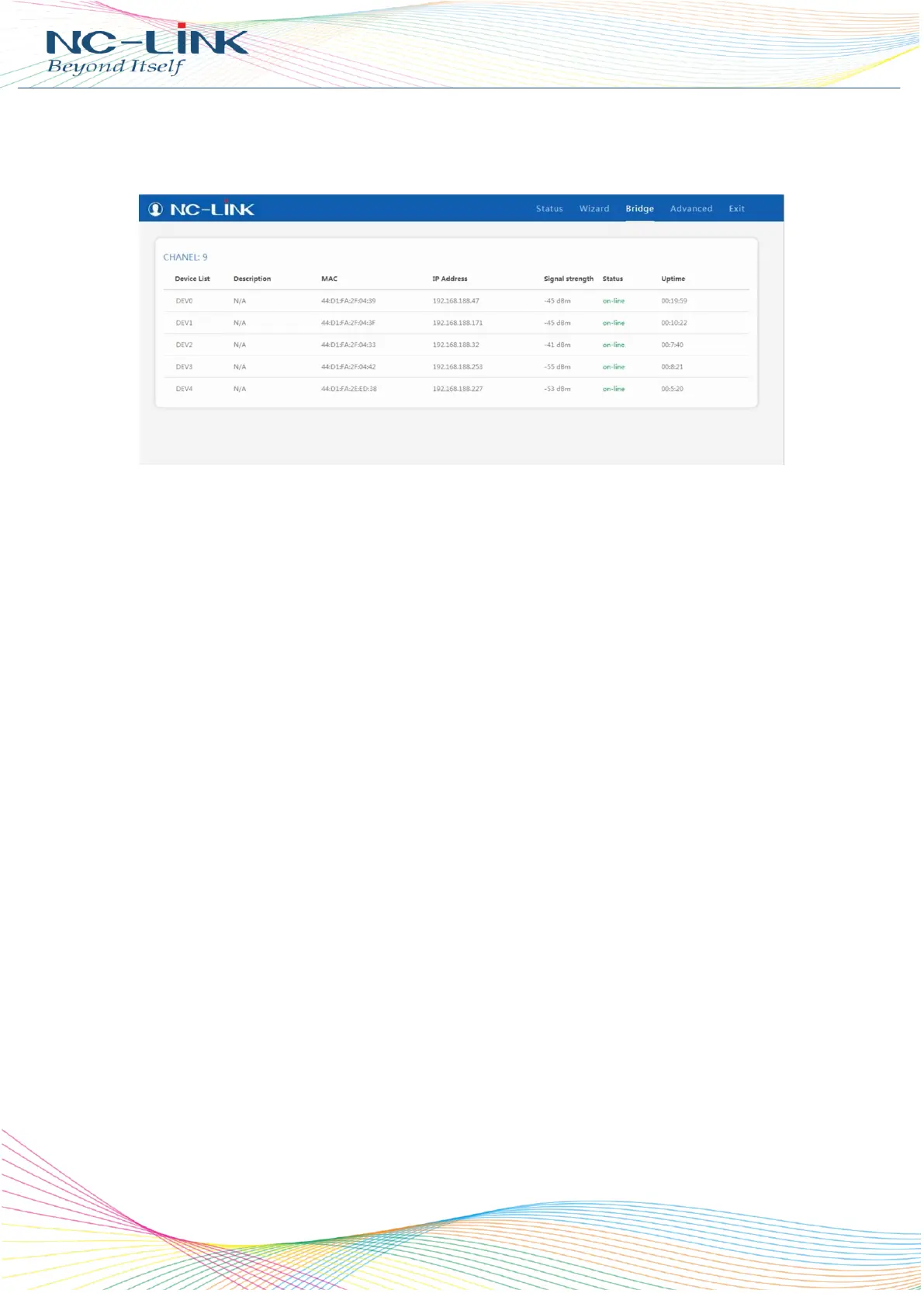
3. Firmware Status
When connection is success, can view the connection status in WEB interface, picture showed as
follow:
Note:
1. How to change the channel when the connection successful?
Press “F” and “S” button to change master AP’s channel, and change slave AP to the same channel with
Master AP within 60 seconds. Master AP and Slave AP will establish connection automatically.
2. When connection success in pairs, one of them power off. What will happen?
The AP will lose the connection, the IP will change to 192.168.188.253, and it will no show signal
strength. When both of master AP and slave power on, it will connect automatically
3. When connection success in pairs, how to add other slave APs?
1) Change the same channel of new slave AP with master AP
2) When press “Reset” button of master AP and the new salve AP “Reset” button, it will connect
automatically.
4. How many slave APs can connect with master AP?
The master AP can connect with 1~4 slave APs
5. What is the default mode and default IP address?
The default mode is slave mode (C), and IP is 192.168.188.253 in default


 To Previous Page